














Admin CPD History
Go to: WordPress Admin → LearnDash CPD → CPD History
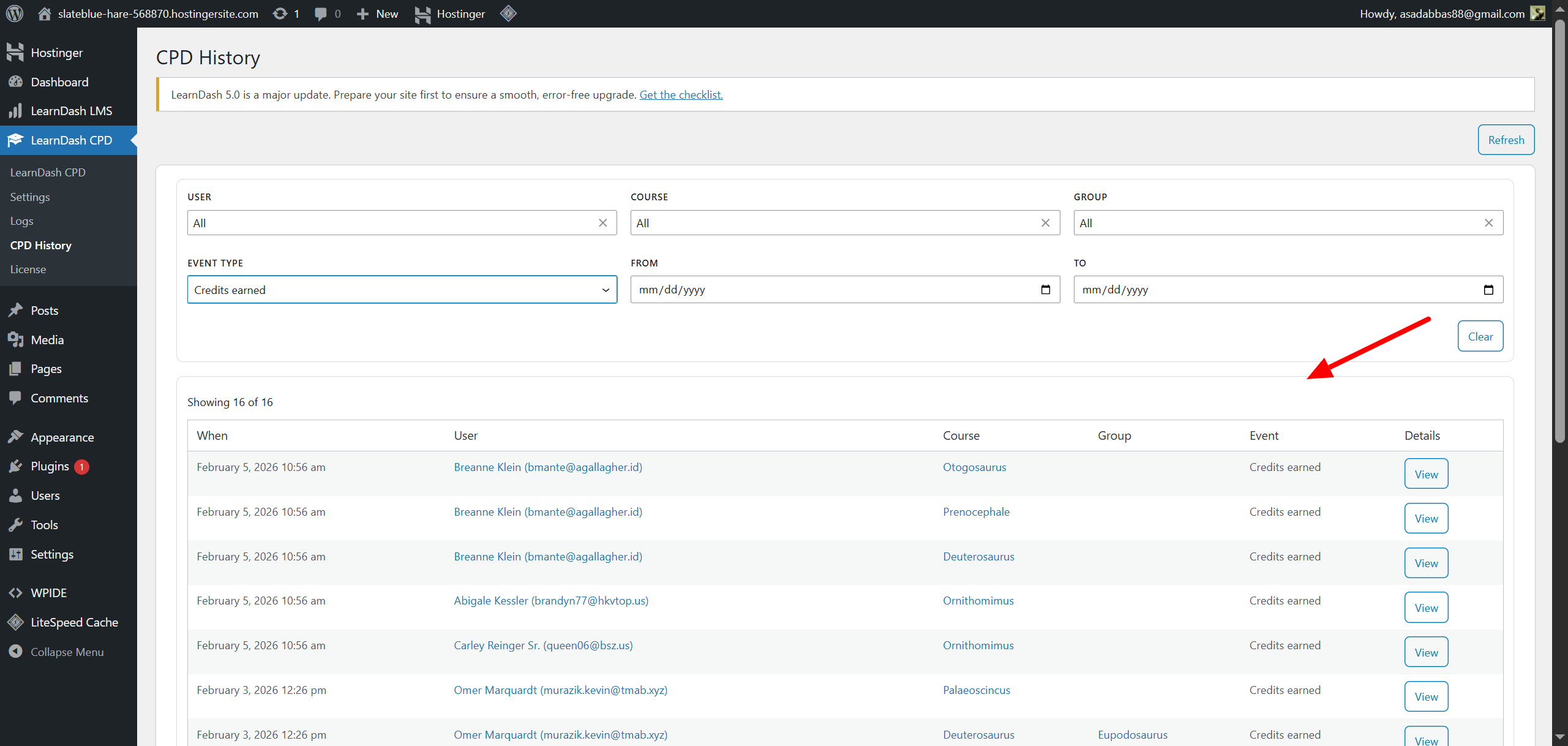
This page provides a complete, audit-ready record of all CPD-related events for learners. It helps administrators track course progress, resets, certificates, and credits earned.
Event Table
The table displays each event with the following columns:
| Column | Description |
|---|---|
| When | Date and time the event occurred |
| User | Learner associated with the event |
| Course | Course linked to the event |
| Group | LearnDash group (if applicable) |
| Event | Type of action: Completion / Reset / Certificate Issued / Credits Earned |
| Details | Opens a modal showing full event data for auditing or troubleshooting |
The table supports pagination, showing 25 entries per page. Use the navigation buttons at the bottom to move between pages.
Filters
You can refine the table view using the following filters:
- User – search by learner name
- Course – filter by a specific course
- Group – filter by a specific LearnDash group
- Event Type – select an event type (Completion, Reset, Certificate, Credits)
- From Date / To Date – limit results to a specific date range
Filters can be combined, and results are applied immediately.
Frontend CPD History
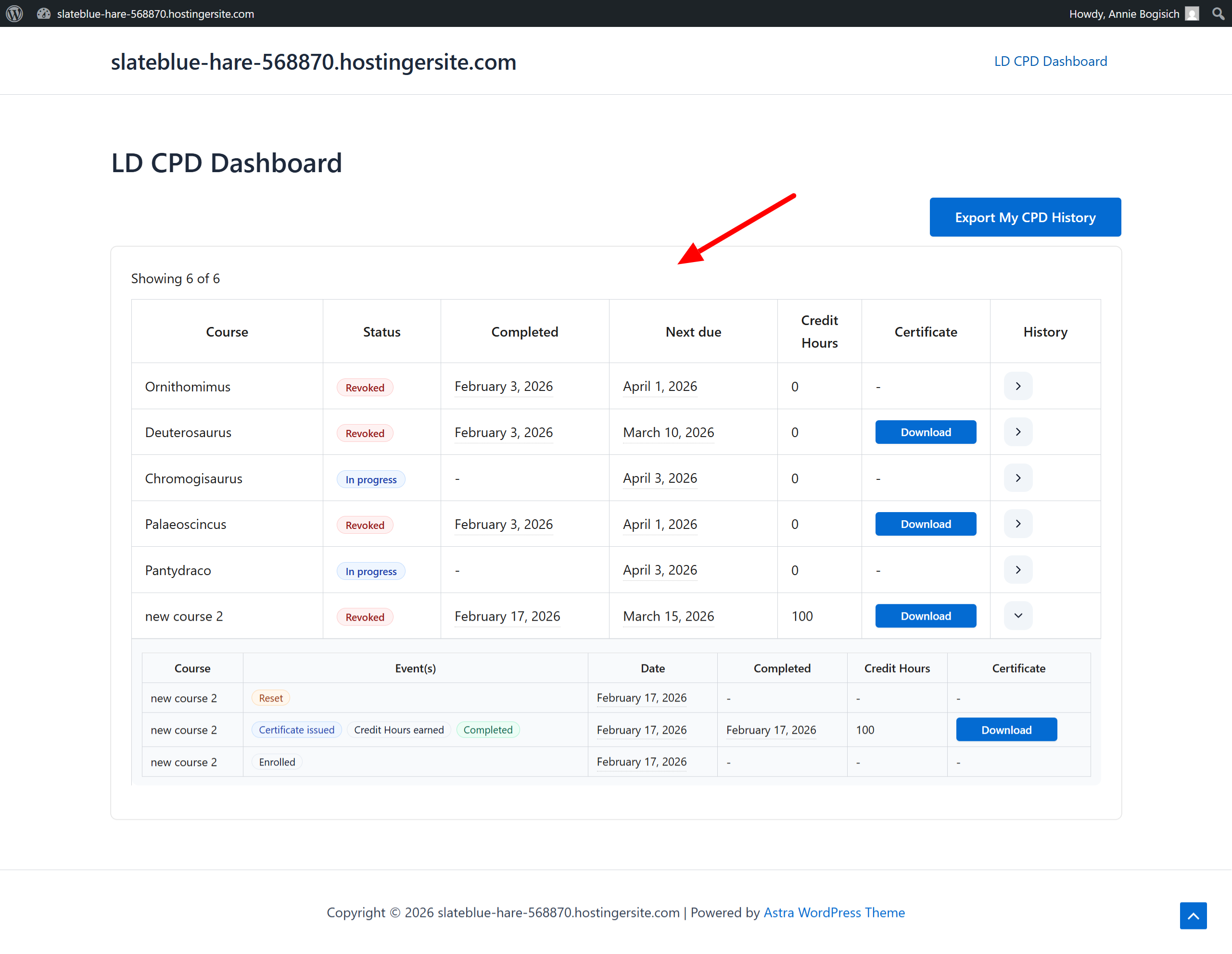
In addition to the admin-side CPD History, learners can also view their own CPD progress directly on the frontend using a shortcode. This allows users to track completions, credits, certificates, and upcoming reset dates without accessing the WordPress admin area.
Displaying User CPD History on the Frontend
To show CPD activity to learners, add the shortcode below to any page or LearnDash student dashboard:
[ldcpd_dashboard]This will automatically detect the logged-in user and display their personal CPD overview.
User Dashboard Table Columns
The frontend dashboard presents the user’s progress in a simplified table with the following columns:
| Column | Description |
|---|---|
| Course | The LearnDash course the user is enrolled in |
| Status | Current progress (e.g., In Progress, Completed, Reset Scheduled) |
| Completed | The date the user last completed the course, if applicable |
| Next Due | The upcoming reset/renewal date for CPD policies |
| Credits | Total CPD credits earned for that course |
| Certificate | A download button appears if a certificate has been issued |
| History | A dropdown that expands to show all past events for that specific course |
The layout is mobile-responsive and optimized for learner usability.
History Dropdown
When the user clicks the History dropdown for a course, a detailed event list is displayed, including:
| Column | Description |
|---|---|
| Course | The course the event belongs to |
| Event(s) | A list of actions such as: Enrolled, Completion, Credits Earned, Certificate Issued, Reset |
| Date | The timestamp of each event |
| Completed | Whether the course was marked as completed for that event |
| Credits | CPD credits earned at that event |
| Certificate | A download button appears if the event generated a certificate |
This gives users a precise event trail for each CPD course, similar to the admin history but limited to their own account.
Certificate Downloads
Whenever a certificate has been issued, a Download Certificate button appears in:
- The Certificate column of the main table
- The Certificate column inside the event history dropdown
The certificate file is delivered instantly, allowing users to save or print their CPD records.
You can also export these logs as a CSV file for external analysis or record-keeping.