
















Think of a small store like a shelf with a few hundred products. Finding one item is fairly easy. But a warehouse with thousands of products, variations, sizes, colours, brands, technical specs, and SKUs.
Search has a lot more information to work through. So the problem is not always that WooCommerce is bad at search. Sometimes your store has simply outgrown a basic search setup.
WooCommerce’s own Product Search documentation gives a useful example. Re-indexing a store with 10,000 products can take up to a couple of hours, depending on the server and available resources. WooCommerce recommends running major re-indexing during quieter traffic periods.
That shows how much more work search has to handle as the catalog grows. Before adding another plugin, it makes sense to first find out what is actually going wrong.
In this guide, we’ll show you how to improve WooCommerce search for large product catalogs and make it easier for customers to find the product they actually want.
First, Find Out What Is Wrong With Your WooCommerce Search
Run a few searches the way a real customer would. Pick around 10 to 20 common searches and test them yourself.
For example:
| Customer Searches For | What You Should Check |
| Exact product name | Does the right product appear first? |
| SKU | Can the search find the exact item? |
| Brand | Are relevant products shown? |
| Colour | Does the search understand the attribute? |
| Size | Can customers find the correct variation? |
| Partial product name | Does it still return useful results? |
| Misspelling | Does search return anything useful? |
| Category | Are results relevant? |
| Technical spec | Can search find products using that information? |
Now note was the result correct and How long did it take? This helps you separate two very different problems.
- Search relevance problem: results are fast but wrong.
- Search performance problem: results are right but too slow.
You may also have both. Once you know the problem, you can fix the right part instead of throwing another search plugin at it.
What Actually Makes WooCommerce Search Better?
Before changing anything, it helps to understand what a good search setup should do.
For a large catalog, search needs to handle more than product names. It should help customers find the right item even when they search by SKU, brand, size, model, attribute, or a slightly different term.
A strong WooCommerce search setup should focus on four things:
- Accuracy: Show the right products.
- Relevance: Put the best matches first.
- Speed: Return results without making shoppers wait.
- Filtering: Help customers narrow large result sets quickly.
If one of these is weak, the whole search experience starts to feel harder. Fast search is not useful if the Fast results are wrong. Good filters do not help much if the right products never appear in the first place.
So rather than fixing one feature at random, work through the search setup in the right order.
1. Clean Your Product Data Before Changing Search Tools
Search works better when your product data is clear and consistent.
If titles, SKUs, categories, attributes, and variations follow different formats, search results can become unreliable.
Start by checking the basics:
- Product titles
- SKUs
- Categories
- Attributes
- Variations
For example, if one product uses 16mm and another uses 16 mm, or one uses Pack of 10 while another uses 10 Pack, search and filtering can behave differently.
WooCommerce suggests using product attributes to add information like size, colour, brand, make, shape and features rather than being stuffed into categories or tags.
Clean product data forms the foundation for the rest of your WooCommerce search setup for a large catalog.
2. Let Customers Search More Than Product Titles
Customers do not always search by product name. A B2B buyer may know the SKU. A parts buyer may search by model number. Another customer may search by brand or technical specification.
Your WooCommerce product search should be able to work with more than titles.
Useful searchable fields can include:
- SKU
- Brand
- Category
- Product attributes
- Short description
- Technical specifications
WooCommerce Product Search can work with titles, content, categories, tags, attributes, and SKUs. The wider your searchable product data is, the easier it becomes for customers to find products using the information they already know.
3. Improve Search Relevance, Not Just Search Speed
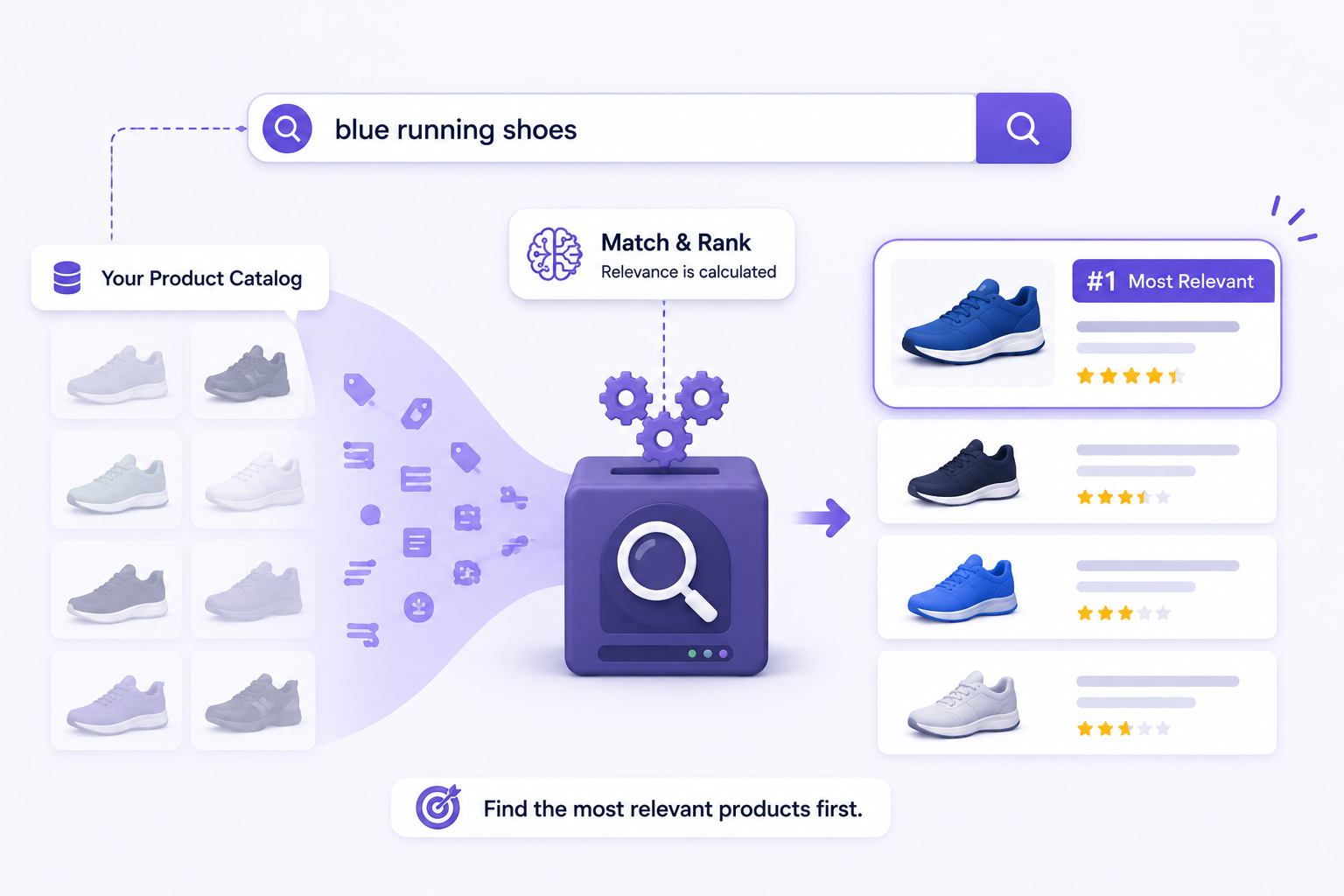
Fast search is not useful if the wrong products appear first. Search relevance decides which results get priority. For many stores, an exact SKU or product-title match should rank higher than a loose match buried inside a long description.
WooCommerce Product Search lets you adjust the importance of different searchable fields.
A simple priority setup could look like this:
- Exact SKU
- Product title
- Brand
- Product attribute
- Category
- Full description
These are example priorities, not fixed WooCommerce settings.
The right order depends on how your customers search. A spare-parts store may give more weight to SKUs, while a technical B2B store may rely heavily on product attributes.
4. Use Search Indexing for Large WooCommerce Catalogs
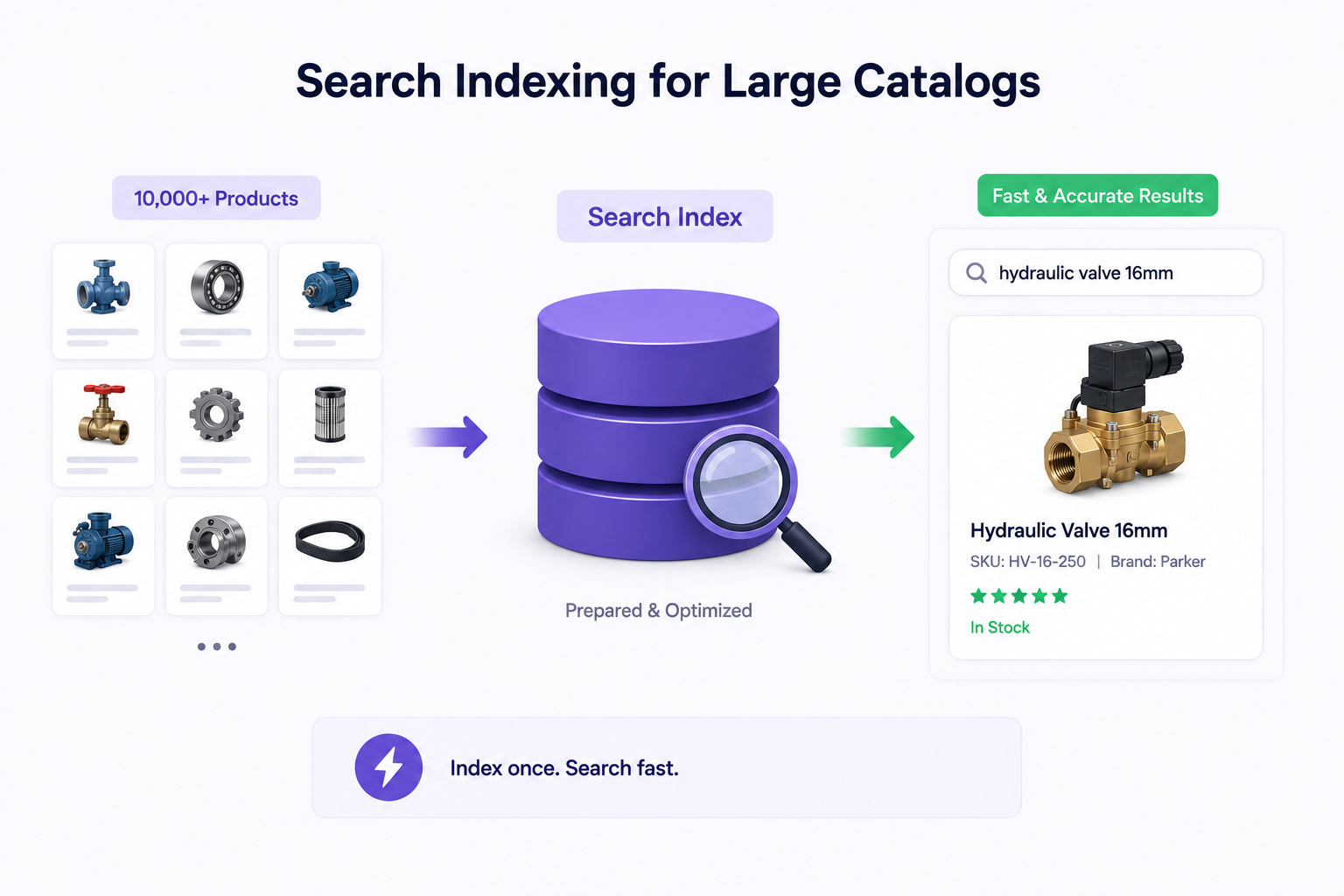
Indexing helps your store search large amounts of product data more efficiently. Instead of checking everything from scratch each time someone searches, the system prepares searchable product information in advance.
This becomes more useful when your store has thousands of products, many variations, large SKU lists, or complex filters. WooCommerce Product Search automatically builds and updates its own search index.
For large catalogs, this can reduce the amount of work needed each time a customer searches.
5. Add AJAX Search, But Do Not Expect It to Fix Everything
AJAX search shows results while the customer is still typing. It can make search feel faster and reduce the number of steps needed to reach a product.
Useful live results may show the product name, SKU, price, and stock status. But live search does not fix weak relevance or messy product data. If the wrong products are being matched, AJAX simply shows those wrong results sooner.
So focus on accurate results first. Then use AJAX to make those results easier to reach.
6. Use Product Filters to Narrow Large Result Sets
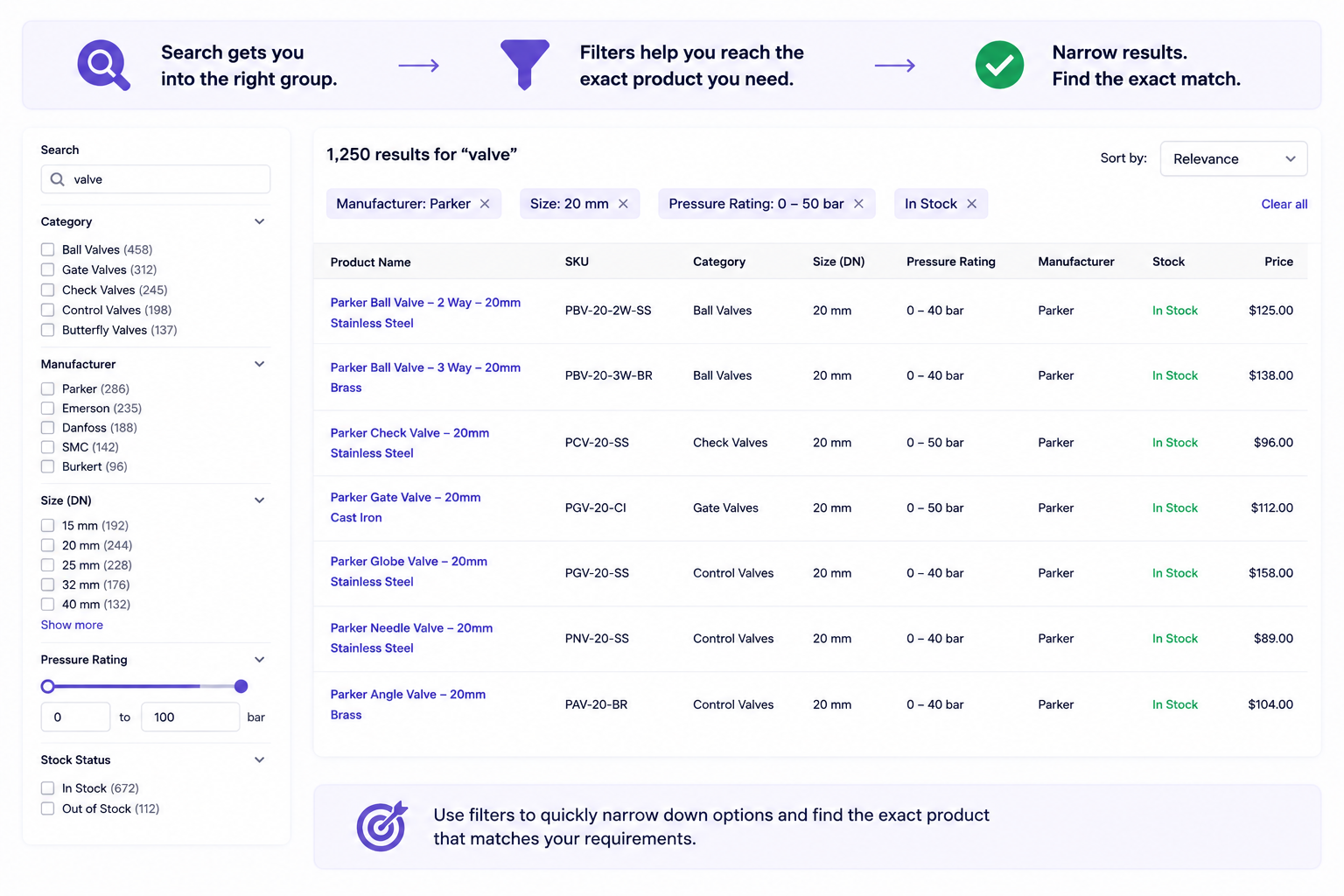
Search may return the right product group but still leave the customer with too many options. That is where WooCommerce product filters help.
For a large catalog, filters may include category, brand, stock status, price, product attributes, or technical specifications. For example, an industrial buyer may search for a valve and then narrow the results by manufacturer, size, pressure rating, and availability.
Search gets the buyer into the right group. Filters help them reach the exact product they need.
7. Make Variation Search Work Properly
In bigger stores, there are several variations of products. Those variations can be SKUs, pack sizes, configurations, models or specs.
Customers should not have to manually verify each option to ensure they have the right one when choosing the correct variation of the main product. This is particularly important for wholesale catalogs, automotive, industrial and parts catalogs.
If each variation requires a different code or specification, ensure the information can direct customers to the right variation.
8. Handle Typos, Partial Searches, and Customer Language
Consumers may not always use the same terminology as you do in your catalog. They might misspell a product name, abbreviate a product name, enter only a portion of a term, or search with an industry name that is different than the one used.
Typo tolerance, partial matching and synonyms can assist with this. For instance, the technical term may be used in your internal product data and the shorter technical term may be used by customers on a regular basis.
Your search should be able to connect those terms where it makes sense. The aim is to match real customer search behaviour, not make customers learn your internal naming system.
9. Improve WooCommerce Search Performance as the Catalog Grows
As the catalog grows, search has more data to process. Products, variations, attributes, stock data, and filters can all add load.
WooCommerce previously tested a large store with 25,000 products and 50,000 variations when it introduced product lookup-table improvements. In that older benchmark, an SKU search dropped from around 40 seconds to under one second.
The result will vary by store, but the example shows how much search structure can matter.
If WooCommerce search feels slow, check:
- Database performance
- Hosting resources
- Number of variations
- Heavy search queries
- Search indexing
- Filter performance
Caching can help as well. WooCommerce Product Search supports options such as File Cache, Redis, Memcached, and WordPress object cache. The right option depends on your hosting setup and how often product data changes.
Start by finding the actual bottleneck before changing the whole setup.
10. Make Large-Catalog Search Easy on Mobile
A large catalog can be harder to use on a small screen. Customers should be able to find the search bar, read suggestions, open filters, see active filters, and remove them without unnecessary steps.
Keep the mobile experience simple. Autocomplete results should stay easy to scan, and filters should not take over the whole screen.
Good WooCommerce search optimization is not only about finding the right product. Customers also need to reach it without fighting the interface.
11. Use Search Analytics to See What Customers Cannot Find
Search analytics can show you where customers are getting stuck.
Pay attention to:
- Most searched terms
- Zero-result searches
- Searches with no clicks
- Common misspellings
- Popular filters
WooCommerce Product Search can report on searches that returned products and searches that returned no results. That data can reveal problems you may not notice yourself.
For example, if customers regularly search for a particular pack size but rarely click a result, the issue may be weak ranking, missing product data, or poor filtering.
Reviewing this data regularly helps you improve WooCommerce search based on real customer behaviour rather than guesses.
What Search Setup Makes Sense for Your Catalog Size?
There is no magic product count where WooCommerce suddenly stops working. A store with 20,000 simple products can behave very differently from one with 5,000 highly variable products and dozens of filters.
Still, this gives you a practical way to think about your setup:
| Catalog Situation | Main Search Focus |
| Small and simple | Clean data and reliable basic search |
| Growing catalog | Better SKU search, attributes, live search, and filters |
| Large catalog | Dedicated indexing, relevance tuning, and caching |
| Very large or complex | Performance testing and more specialised search architecture |
| Large B2B catalog | Exact SKU/variation search, technical filters, and custom relevance |
These are not official WooCommerce limits. Use them as planning guidance.
The more complex the catalog becomes, the less sense it makes to judge search only by the number of products.
WooCommerce Search Plugin or Custom Search?
This is where many larger stores hit another decision. Do you install a better search plugin, or do you need something built around your catalog?
When a Search Plugin Is Usually Enough
A good WooCommerce search plugin can work well if you mainly need:
- Better product relevance
- SKU search
- AJAX suggestions
- Product filters
- Search indexing
- Search analytics
That covers a lot of stores. So do not jump to custom development just because your catalog is large.
When Custom WooCommerce Search Starts to Make Sense
A standard plugin may struggle when your store has rules that are specific to your business.
For example:
- Account-specific B2B products
- Customer-specific pricing
- ERP or PIM product data
- Complex part-number structures
- Custom compatibility rules
- Unusual product relationships
- Custom fields that need to affect ranking
- Special filters that normal plugins do not understand
WooCommerce Product Search can even index additional custom-field data, but WooCommerce notes that this requires development knowledge to configure. At that point, custom WooCommerce development can shape the search around the way your catalog actually works instead of forcing your catalog around a plugin.
TeknoFlair can help connect WooCommerce search with custom product data, ERP or PIM systems, specialised filters, or business-specific search rules.
That gives the search setup a better chance of matching the way customers actually look for products.
Final Thoughts
A large WooCommerce catalog does not need a bigger search box. It needs a better way to understand, rank, and return product data.
Start by seeing what customers cannot find. Then fix search behaviour and performance around those real problems. As your catalog grows, keep checking the data. Search should grow with the store, not become another obstacle customers have to work around.
Frequently Asked Questions
Why is WooCommerce product search slow?
Large catalogs, many variations, complex filters, database queries, hosting limits, and poorly optimised plugins can all slow search down. Test the search before deciding what needs fixing.
How can I improve WooCommerce search?
Start with clean product data and relevant searchable fields. Then look at relevance, indexing, filters, caching, typo handling, and search analytics.
Can WooCommerce search by SKU?
Yes. Search tools such as WooCommerce Product Search can include product SKUs in search results when SKU search is enabled.
Can customers search WooCommerce product attributes?
Yes. WooCommerce Product Search can search related product attributes and also use attributes as live product filters.
Does AJAX search make WooCommerce faster?
AJAX can make the search experience feel faster by showing results while shoppers type. It does not fix poor relevance or underlying database performance on its own.
How many products can WooCommerce handle?
There is no useful fixed limit. Product complexity, variations, traffic, extensions, hosting, and database setup all affect performance.
Do I need a WooCommerce search plugin?
Not always. Basic search may be enough for a small catalog. Larger or more complex stores often benefit from better indexing, relevance controls, SKU search, filters, and analytics.
