



Many businesses reach a point where employee training becomes difficult to manage. Training files sit in Google Drive. Videos are shared through email. New employees ask the same questions again and again. Managers have no clear way to check who completed training and who did not.
At this time, your employees need a training LMS. But building an LMS without a plan can create more problems later. You may end up with messy courses, missing reports, unclear user roles, and a platform that employees do not enjoy using.
That is why an employee training LMS checklist matters before development starts. A good checklist helps you plan your goals, users, training content, course structure, reports, and launch process. It also helps your development team build the right system from the start.
What Is an Employee Training LMS?
An employee training LMS is a learning management system (LMS) that businesses use to train, manage, and track employees. It is a single application for storing training material, assigning courses, tracking progress, testing employees and managing certificates for your company.
A business can use an employee training LMS for:
- New employee onboarding
- Compliance training
- Product training
- Sales training
- Customer service training
- HR policy training
- Internal process training
- Safety training
- Department based learning
For example, a new sales employee may need to complete company onboarding, product training, and sales script training before speaking with customers.
Without an LMS, this process usually depends on managers, emails, and scattered files. With an LMS, the training path is clear. The employee knows what to complete. The manager can track progress. The company can keep training records in one place.
Why Businesses Need an Employee Training LMS Checklist Before Building
A lot of businesses start with one simple idea. “We need a training portal.”
That sounds simple at first. But once development starts, more questions appear.
Who will upload the courses?
Who will assign training to employees?
Should managers see reports?
Do certificates expire?
Should different departments see different courses?
Will the LMS connect with HR software?
These questions should not appear halfway through the project. They should be planned before the build starts. An employee training LMS checklist can help make your business’ training processes more efficient, error-free, and cost-effective. It provides your team with clarity prior to design and development.
It also assists you to create an LMS for actual business objectives. For example, the goal may be to reduce onboarding time from 30 days to 15 days. It may also be to ensure that 90% of the staff have finished their compliance training by a deadline.
The more goals are clear, the more useful the LMS becomes. It isn’t merely a video uploading platform! It evolves into a training, performance and accountability system.
1. Define the Main Training Goal
Before you choose features, define the main reason you are building the LMS. This is the first step in any LMS planning checklist. A clear goal helps you decide what the platform needs and what it does not need.
Some businesses build an LMS to onboard new employees faster. Others need it for compliance training, product education, internal SOPs, or leadership development.
Common LMS goals include:
- Reduce employee onboarding time
- Improve training completion rates
- Track compliance training
- Train remote teams
- Standardize company processes
- Reduce repeated questions to managers
- Improve product knowledge
- Create department based learning paths
If your goal is onboarding, your LMS should focus on welcome courses, company policies, role based training, progress tracking, and manager reports.
If your goal is compliance, you may need certificates, expiry dates, reminders, quiz scores, and audit reports. The goal changes the whole LMS structure. That is why businesses should not start by asking, Which features do we need? The better question is:
What problem should this employee training platform solve?
2. Identify the Learners
Once the goal is clear, identify who will use the LMS. This step sounds basic, but it affects almost every part of the platform.
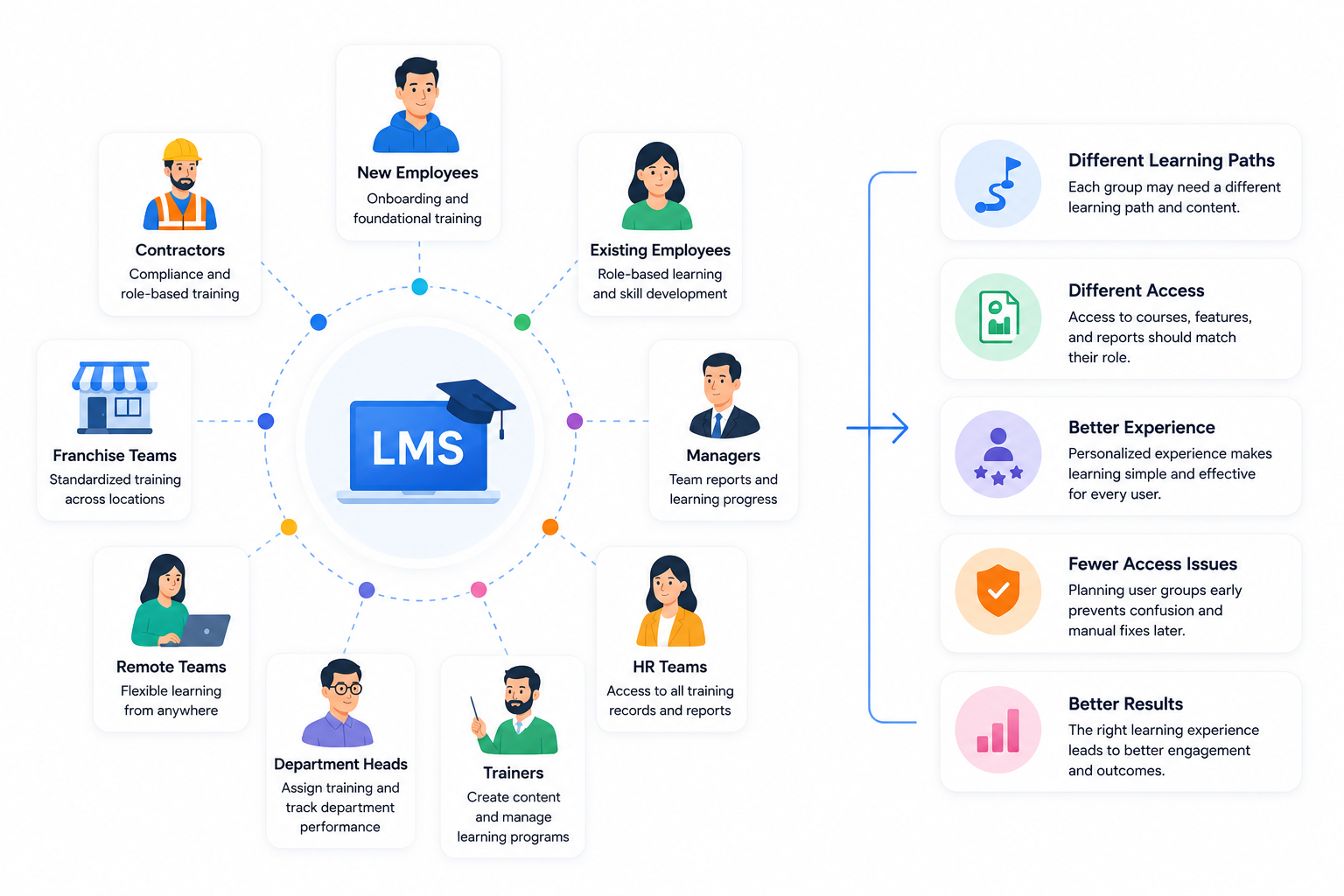
Each group may need a different learning experience. A new employee may need a complete onboarding path. A manager may only need access to team reports. HR may need access to all training records. A department head may need to assign courses to specific staff.
For example, an employee onboarding LMS should not show every course to every new hire. A finance employee and a sales employee may both need company onboarding, but their role based training should be different.
This is where many LMS projects become messy. If user groups are not planned early, the system can become confusing after launch. Employees may see the wrong courses. Managers may not get the reports they need. Admins may spend too much time fixing access issues manually.
A good employee training LMS should make learning simple for each user type.
3. Decide the Type of Training Content
Before building the LMS, list the content you already have and the content you still need to create. Many businesses underestimate this step. They think the LMS is the main project. But the content is just as important.
Your employee training platform may include:
- Training videos
- PDFs
- Slides
- SOP documents
- Quizzes
- Assignments
- Checklists
- Recorded webinars
- Audio lessons
- Downloadable resources
- Certificates
- Short knowledge tests
You should also decide which content needs to be created first. For example, a business building an onboarding LMS may start with:
- Company introduction
- HR policies
- Attendance rules
- Tool access guide
- Department training
- Manager introduction
- First week checklist
A company building a sales training LMS may need:
- Product videos
- Pricing guides
- Sales scripts
- Objection handling lessons
- CRM training
- Demo call examples
- Quizzes after each module
The content format also matters. Short videos may work better for busy employees. PDFs may work well for policies. Quizzes may work well for compliance and product knowledge.
The goal is not to upload everything at once. The goal is to organize the most important training first and make it easy to complete.
This is why an employee training LMS checklist should always include content planning. Without clear content, even the best LMS design will feel incomplete.
4. Plan the Course Structure
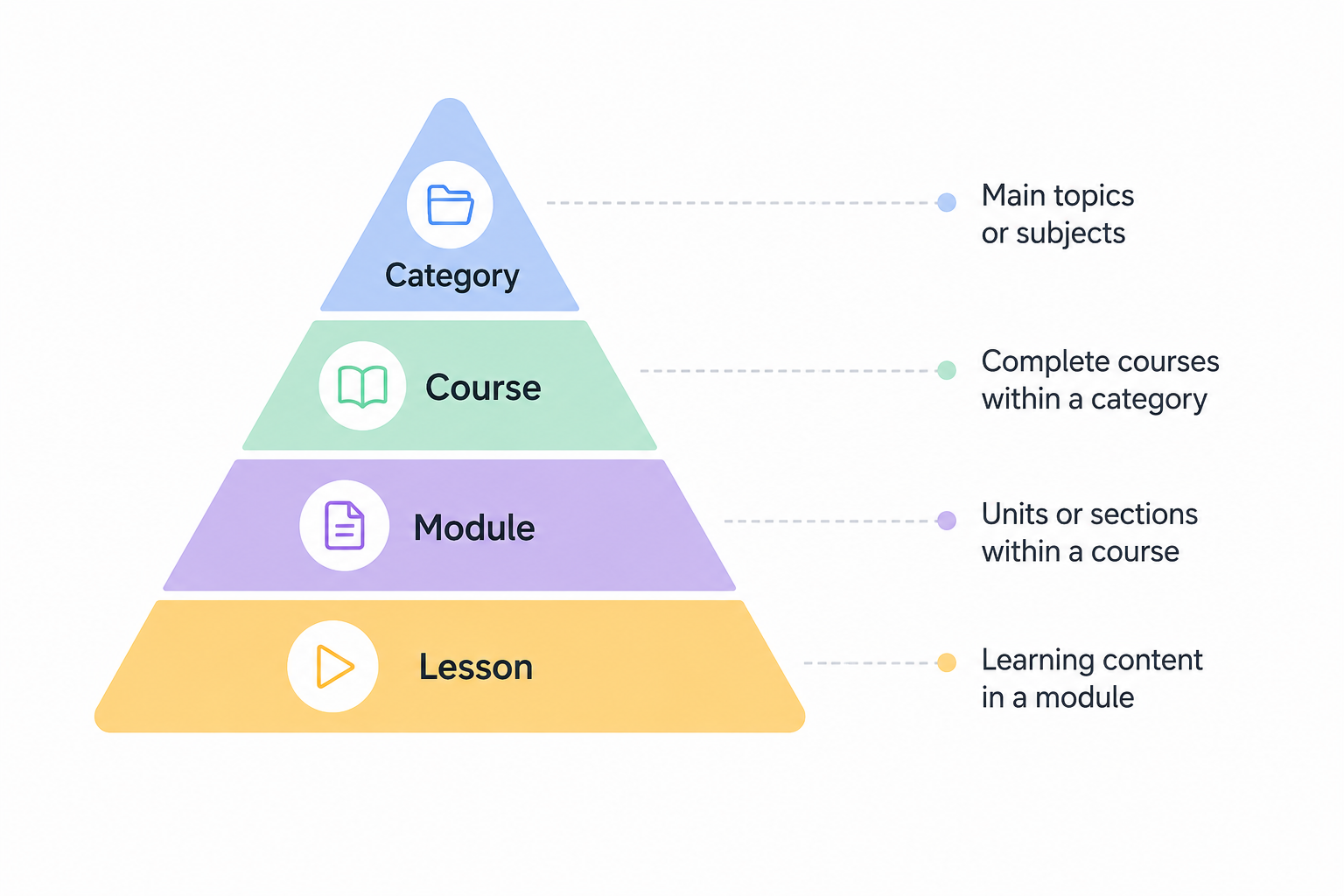
Course structure decides how employees move through the training. This is where an LMS starts becoming useful. If the structure is weak, employees may not know what to complete first. Managers may also struggle to track progress.
A good course structure should be clear, simple, and based on job roles.
For example, a new sales employee may need this learning path:
- Company onboarding
- Product training
- CRM training
- Sales script training
- Demo call training
- Final assessment
A warehouse employee may need a different path:
- Safety training
- Equipment handling
- Attendance policy
- Inventory process
- Compliance checklist
This is why every LMS planning checklist should include course categories, modules, lessons, and learning paths.
You should plan:
- Course categories
- Lesson order
- Mandatory courses
- Optional courses
- Department based courses
- Role based learning paths
- Course completion rules
Employees should know what to do next without asking a manager.
5. Define User Roles and Permissions
Not every user needs the same access. An employee should complete training. A manager should view team progress. An admin should manage courses, users, reports, and settings. If roles are not planned early, the LMS can become difficult to manage.
Common LMS roles include:
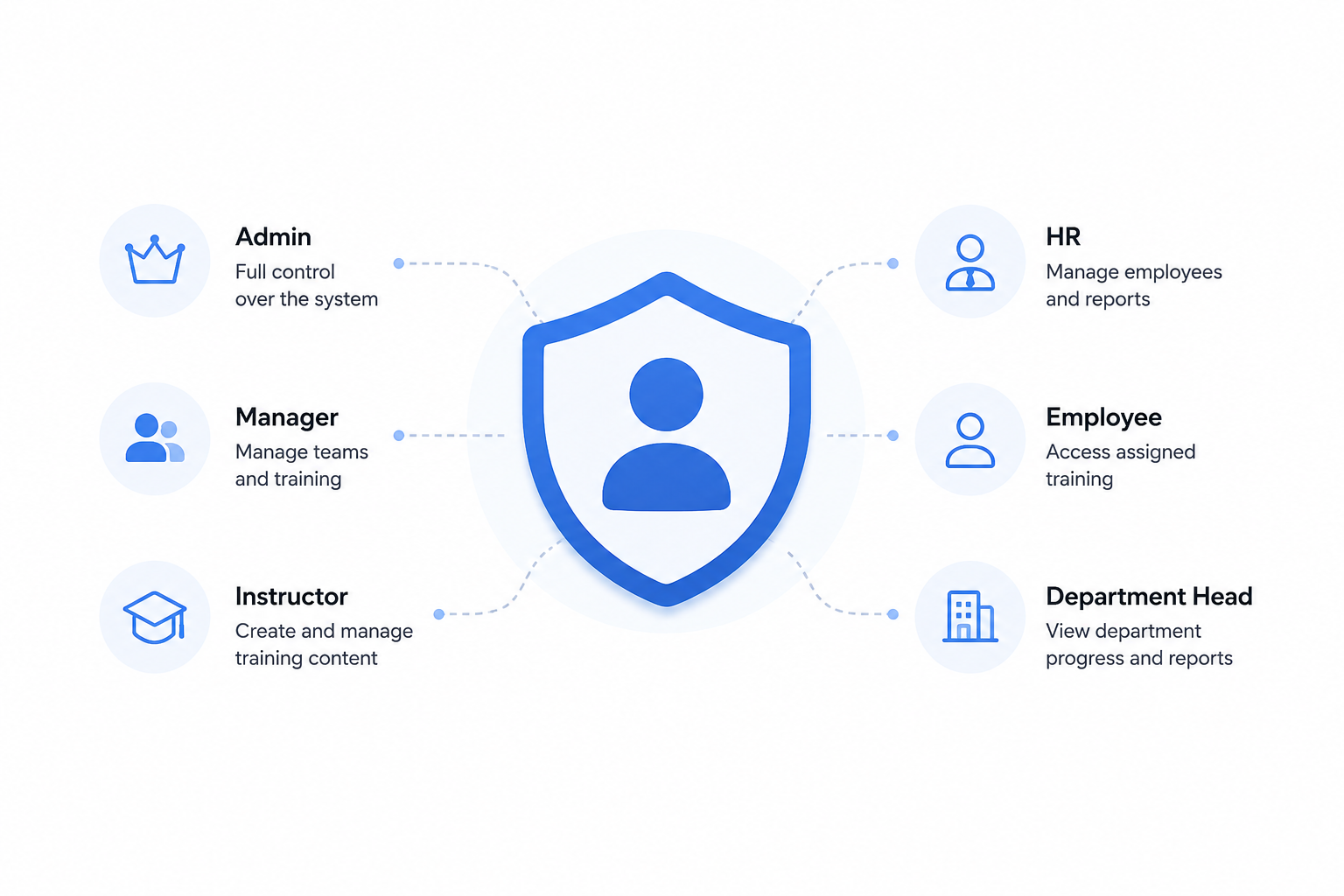
Each role should have clear permissions. A manager may need to see only their team’s training progress. HR may need access to all employee records. Trainers may need permission to upload courses and quizzes.
This matters more as the company grows. A small team can manage training manually for some time. But once you have multiple departments, locations, or remote teams, permissions become very important.
A good internal training LMS should give each user access to the right content, tools, and reports.
6. Plan Quizzes, Tests, and Certificates
Training should not end with watching a video. Businesses also need to know whether employees understood the material. That is where quizzes, tests, and certificates help.
They are especially important for compliance training, safety training, product training, and onboarding. Before building the LMS, decide how assessments will work.
You should plan:
- Quiz passing score
- Number of quiz attempts
- Retake rules
- Question types
- Certificate design
- Certificate expiry date
- Reminder emails
- Final assessments
For instance, a compliance course could have an 80% pass rate. Employees who do not pass may have to re-take the quiz before being issued with a certificate. Small quizzes are included in a Product training course after every course. This assists managers to be aware of employee knowledge and areas for development.
Certificates also enable businesses to maintain accurate records. Compliance, safety, healthcare, finance, or legal processes can make certificate tracking an essential requirement for your company.
7. Decide What Reports You Need
Reports are one of the biggest reasons businesses build an employee training LMS. Without reports, training becomes guesswork. You may know that courses were assigned, but you may not know who completed them, who failed a quiz, or which department needs more training.
This is why reporting should be planned before development starts.
Useful LMS reports include:
- Course completion reports
- Employee progress reports
- Quiz score reports
- Department reports
- Failed attempt reports
- Certificate expiry reports
- Login activity reports
- Manager level reports
For example, HR may want to see company wide training completion. A sales manager may only need reports for the sales team. A compliance officer may need proof that employees completed mandatory training before a deadline.
The report design should match the business need. Do not add reports just because they sound useful. Add reports that help managers make decisions.
8. Plan Integrations Early
Integrations should not be treated as a last minute task. If your LMS needs to connect with other business tools, plan that before development begins. This can affect the platform structure, user data, login process, reporting, and cost.
Common LMS integrations include:
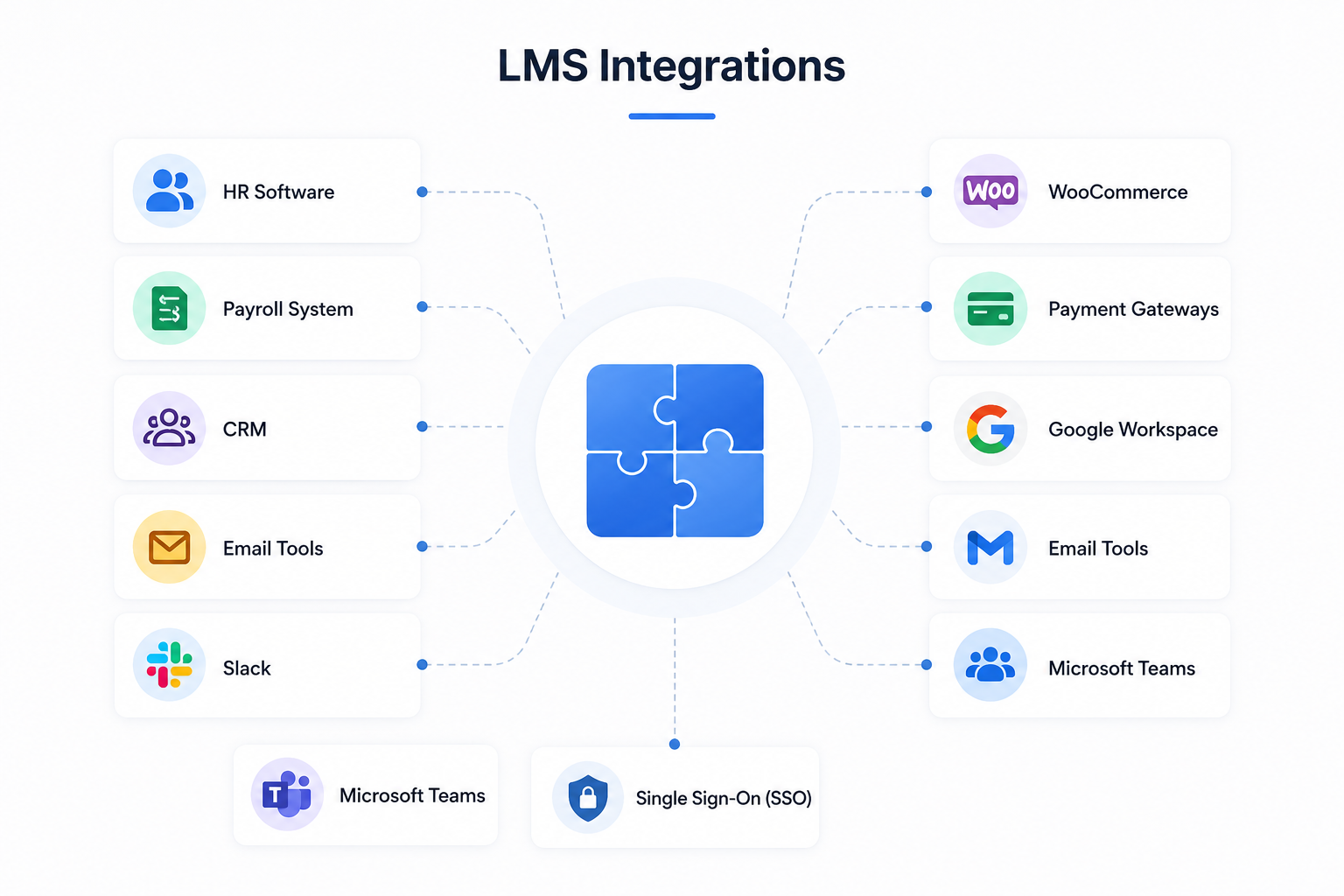
If your business is using HR software, for instance, the LMS might require to automatically retrieve employee names, departments, and job roles. Training reminders can be sent via Slack or Microsoft Teams. WooCommerce or payment gateway integration might be required for online training course sale.
This is where an LMS requirements checklist comes in handy. It can help you determine which integrations are required for phase one and which can be postponed for the later phase. The best way to begin most businesses is to get the most critical integrations up and running first.
Excessive integrations at the beginning can lead to it becoming costlier and time-consuming to launch.
9. Make the LMS Easy for Employees
Employees can struggle to use an LMS, even if it has great features. Most employees don’t like complicated training systems. They would like to log in, view their assigned courses, complete the lessons and continue with their work. That’s why it’s essential for your employee training LMS checklist to include user experience.
A good employee training LMS should include:
- Simple login
- Clear dashboard
- Easy course search
- Progress bars
- Mobile access
- Course reminders
- Clear course names
- Simple buttons and navigation
For example, a new employee should not need to ask HR where the onboarding course is. It should be visible as soon as they log in.
The same rule applies to managers. A manager should be able to see team progress without checking five different screens. The easier the LMS is to use, the more likely employees are to complete their training on time.
10. Set a Launch and Testing Plan
Before launching the LMS to everyone, test it with a small group. This helps you find problems before employees start using the system. A small test group can include HR, managers, trainers, and a few employees from different departments.
Test the most important parts first.
This includes:
- Login process
- Course access
- Mobile view
- Quiz setup
- Certificate generation
- Email reminders
- Report accuracy
- User roles
- Course completion tracking
For example, if a manager cannot see team reports during testing, you can fix it before the full launch. If an employee cannot open a course on mobile, you can adjust the layout before it becomes a bigger issue.
Testing may feel like an extra step, but it saves time after launch. A good LMS planning checklist should always include testing before rollout.
Common Mistakes to Avoid Before Building an LMS
Many LMS problems start before development begins. Here are common mistakes businesses should avoid:
- Building without clear training goals
- Adding too many features in phase one
- Uploading messy or outdated content
- Ignoring mobile users
- Forgetting manager reports
- Not defining user roles
- Skipping testing before launch
- Not planning future courses
- Choosing design over usability
One of the biggest mistakes is trying to build everything at once. A better approach is to launch with the most important training first. Then you can add more courses, reports, and features over time. This keeps the project easier to manage and helps employees start using the LMS sooner.
Employee Training LMS Checklist Table
| Area | What to Plan |
| Training Goal | What business problem should the LMS solve? |
| Learners | Who will use the LMS? |
| Content | What training materials are needed first? |
| Course Structure | How will courses, lessons, and learning paths be organized? |
| User Roles | Who can manage, teach, learn, and view reports? |
| Assessments | What quizzes, tests, and certificates are needed? |
| Reports | What data should managers and HR teams see? |
| Integrations | Which tools should connect with the LMS? |
| User Experience | How easy is it for employees to complete training? |
| Testing | Who will test the LMS before launch? |
When Should a Business Build a Custom LMS?
A custom LMS makes sense when basic training tools are no longer enough. Some businesses start with spreadsheets, shared folders, or simple video libraries. That can work for a small team.
But as the company grows, training becomes harder to track. A custom employee training LMS is useful when you need:
- Role-based learning paths
- Department-based courses
- Custom reports
- Employee progress tracking
- Certificates and expiry dates
- Branded training experience
- HR or CRM integrations
- LearnDash or WordPress control
- Long-term training management
A business with 20 employees may manage onboarding manually. A business with 100 employees across different departments needs a better system. At that stage, an internal training LMS can save time, reduce repeated questions, and give managers better visibility.
Final Thoughts
Building an LMS should not start with design or plugins. It should start with planning. A good employee training LMS LaunchPad helps employees learn faster, managers track progress, and businesses keep training organized in one place.
The best results come when goals, users, content, reports, and integrations are clear before development begins. That is why this employee training LMS checklist is important. It gives your team a simple starting point before you invest time and money into building the platform.
At TeknoFlair, we help businesses build WordPress LMS solutions for employee training, onboarding, compliance, and internal learning. With the right plan, your LMS can be simple for employees and useful for managers from day one.
FAQs
What should be included in an employee training LMS checklist?
An employee training LMS checklist should include training goals, learners, content types, course structure, user roles, quizzes, reports, integrations, user experience, testing, and launch planning.
How do I plan an LMS for employee training?
Start by defining your training goal. Then identify your learners, organize your content, plan course structure, decide user roles, and list the reports your business needs.
What features should an employee training LMS have?
An employee training LMS should include courses, lessons, quizzes, certificates, progress tracking, reports, user roles, reminders, mobile access, and integration options.
Can WordPress be used for an employee training LMS?
Yes. WordPress can be used to build an employee training LMS with tools like LearnDash. It is a good option for businesses that want control over design, content, users, and reporting.
Is LearnDash good for employee training?
Yes. LearnDash is useful for employee training, onboarding, compliance courses, quizzes, certificates, and progress tracking. It works well for businesses that want a WordPress based LMS.
How long does it take to build an LMS?
A simple LMS may take a few weeks. A more advanced LMS with custom reports, integrations, certificates, and role based learning may take longer. The timeline depends on the features and content.
Should small businesses build an LMS?
Yes, if training is repeated often. Small businesses can use an LMS to onboard employees, reduce repeated questions, organize training content, and track progress more easily.
