











AI can build your website in minutes. But can it build a business you’ll still want to run five years from now?
You enter a prompt, choose a design, and the platform generates pages, text, and layouts for you. That sounds useful, especially when you want to launch quickly. But Will the platform still support your needs when your business becomes larger, more technical, or more valuable?
An online course business needs secure payments, student accounts, lesson access, progress tracking, memberships, email automation, reporting, and room to grow.
This is where many AI-generated apps start to feel limited. They may work well for a simple landing page or early idea. However, they often struggle when a business needs custom workflows, advanced integrations, several course levels, or a branded student experience.
This is why many serious businesses choose WordPress for online courses. It gives them more control over their content, customers, systems, and future growth.
WordPress also lets businesses use AI without giving up ownership. AI can support content creation, lesson planning, emails, quizzes, and marketing. WordPress remains the main platform that manages the business.
Why WordPress Remains the Preferred Choice for Serious Course Businesses
AI can help you build a website quickly, but running a successful online course or membership business takes much more than a fast launch. You need a platform that supports growth, ownership, SEO, integrations, and a better learning experience.
Here are ten reasons why many growing businesses continue to choose WordPress.
1. Keep Full Control of Your Website, Content, and Customer Data
Ownership is one of the biggest advantages of WordPress. The table below shows how WordPress and AI-generated apps compare when it comes to ownership and long-term control.
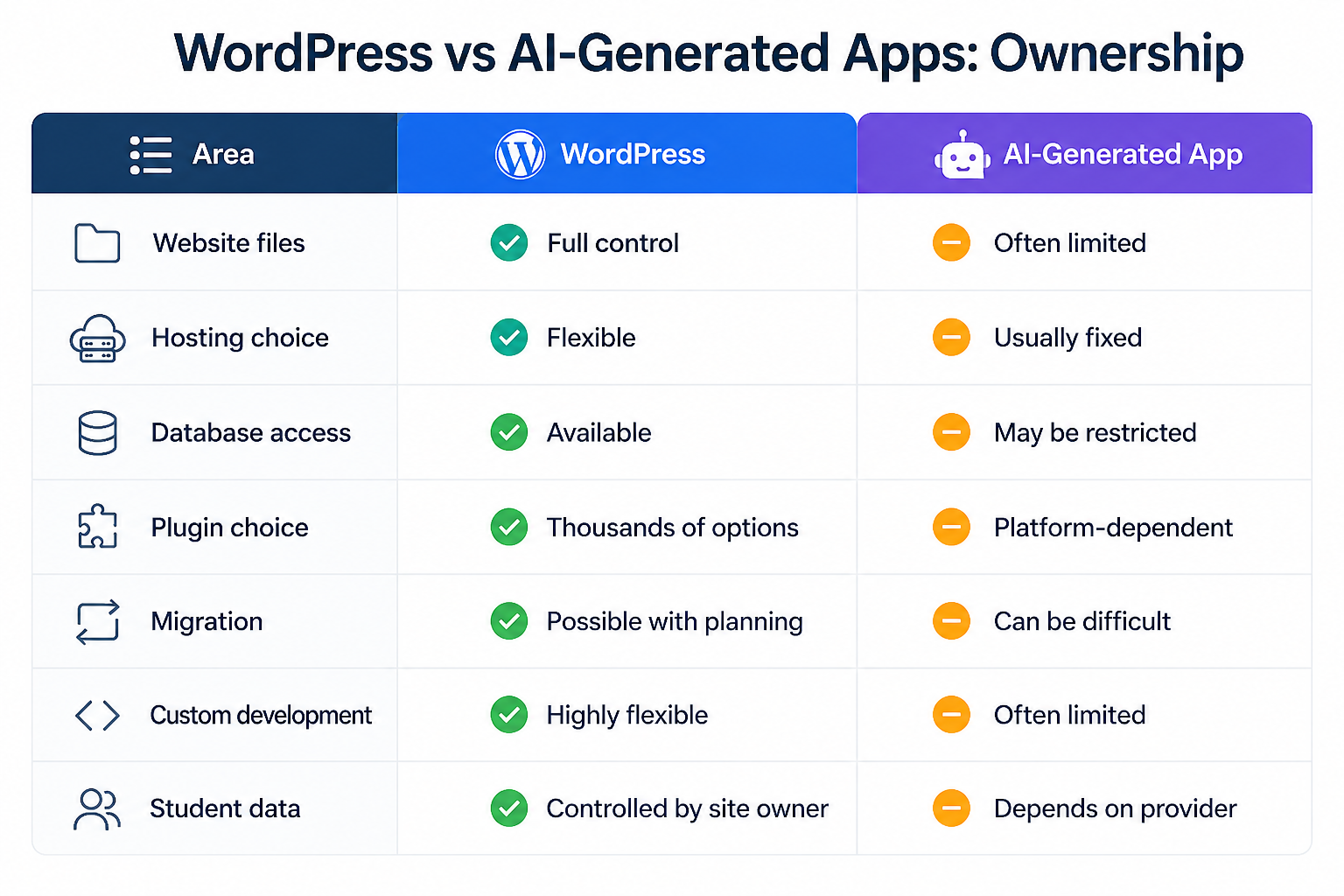
With a self-hosted WordPress website, you own your website files, database, content, customer information, and hosting environment. You can move your website, change hosting providers, replace plugins, or hire a different developer whenever you choose.
Many AI-generated platforms work inside closed systems. Your website, customer data, and features may depend entirely on that platform.
For a growing business, this creates unnecessary risk. Your course content, student records, memberships, payment history, and SEO work are valuable assets. They should remain under your control instead of being tied to one provider.
2. Your Learning Platform Can Grow With the Business
A serious online course business rarely stays simple. A creator may start with one course. Later, they may add memberships, coaching, digital downloads, live workshops, private communities, or partner training.
The platform needs to support each stage. This is one reason a WordPress LMS can be a better long-term choice than a basic AI course builder.
WordPress works with learning management system plugins such as LearnDash. Custom LearnDash development can turn a standard WordPress website into a complete online learning platform.
You can also use TeknoFlair’s LearnDash Continuing Professional Development solution to automate credit tracking, issue certificates, and send licence renewal reminders from one connected platform
You can start with a small setup and add more features later. The website does not need to be rebuilt each time. The business can add or replace tools as its needs change.
For example, a course business may follow this growth path:
Stage 1: One paid course
Stage 2: Several courses and bundles
Stage 3: Monthly membership
Stage 4: Private student community
Stage 5: Coaching and live sessions
Stage 6: Corporate or group training
Stage 7: Custom reporting and automation
This flexibility is useful because growth is not always predictable. A course creator may discover that customers want a membership instead of a one-time purchase. A training company may need group licences for businesses.
A closed AI app may require the business to wait for the provider to add those features. WordPress lets the business choose the tools it needs.
3. Connect the Course Platform With the Tools You Already Use
An online course website does not work alone. It usually needs to connect with payment systems, email platforms, CRMs, analytics tools, webinar software, support systems, and automation platforms. These connections help reduce manual work.
For example, when a student buys a course, the platform can automatically:
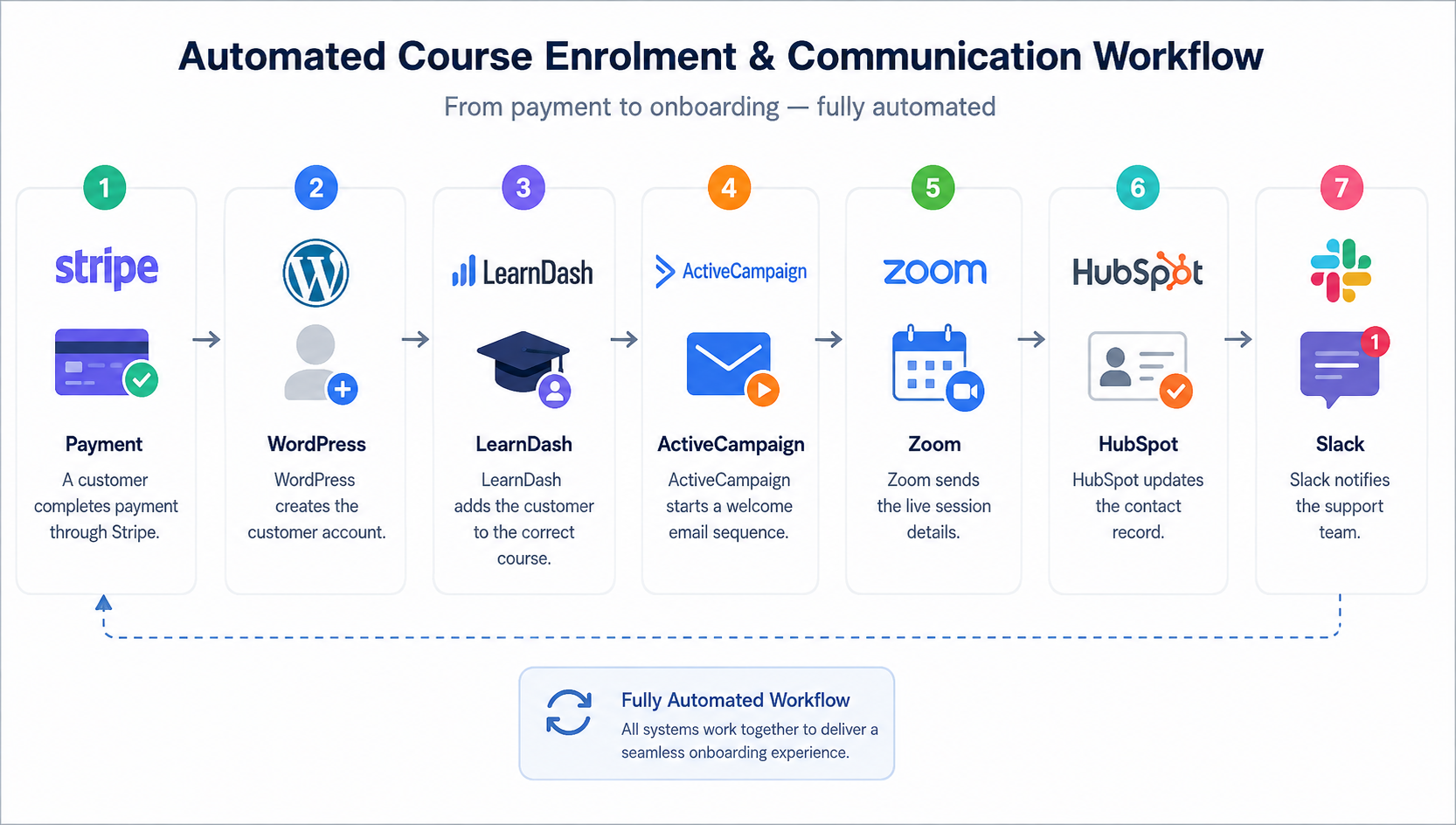
WordPress supports a large range of plugins, APIs, and third-party integrations. An AI-generated app may support a few major tools. But it may not support the exact system your business already uses.
This becomes more important as the business grows. A small creator may only need Stripe and an email platform. A larger membership business may need a CRM, tax software, affiliate system, help desk, reporting dashboard, and several automation workflows.
WordPress gives the business more ways to connect these systems.
4. Create a Stronger SEO Foundation for Long-Term Traffic
Course businesses need more than paid ads and social media. They also need people to find them through search engines. This is especially important for businesses that publish useful guides, target several industries, answer customer questions, or sell courses in competitive markets. WordPress provides strong SEO control.
A course business can create:
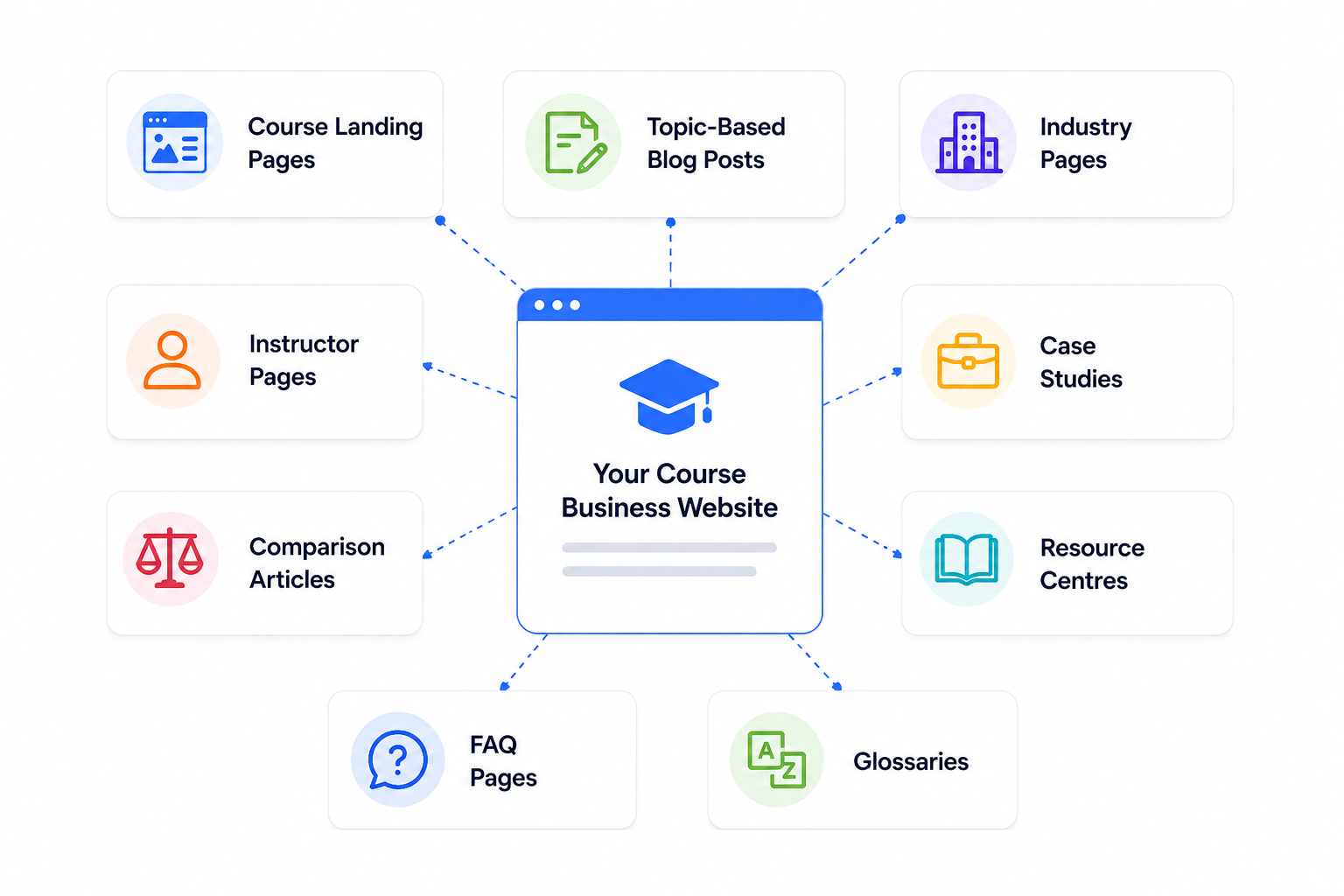
It can also control key SEO elements such as meta titles, meta descriptions, page URLs, internal links, redirects, image alt text, XML sitemaps, canonical tags, and structured data. This makes WordPress for online courses useful for businesses that want to build steady organic traffic.
AI can help draft content. However, strong SEO still needs a clear site structure, proper search intent, internal linking, technical control, and regular updates.
5. Use AI for Speed Without Giving Up Platform Control
Choosing WordPress does not mean avoiding AI. In fact, the strongest setup may combine both. AI can make course creation and marketing faster. WordPress can manage the website, courses, payments, students, and memberships.
This gives the business speed without losing control.
AI can help create:
- Course outlines
- Lesson ideas
- Quiz questions
- Email drafts
- Landing page copy
- Video scripts
- Social media posts
- Student FAQs
- Translations
- Content summaries
- Support responses
WordPress can manage:
- User accounts
- Course access
- Membership plans
- Payments
- Subscriptions
- Student progress
- Certificates
- Email integrations
- Reporting
- Website content
This is a more practical way to use AI. Instead of asking AI to control the whole platform, the business uses it as a support tool.
This approach keeps human control in the process. It also reduces the risk of depending on one AI-generated app for every part of the business.
6. Create More Revenue Streams From One Platform
A serious course business often needs more than one way to make money. At first, the business may sell one course for a fixed price. Later, it may add memberships, coaching, bundles, workshops, digital downloads, or corporate training.
WordPress supports all of these options.
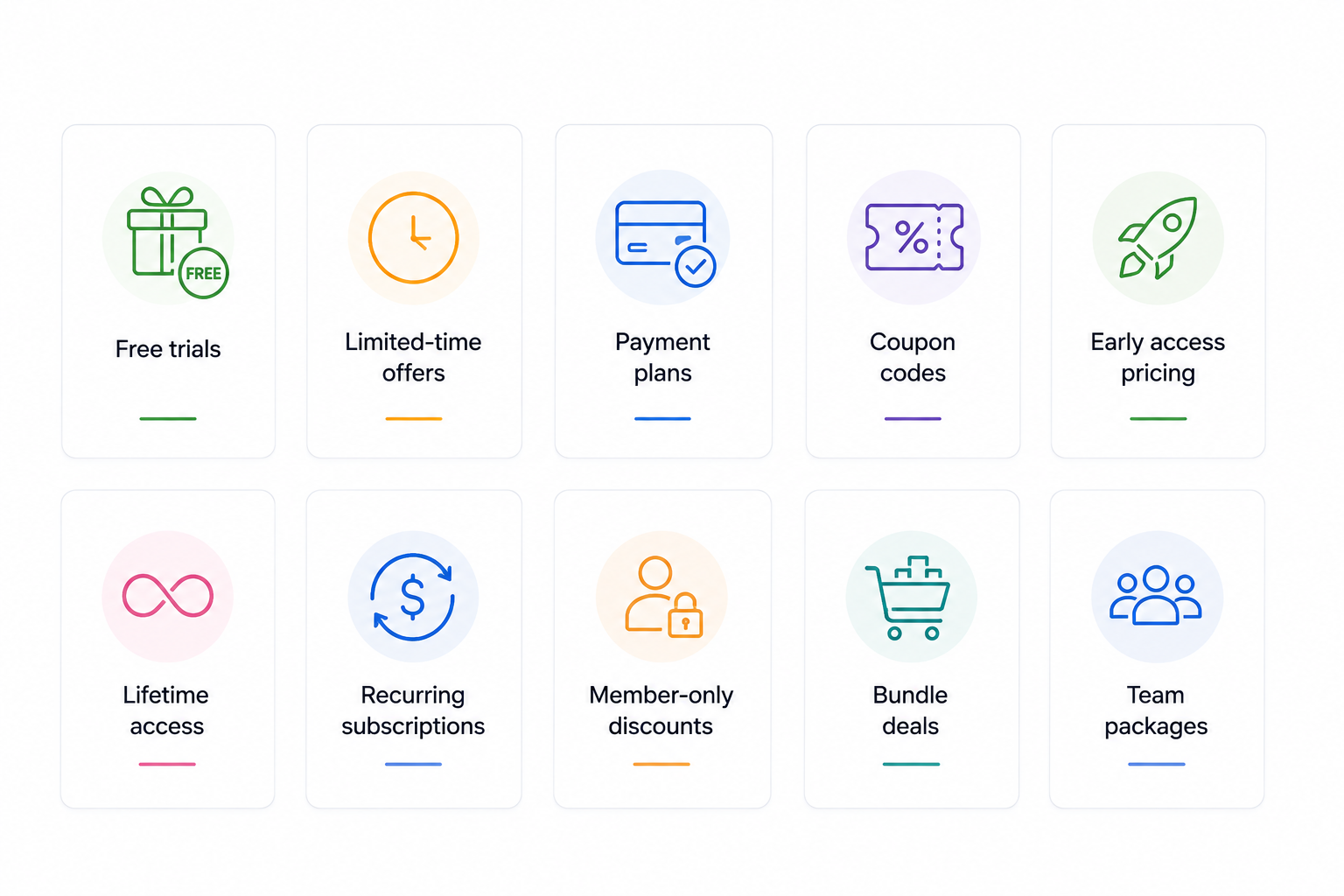
This means the business can shape the sales model around the customer instead of accepting the limits of a platform. For example, one main course could be sold as a one-time product, included in a membership, bundled with coaching, or licensed to a company.
The course content may stay the same, but the offer can change for different customers. WordPress tools such as WooCommerce, LearnDash, MemberPress, and Paid Memberships Pro make these models possible.
7. Build a Fully Branded Student Experience
Course businesses need to look professional. Students should feel that they are learning inside one clear and trusted platform. The colours, fonts, dashboard, course pages, emails, and checkout should all feel connected.
You can also match the learning platform with the main brand website. This is especially useful for businesses that already have a strong visual identity.
AI-generated apps often create attractive layouts quickly. But they may rely on fixed templates or limited design systems. That can become a problem when the business wants a more custom experience.
8. Give Students a Better Learning Journey
A strong course platform should make learning easy. Students need to know where to start, what to do next, and how much progress they have made.
A confusing learning experience can reduce course completion. WordPress LMS tools can create a more structured journey.
Useful student features include:
- Clear course navigation
- Progress tracking
- Lesson completion
- Certificates
- Discussion areas
- Instructor feedback
- Email reminders
- Mobile-friendly lessons
- Downloadable resources
- Course bookmarks
- Gamification
These features can help students stay active.
For example, a student who has not logged in for seven days can receive an automatic reminder. A learner who completes a module can unlock the next section. A customer who passes a final quiz can receive a certificate.
These small actions can improve the full learning journey.
WordPress can also support different learning paths. A beginner may need the complete course. An experienced learner may only need advanced lessons. A business may need separate training for sales teams, technical staff, managers, or partners.
A basic AI-generated app may create a course interface, but it may not support these deeper enrolment rules and user roles
9. Reduce Long-Term Costs and Avoid Expensive Lock-In
AI-generated apps may look cheaper at the start. Some platforms offer a low monthly fee and promise a complete website with very little setup work. That can be useful during the early stage.
However, the cost may rise as the business grows. The provider may charge more for extra users, storage, traffic, integrations, automation, team access, advanced features, or premium support.
The business may also need to move to a higher plan just to unlock one important feature. WordPress has its own costs. These can include hosting, plugins, maintenance, security, and development.
The table below shows how the two options compare across the main long-term cost areas.
| Cost Area | WordPress | AI-Generated App |
| Hosting | Flexible pricing | Usually included in the plan |
| Platform fee | No fixed platform fee | Monthly or annual fee |
| Transaction fee | Depends on the payment tool | May include extra fees |
| User limits | Depends on hosting and setup | Often based on the plan |
| Custom features | Can be developed | May not be available |
| Migration | Possible with planning | Can be difficult |
| Integrations | Large range of options | Depends on the provider |
| Price control | More flexible | Controlled by the platform |
The cheapest option today may not be the cheapest option after three years.
10. Get Better Security and More Control Over Access
Online course and membership businesses manage sensitive information. This may include customer details, payment records, private lessons, company training, and student progress.
WordPress gives businesses more control over how that information is protected.
With WordPress, security can be adjusted around the needs of the platform. A small course website may need simple protection. A larger training business may need single sign-on, company-based access, stronger account controls, or custom permissions.
This level of control helps businesses protect their content, manage users more carefully, and build a safer learning experience.
Combine AI Efficiency With WordPress Flexibility
The strongest approach is not always WordPress against AI. It can be WordPress with AI. AI can speed up creative and repetitive tasks. WordPress can manage the business systems that need control, structure, and reliability.
Course teams can use AI to help with:
- Lesson outlines
- Research summaries
- Quiz ideas
- Video scripts
- Email drafts
- Course descriptions
- Support articles
- Social posts
- Translation drafts
- Content updates
The team should still review the output.
AI can make mistakes, miss context, or create weak information. Human review helps protect quality.
Can LearnDash Support a Serious Course Business?
Yes. LearnDash can support far more than a basic course website. It gives businesses a structured way to deliver lessons, quizzes, assignments, certificates, paid access, group training, and progress tracking from WordPress.
This makes it suitable for online course businesses, membership platforms, employee training, customer education, and certification programmes. It also works well with tools such as WooCommerce, membership plugins, CRM platforms, and automation systems.
You can customise your LearnDash platform with TeknoFlair to save admin time, reduce support work, connect business tools, and create a smoother learning experience that scales with your growing course platform with ease.
Final Thoughts
AI-generated apps can help businesses launch quickly. They can create layouts, draft content, and build basic features with less work.
But a serious online course or membership business needs more than speed. It needs ownership, flexible pricing, reliable integrations, strong SEO, student reporting, custom design, and room to grow.
WordPress provides a stronger foundation for businesses that want long-term control. It also does not prevent you from using AI. You can use AI to create content, save time, and support your team. WordPress can manage the customers, courses, payments, memberships, and business systems behind that content.
For growing education businesses, this combination offers both speed and control.
