









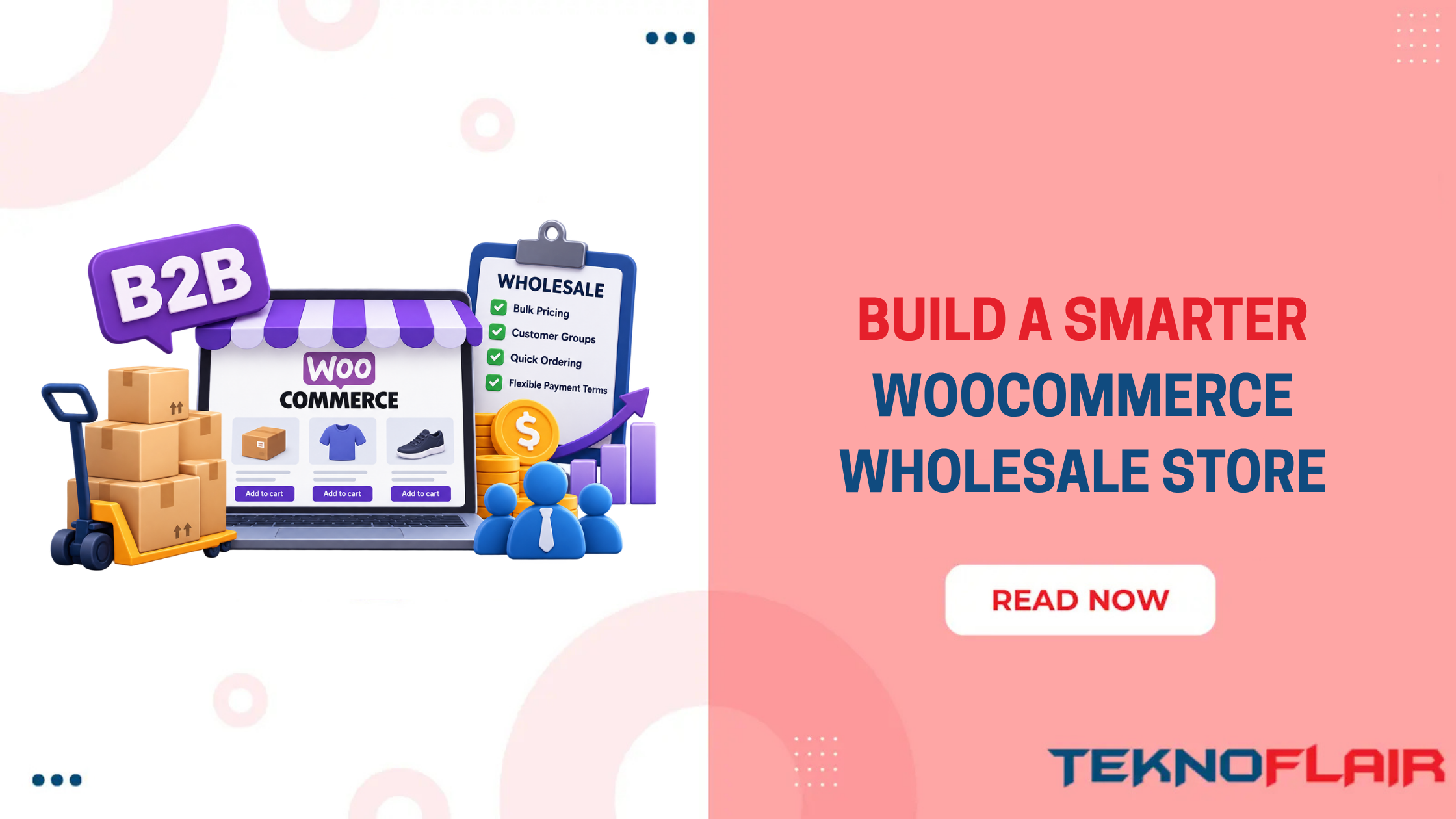
Running wholesale through a normal WooCommerce store can get messy pretty quickly. Retail customers usually buy a few products and pay immediately. Wholesale buyers work differently. They may need special pricing, minimum quantities, bulk ordering, account approval, private products, invoice payments, or different shipping rules.
A good WooCommerce B2B plugin should handle these rules inside your store, so you do not have to manage every wholesale customer manually.
In this guide, we’ll use B2BKing to build that setup from start to finish. We’ll cover installation, wholesale pricing, customer groups, registration, bulk orders, quotes, tax settings, payment methods, testing, and the features you actually need to get started.
What Should a Good WooCommerce B2B Plugin Handle?
Not every wholesale plugin gives you the same level of control. Some only handle pricing, while others can manage customer groups, ordering rules, product access, payments, shipping, and account approval in one setup.
So before choosing a WooCommerce B2B plugin, check whether it can cover the full process you want to manage inside your store.
A useful setup should cover:
- Business registration and customer approval
- Different wholesale customer groups
- Group-specific or customer-specific pricing
- Quantity and tiered discounts
- Minimum and maximum order quantities
- Carton, case, or pack-size rules
- Wholesale-only products or private catalogs
- Bulk ordering
- Quote requests
- Different payment and shipping options
- VAT and tax handling
- Saved purchase lists and repeat ordering
- Multiple buyers under one company account
If a plugin only changes product prices, you may still need extra tools for the rest of your wholesale workflow.
Setting Up WooCommerce Wholesale With B2BKing
B2BKing is designed for wholesale, B2B-only, and mixed B2B+B2C WooCommerce stores.
Instead of building a completely separate wholesale website, you can keep everything inside WooCommerce and change the experience based on who is logged in. Once the wholesale buyer logs in, the store can apply their pricing, products, payment methods, quantity rules, and other B2B conditions automatically.
Before installing anything, you can also try the B2BKing live demo. It is worth spending a few minutes there because you can see how the wholesale experience looks before building your own version.
Now, let’s set it up step by step.
Install B2BKing on WooCommerce
First, make sure WooCommerce is already installed and active. Then go to:
WordPress Dashboard → Plugins → Add New
Search for B2BKing, then click:
Install → Activate
If you are using the Premium version, download the plugin ZIP from your account and go to:
Plugins → Add New → Upload Plugin
Upload the file, install it, and activate it. Once activated, B2BKing adds its own settings and management areas inside your WordPress dashboard. With the plugin active, the next decision is how wholesale customers should fit into your existing store.
Choose Between a B2B Store and a B2B + B2C Store
This should be one of the first decisions you make. Go to:
B2BKing → Settings
You can configure the store around two main models.
B2B Only
Choose this if your website sells only to businesses. In this setup, your store can focus completely on wholesale customers, business registration, trade pricing, larger quantities, and B2B ordering.
B2B + B2C Hybrid
Choose this if you sell to both retail and wholesale customers. Retail visitors can continue shopping normally, while approved B2B users receive their own prices, products, payment methods, and ordering rules after logging in.
Once you know which store model you need, you can start separating buyers into the right groups.
Create Your Wholesale Customer Groups
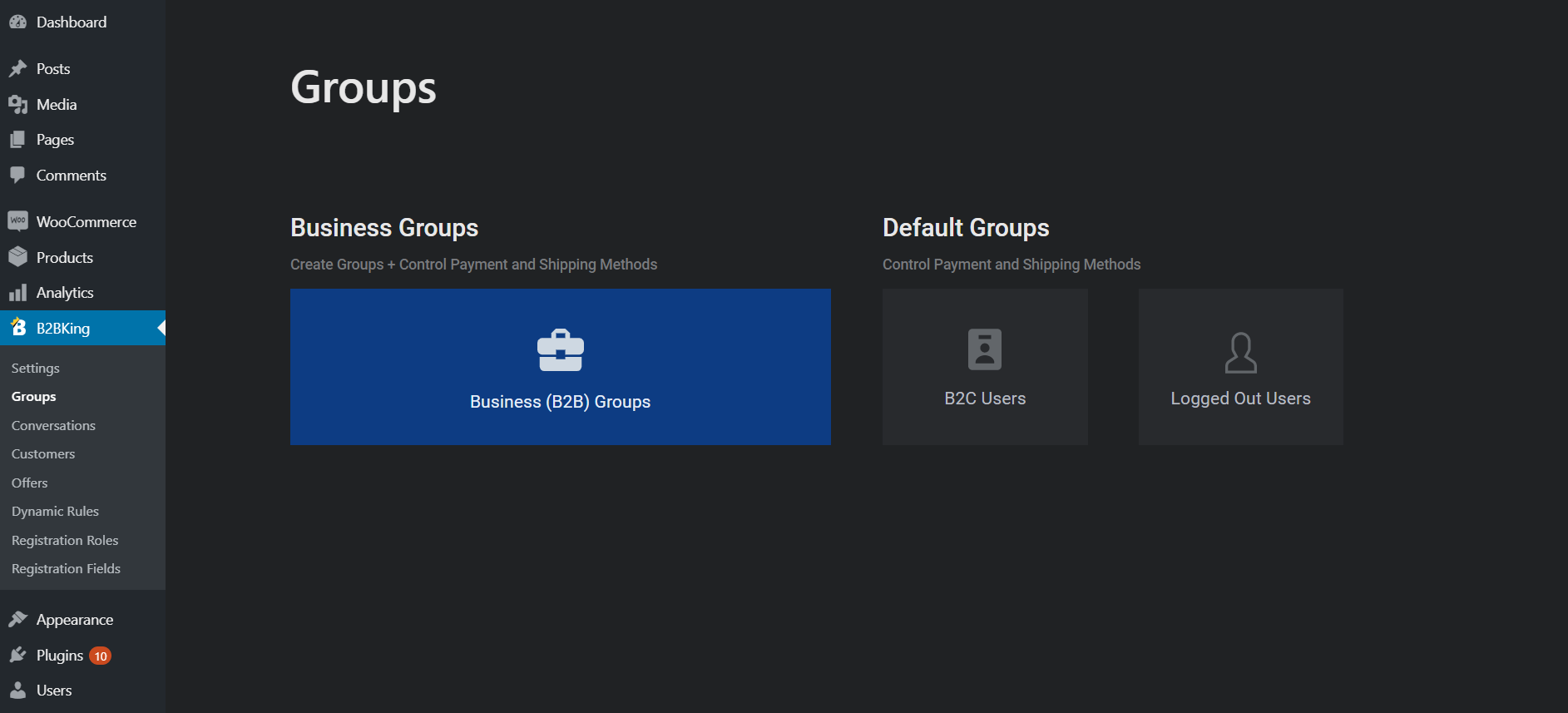
Now you need to decide who gets what. Go to the B2BKing groups area and create groups that match your actual sales structure.
For example:
| Customer Type | Example Pricing |
| Retail Customer | Standard price |
| Wholesale Buyer | 15% discount |
| Distributor | 25% discount |
| VIP Distributor | Negotiated pricing |
You do not need a separate group for every customer. If all wholesale customers receive the same pricing and payment terms, one group may be enough. Add another group only when the buying conditions genuinely change.
For example, distributors may receive:
- Lower pricing
- Higher minimum quantities
- Invoice payments
- Different shipping methods
Your customer groups become the base for many of the rules you configure later
Build Your Wholesale Registration Form
The next step is deciding how businesses apply for an account. A B2B registration form usually needs more information than a standard WooCommerce signup.
You may want to ask for:
- Company name
- Contact name
- Business email
- Phone number
- VAT or tax number
- Company registration number
- Website
- Reseller certificate or another document
B2BKing Premium supports separate B2B and B2C registration, custom fields, file uploads, custom registration roles, and manual or automatic approval. It also supports VAT fields with VIES validation for relevant EU setups.
Try not to turn registration into an interrogation, though. Only request information you actually use when approving an account. A simpler form usually means fewer businesses abandon the application halfway through.
Approve Customers and Assign Them to the Right Group
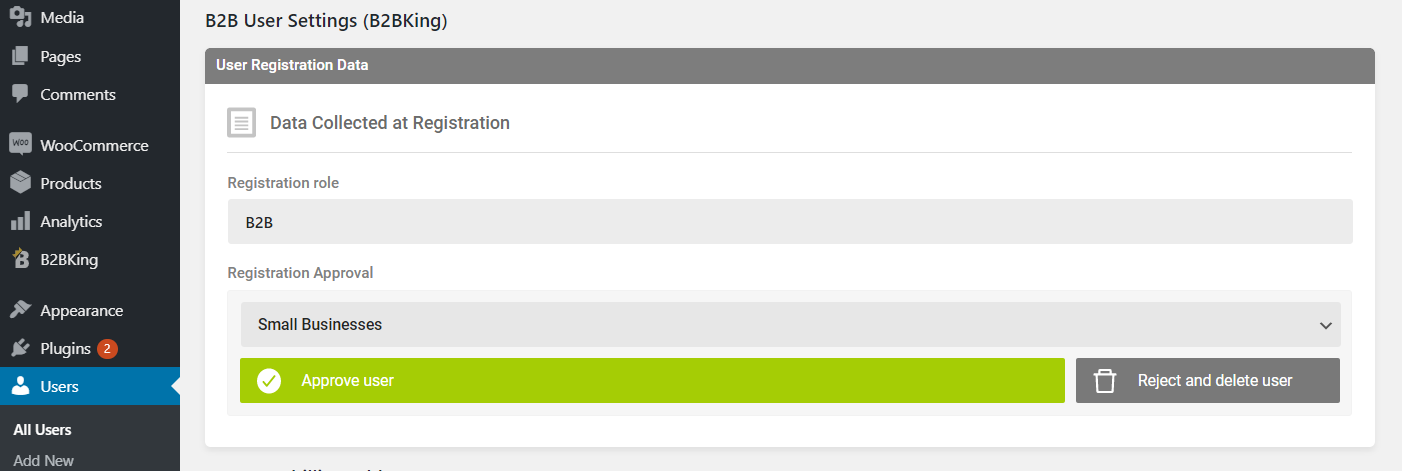
Once a business submits the form, you need to decide whether it should receive wholesale access.
A common workflow is:
Business registers → You review the account → Approve it → Assign a wholesale group → B2B rules become active
This prevents anyone from creating an account and immediately receiving trade pricing. This WooCommerce B2B plugin also gives you a customer management area where you can review details such as registrations, group assignments, orders, notes, uploaded information, and connected company accounts.
Once the customer is in the correct group, you can start controlling what they pay.
Set Wholesale Prices for Individual Products
Now we get to one of the main reasons businesses install a WooCommerce B2B plugin: separate pricing. With the free B2BKing version, you can edit a WooCommerce product and enter a regular B2C price and a separate B2B price.
For example:
Retail price: $199
Wholesale price: $179
A normal customer sees $199. An approved wholesale customer sees $179 after logging in Product-level pricing is useful when margins vary across your catalog. You will be able to offer 20% off one product but only 10% off another. However, editing every product manually is not always practical for a large catalog. That is where broader pricing rules help.
Apply Store-Wide Wholesale Discounts
If hundreds of products receive the same wholesale discount, you do not need to edit them one by one. You can create rules such as:
Wholesale group → 15% off all products
or:
Distributor group → 10% off Industrial Equipment
B2BKing can apply rules to specific groups, users, products, or categories. This works well for stores where pricing follows a clear structure.
Use individual product pricing when margins differ. Use group discounts when the same rule applies across many products.
Set Tiered Pricing for Larger Orders
Wholesale buyers often expect the unit price to drop when they buy more.
For example:
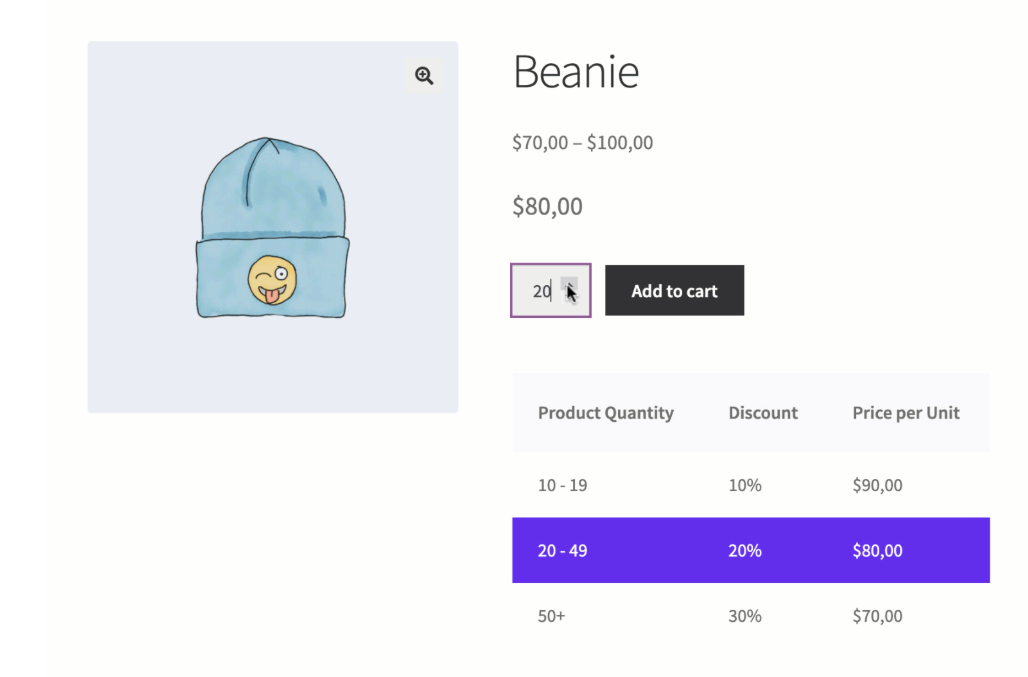
This is known as tiered pricing.
Instead of asking your sales team whether 100 units qualify for a better deal, the buyer can see the pricing directly while ordering.
This works especially well for:
- Manufacturers
- Parts suppliers
- Packaging businesses
- Apparel wholesalers
- Distributors
Pricing is now sorted. Next, you need to control how much customers are allowed to order.
Set Minimum, Maximum and Pack Quantities
Wholesale products are often sold in cases, cartons, packs, or larger minimum. Suppose you sell bottles in cartons of 12. You probably do not want customers ordering:
13, 17, or 29 bottles
Instead, your order quantities should follow:
12 → 24 → 36 → 48
You can configure rules such as:
Minimum quantity: 12
Required multiple: 12
Minimum order value: $500
B2BKing supports quantity and order-value conditions for selected customers or groups. This keeps your website aligned with the way products are actually packed and shipped.
Control Which Products B2B Customers Can See
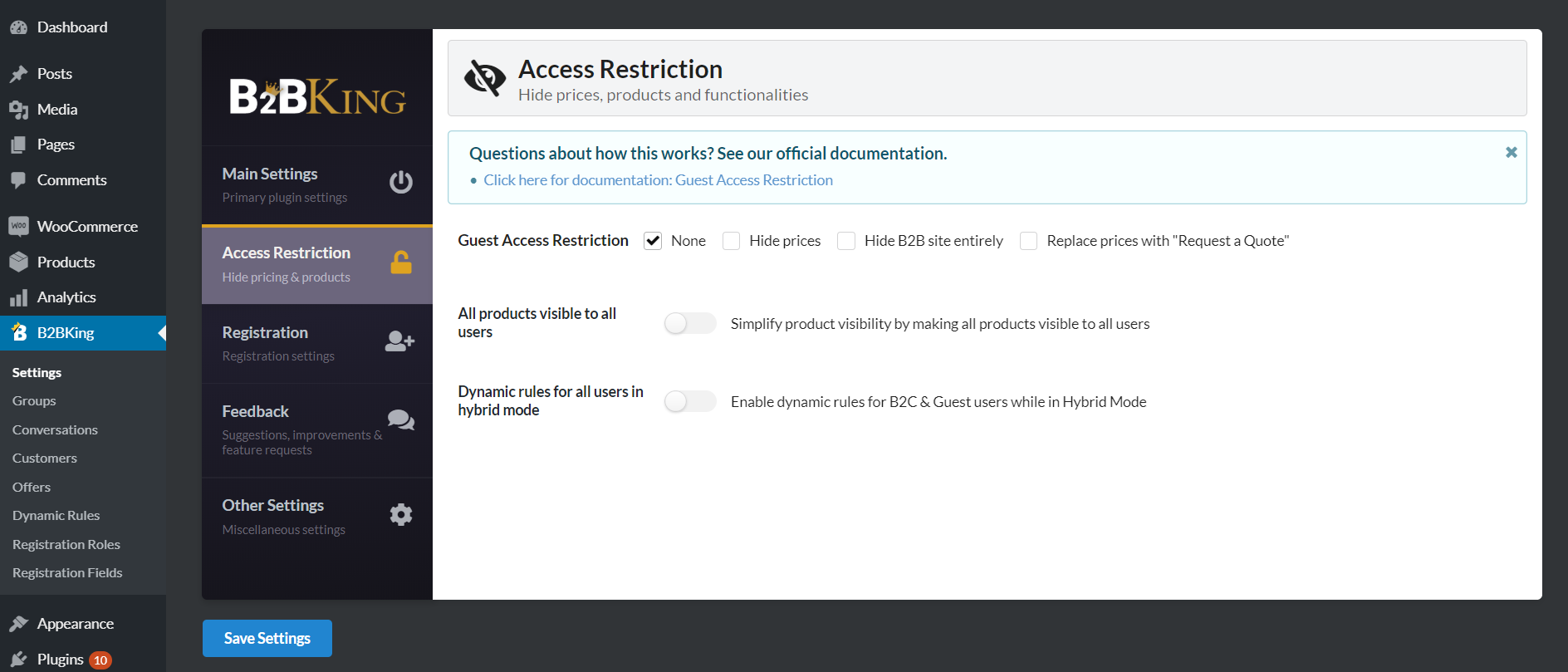
Not every product needs to be available to everyone.
You may have products that are:
- Available only to distributors
- Reserved for large accounts
- Hidden from retail buyers
- Sold only in selected countries or customer groups
B2BKing includes product and category visibility controls, allowing access to be changed for groups or users. This makes it possible to run a private wholesale catalog inside the same WooCommerce installation as your public retail store.
Hide Prices Until a Customer Logs In
Some wholesale businesses do not want trade pricing visible to the public. In that case, you can hide prices from guests and require buyers to log in. B2BKing can also hide the entire store or replace normal purchasing with quote requests for selected users or situations. When prices are hidden through its pricing rules, the affected customer cannot simply add the unknown-price product to the cart.
This can be useful when your pricing depends on contracts, territories, volume, or negotiated customer terms.
Set Up the Wholesale Bulk Order Form
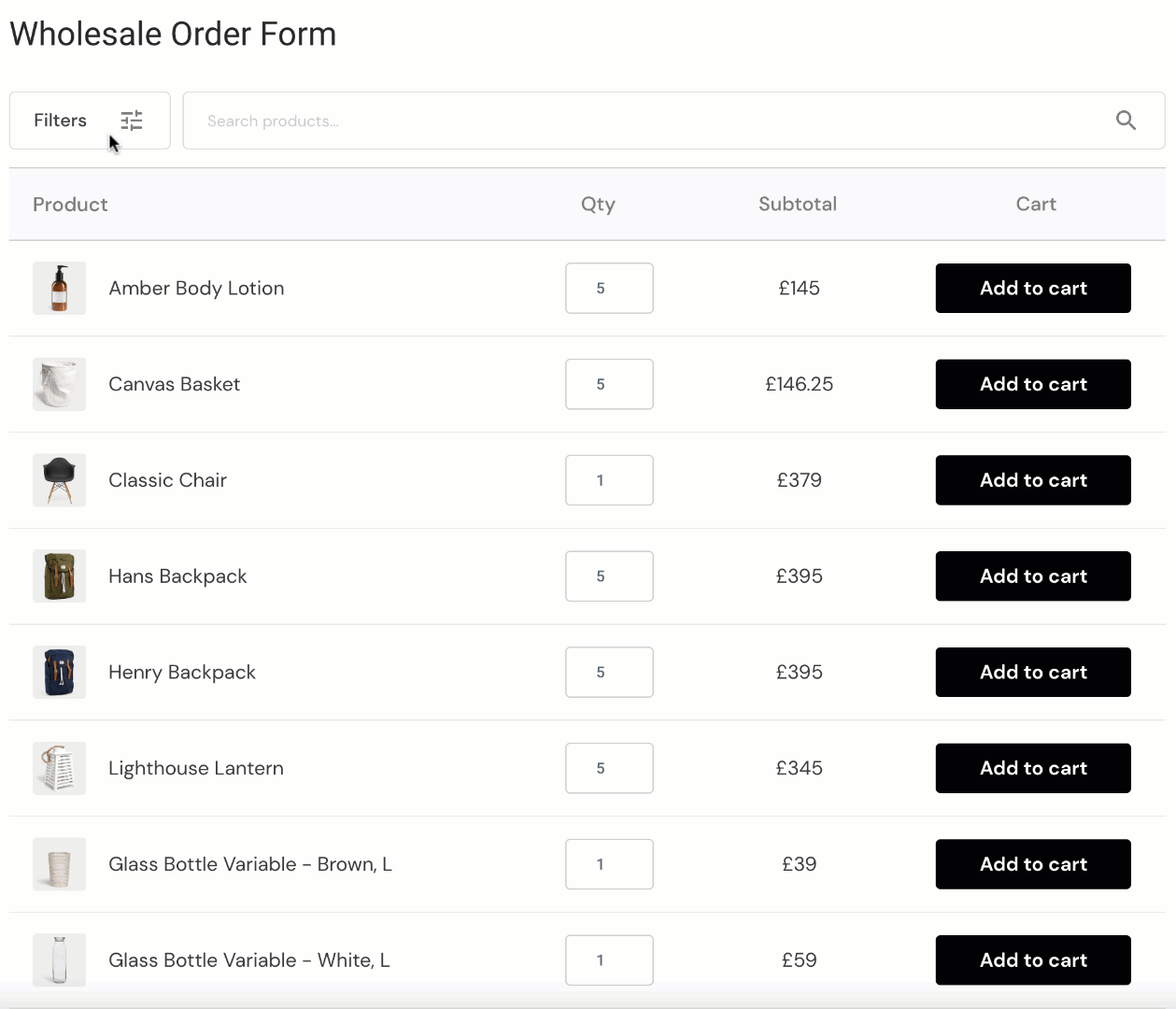
Wholesale buyers often know exactly what they need, especially when they are reordering stock. B2BKing includes a bulk order form where customers can search products, choose quantities, and add items to the cart without opening each product page.
The form appears in the customer’s My Account area by default and can also be added elsewhere with a shortcode.
Set Up CSV Orders and Purchase Lists
Large business buyers may already keep their regular stock order inside a spreadsheet. Making them search your website for every SKU adds unnecessary work.
B2BKing supports quick ordering through CSV, allowing customers to work with product references and quantities in bulk. CSV tools are also available for areas such as group-based B2B pricing. This is particularly useful when buyers regularly order tens or hundreds of different SKUs at once.
Create Purchase Lists for Repeat Orders
Many wholesale orders repeat. A café may order nearly the same supplies every month. A retailer may regularly replenish the same 40 products. A workshop may reorder the same parts.
B2BKing purchase lists let customers save a selection of products and reuse it later. The bulk order form can also save its contents as a purchase list. So instead of rebuilding the order each time, the customer starts from a saved list and adjusts the quantities.
Add Request a Quote for Wholesale Orders
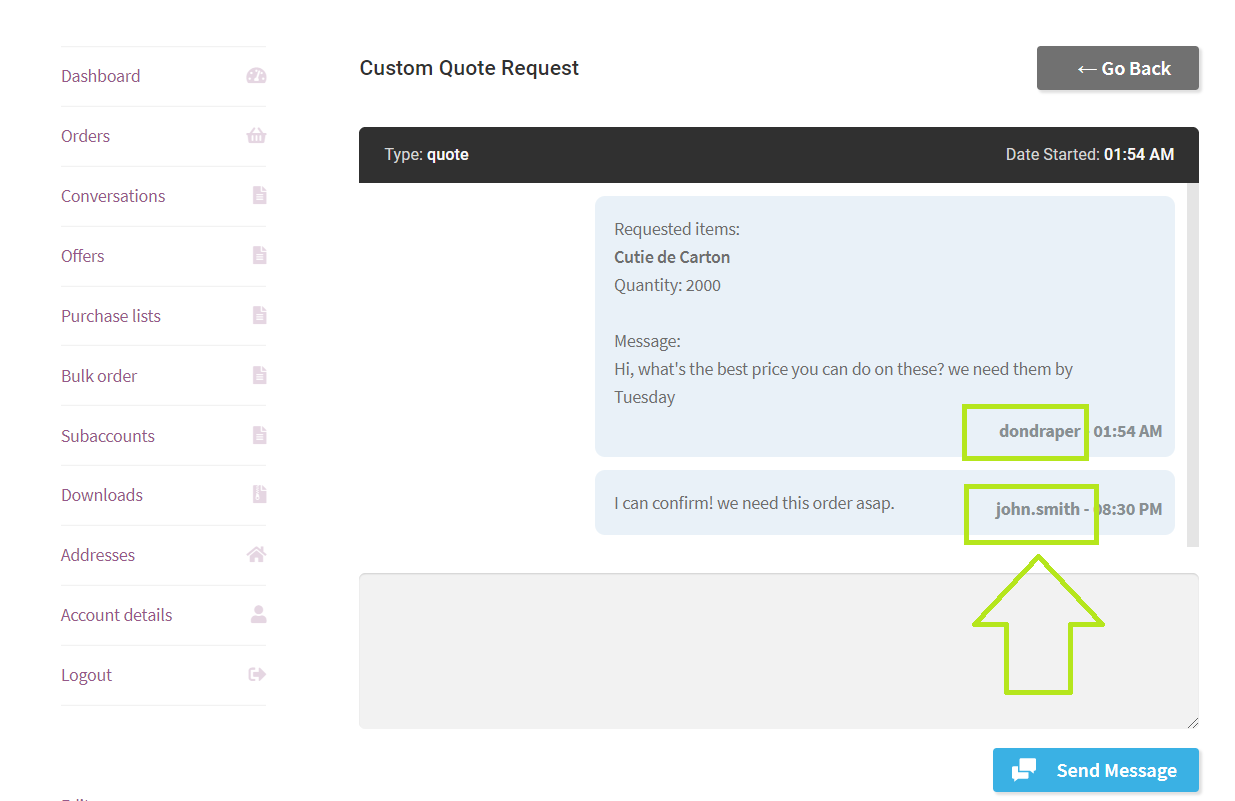
B2BKing can replace the normal cart process with a quote system for selected customers or groups. You can also enable quotes for specific products instead of the whole store.
The customer adds products to a quote request and submits the form. From there, the request can become a conversation between you and the buyer. You can negotiate the price and then send an offer the customer can purchase through the store.
That gives you the flexibility of email negotiation without moving the entire process outside WooCommerce.
Create Custom Offers for Individual Customers
Some customers simply have different deals. Maybe one distributor buys 1,000 units each month and has negotiated a special price. Instead of changing your public pricing, B2BKing lets you create offers for particular users or groups.
For example:
500 units of Product A
Normal wholesale price: $10 each
Negotiated price: $8.75 each
Offers can appear inside the customer’s account and can be added to the cart for purchase. This is helpful when sales teams regularly negotiate larger orders.
Set Different Payment Methods for Wholesale Buyers
Retail buyers usually pay immediately. Wholesale customers may have very different arrangements.
For example:
Retail
- Credit/debit card
- PayPal
Wholesale
- Bank transfer
- Invoice
- Purchase order
B2BKing allows payment methods to be enabled or disabled for specific customers or groups. The premium feature set also includes invoice and purchase-order payment gateways. So a normal shopper can still pay by card, while an approved distributor gets access to the payment options agreed with your business.
That is a much cleaner setup than manually correcting orders after checkout.
Configure Wholesale Shipping Rules
Shipping can also change by customer type. A retail customer might use standard courier delivery, while a distributor needs freight shipping.
You could also offer:
Free shipping for wholesalers above $2,000
or:
Freight delivery only for Distributor accounts
B2BKing allows shipping methods to be controlled by user or group and supports condition-based free-shipping rules. This matters because a good WooCommerce B2B plugin should control the full buying process, not just the price displayed on the product page.
Configure VAT and Tax Rules
Tax rules vary by business and country, so do not copy someone else’s setup without checking your own requirements. From the plugin side, B2BKing provides tools for tax exemptions, displaying prices including or excluding tax, VAT handling, custom tax rules, and EU VIES validation.
For example, you might show:
B2C: Prices including tax
B2B: Prices excluding tax
Or a validated business account may qualify for a different tax treatment depending on the rules that apply to the transaction. The plugin can handle the store logic, but your accountant or tax adviser should still determine which rules your business should actually use.
Let One Company Have Multiple Buyers
This is easy to overlook when building a WooCommerce B2B setup. Your customer may be one company, but that company can have several employees placing orders.
For example:
ABC Construction Ltd
- Purchasing Manager
- Finance Manager
- Site Manager
B2BKing subaccounts allow multiple users to work under one company account. Permissions can control whether a subaccount can place orders, view orders, access conversations, and perform other account actions. Orders can also show which user actually placed them.
This is much better than five employees sharing one password.
B2BKing Free vs Premium
You do not necessarily need the paid version on day one.
The free WooCommerce B2B plugin includes useful basics such as separate wholesale prices, B2B customer groups, group-based payment and shipping methods, percentage discounts, account approval notifications, customer management, and B2B/B2C reporting.
B2BKing Premium is aimed at stores that need a more complete wholesale workflow.
| Feature | Free | Premium |
| Basic wholesale pricing | ✓ | ✓ |
| B2B customer groups | ✓ | ✓ |
| Group discounts | ✓ | ✓ |
| Payment/shipping controls | ✓ | ✓ |
| Customer CRM area | ✓ | ✓ |
| Advanced B2B registration | ✓ | |
| Tiered pricing | ✓ | |
| Customer-specific price lists | ✓ | |
| Bulk order form | ✓ | |
| Quote requests | ✓ | |
| Purchase lists | ✓ | |
| Subaccounts | ✓ | |
| Advanced tax/VAT tools | ✓ | |
| Custom offers | ✓ |
At the time of writing, B2BKing lists a Startup plan for one site at $199 for the first year, a Pro plan for three sites at $299 for the first year, and a Developer plan for unlimited sites at $449 for the first year. Renewal rates are higher, and lifetime licences are also available. Pricing can change, so check the current official pricing before purchasing.
24. Test Your WooCommerce B2B Setup Before Launch
Do not test only while logged in as an administrator. Create a completely separate test wholesale account and go through the store like a real customer.
Test this full journey:
Register → Wait for approval → Approve account → Log in → Check wholesale price → Check private products → Add bulk quantity → Test minimum order → Request quote → Check payment method → Check shipping → Place order
Then log out and check the retail store again. If you use multiple groups, repeat the test for each major group.
A Distributor account seeing Wholesale pricing is the kind of small setup error that can become an expensive one very quickly.
Final Thoughts
A good WooCommerce B2B plugin should make buying easier for your customers and reduce the manual work for your team. With B2BKing, you can handle registration, approval, customer groups, wholesale pricing, quantity rules, bulk orders, quotes, payment methods, shipping, and other B2B requirements inside WooCommerce.
If you want the setup done for you, or your store needs something beyond the standard plugin options, TeknoFlair can help with the complete setup, while custom WooCommerce development can cover unique pricing rules, integrations, checkout logic, or other business-specific requirements.
If your wholesale process does not fit neatly into standard plugin settings, a more customized setup may be the better option.
FAQs
Can WooCommerce be used for B2B wholesale?
Yes. WooCommerce can handle the ecommerce side of the store, while a WooCommerce B2B plugin adds wholesale-specific features such as customer groups, trade pricing, bulk ordering, quantity rules, and account approval.
Can I run retail and wholesale on the same WooCommerce store?
Yes. You can use a hybrid B2B+B2C setup where retail visitors keep the normal shopping experience while approved business customers receive their own wholesale conditions.
Can different B2B customers see different prices?
Yes. You can create different pricing for customer groups and, where needed, individual customers.
Can I hide wholesale pricing from visitors?
Yes. You can require customers to log in before they see trade pricing or restrict certain products to approved accounts.
Can wholesale customers request quotes?
Yes. Quote workflows are useful when the final price depends on quantity, shipping, customisation, or negotiated terms.
Can wholesale buyers order by SKU?
Yes. The bulk order form allows buyers to search by SKU or product name instead of opening products individually.
