









You could be losing thousands $$$ every year on your LMS without even realising it.
Platforms like Kajabi and Teachable make it easy to get started. You launch your course, start selling, and everything feels simple at first. But as your business grows, the real cost starts to show.
You pay high monthly subscription fees just to keep your platform running. On lower plans, transaction fees quietly take a cut from every sale. And when you need better marketing or automation, you end up paying for extra tools on top. This “integration cost” adds up quickly.
What looked like a simple setup turns into an expensive system that eats into your margins. Another problem is that you rely on a platform that decides how your system works, what you can customise, and how much you need to pay as you scale.
For many creators, this becomes a problem early. You pay for features you don’t fully use, and your LMS starts feeling like expensive overkill instead of a growth tool.
There is another approach that many growing training businesses are now choosing. Instead of paying more every month, they scale their training platform without losing control of their revenue.
In this guide, you will see why SaaS LMS platforms reduce your margins over time, how LearnDash changes that, and what a practical LearnDash migration roadmap looks like in 2026.
Why SaaS LMS Platforms Hurt Margins
At a glance, most SaaS LMS platforms look similar. They promise easy setup, built-in tools, and a smooth way to sell your courses. But the real difference shows when you start using them at scale.
Costs increase, features become limited, and you end up paying more just to maintain basic functionality. What seemed simple at the start slowly becomes expensive and restrictive.
To understand this better, let’s break down two of the most popular platforms and see what you are actually paying for.
Why Kajabi Isn’t Built for Most Creators
A Premium Platform With a Premium Price
Let’s start with Kajabi.
Think of Kajabi as a premium, all-in-one system. It looks polished, everything is built in, and it works smoothly. But just like any premium system, you pay for that convenience.
Kajabi starts at around $143 per month, but that entry plan is very limited. You get:
- 5 product
- Limited contacts
- Basic support during business hours only
If something breaks during a weekend launch, you wait. That delay alone can cost you sales.
Pricing Scales Fast as You Grow
Now, if you want proper features like automation, better support, and more flexibility, you move up quickly:
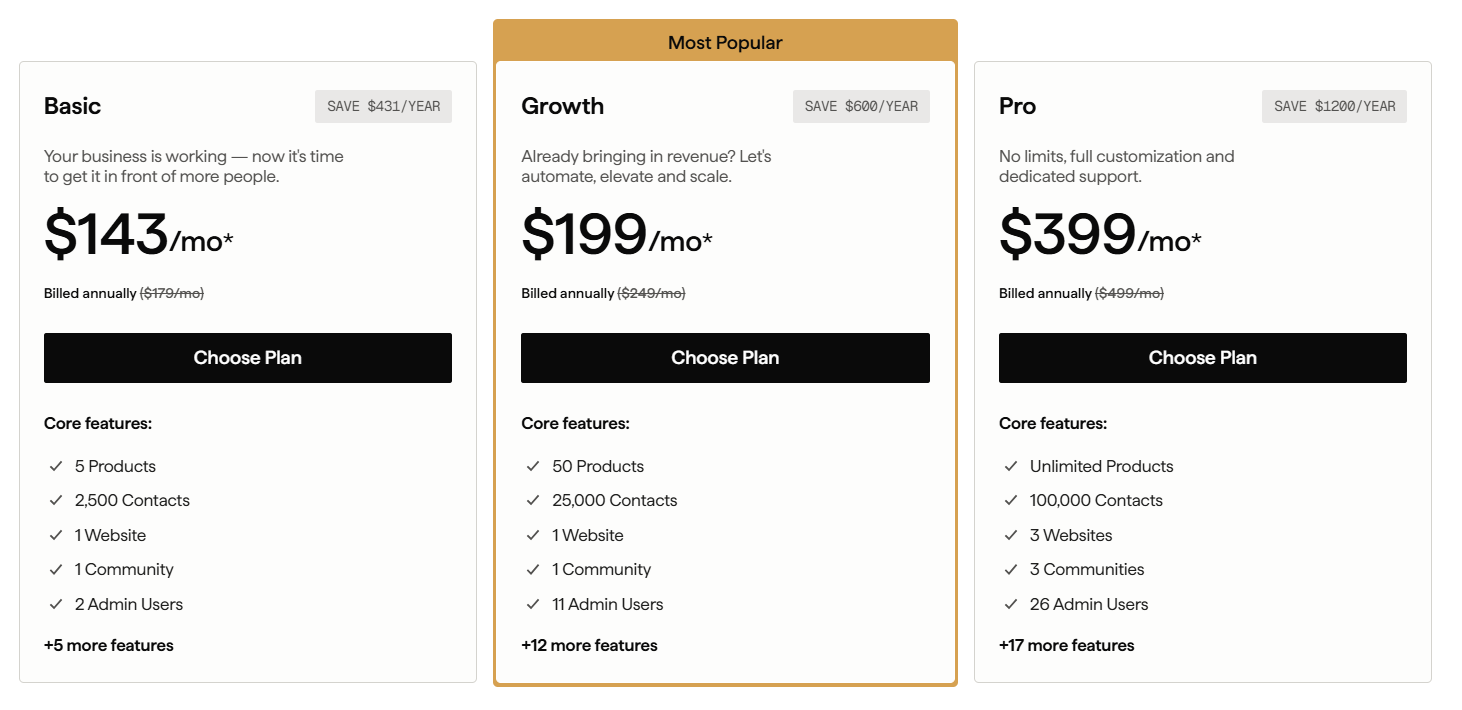
- Growth plan: around $199/month
- Pro plan: around $399/month
That’s $2,000 to $5,000 per year just to run your platform.
What Kajabi Actually Does Well
To be fair, Kajabi does deliver value. You get:
- Built-in funnels
- Email marketing
- Course delivery
- Website builder
- No transaction fees on paid plans
For high-ticket creators selling $1,000+ programs, this can work well. You set it up once, and it runs like a system on autopilot.
How Teachable Quietly Drains Your Revenue
Looks Affordable at First
Now let’s talk about Teachable.
At first glance, Teachable looks like the smart choice.
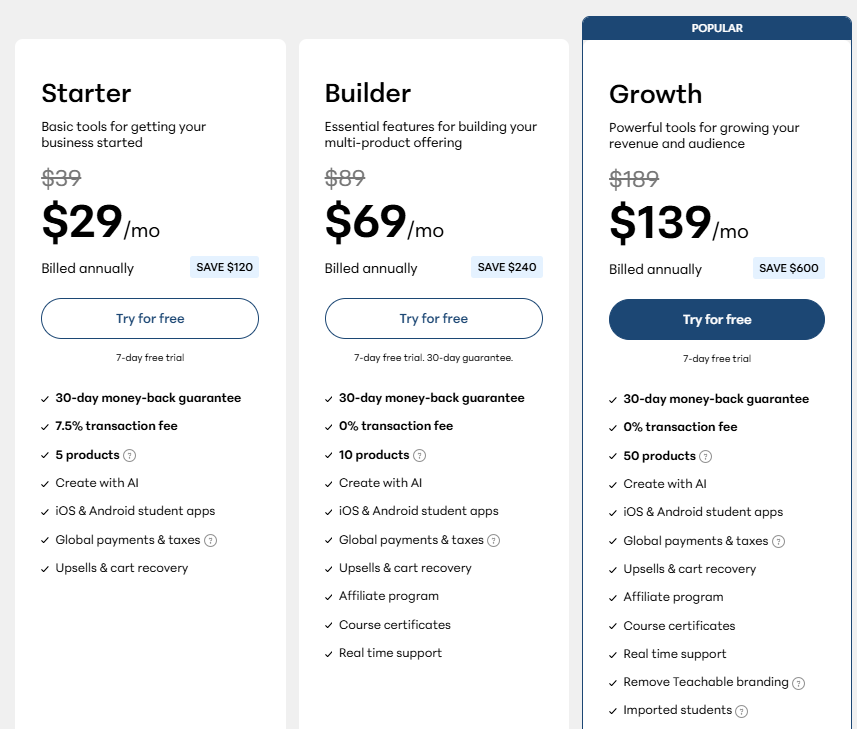
The entry plan starts at around $29 per month. Compared to Kajabi, it feels affordable.
The Hidden Cost: Transaction Fees
But this is where most people get it wrong.
That $29 plan comes with a 7.5% transaction fee on every sale
Let’s break that down.
- You sell a course for $100 → Teachable takes $7.50
- You make $10,000 in a month → Teachable takes $750
Add the subscription:
You are paying $789 for that month
What You Actually Pay Over Time
Over a year, that’s easily: $9,000+ lost in fees
Even at lower revenue:
$5,000/month = ~$450 in fees
Around $6,000 per year
So the “cheap” platform becomes expensive as soon as you start growing.
Feature Limitations on Lower Plans
And that’s not the only issue.
On the starter plan, you get:
- Only 1 published product
- No live chat support
- No certificates
- Limited features
You Pay More to Unlock Basic Features
To remove transaction fees or unlock basic functionality, you need to upgrade:
- Builder plan: $69/month
- Growth plan: $139/month
Now you are paying close to Kajabi pricing, but still getting fewer features and limited customization. Even branding control is restricted unless you move to higher plans.
And many users report that support is not always reliable, especially on lower tiers.
Where Teachable Still Works
To be fair, Teachable is simple.
- Easy to use
- Beginner-friendly
- Quick to launch
If you just want to test an idea, it works.
Why LearnDash Is a Smarter Long-Term Option
You don’t have to keep paying high monthly fees or lose a percentage of every sale.
LearnDash works on WordPress and gives you full ownership. You build your courses, manage your users, and run your business without platform limits.
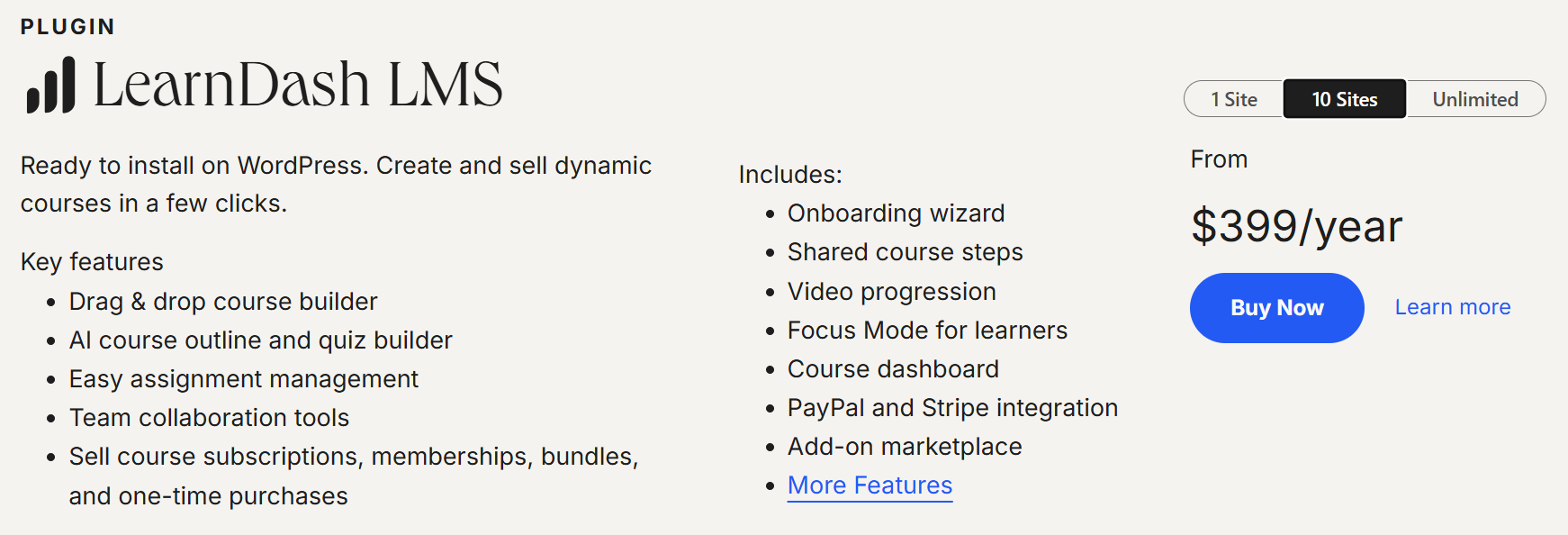
From a powerful drag-and-drop course builder to AI-assisted quizzes, built-in payments with PayPal and Stripe, and flexible course selling options like subscriptions or bundles, everything is designed to help you scale without extra cost layers.
With this LearDash Pricing. You also get:
- Complete control over your course structure and pricing
- Built-in tools for learner progress and engagement
- Integration flexibility without relying on multiple paid tools
- A system that grows with your business, not against it
And the biggest difference? You are not paying every month just to keep your platform running. You invest once, set up your system properly, and keep more of what you earn.
That’s the shift most creators miss and it’s exactly what ends up costing them thousands of dollars every year in platform fees, upgrades, and lost revenue.
Kajabi vs Teachable vs LearnDash (2026 Comparison)
Before you decide which platform makes sense, it helps to see how they compare side by side. Here’s a clear breakdown of Kajabi, Teachable, and LearnDash.
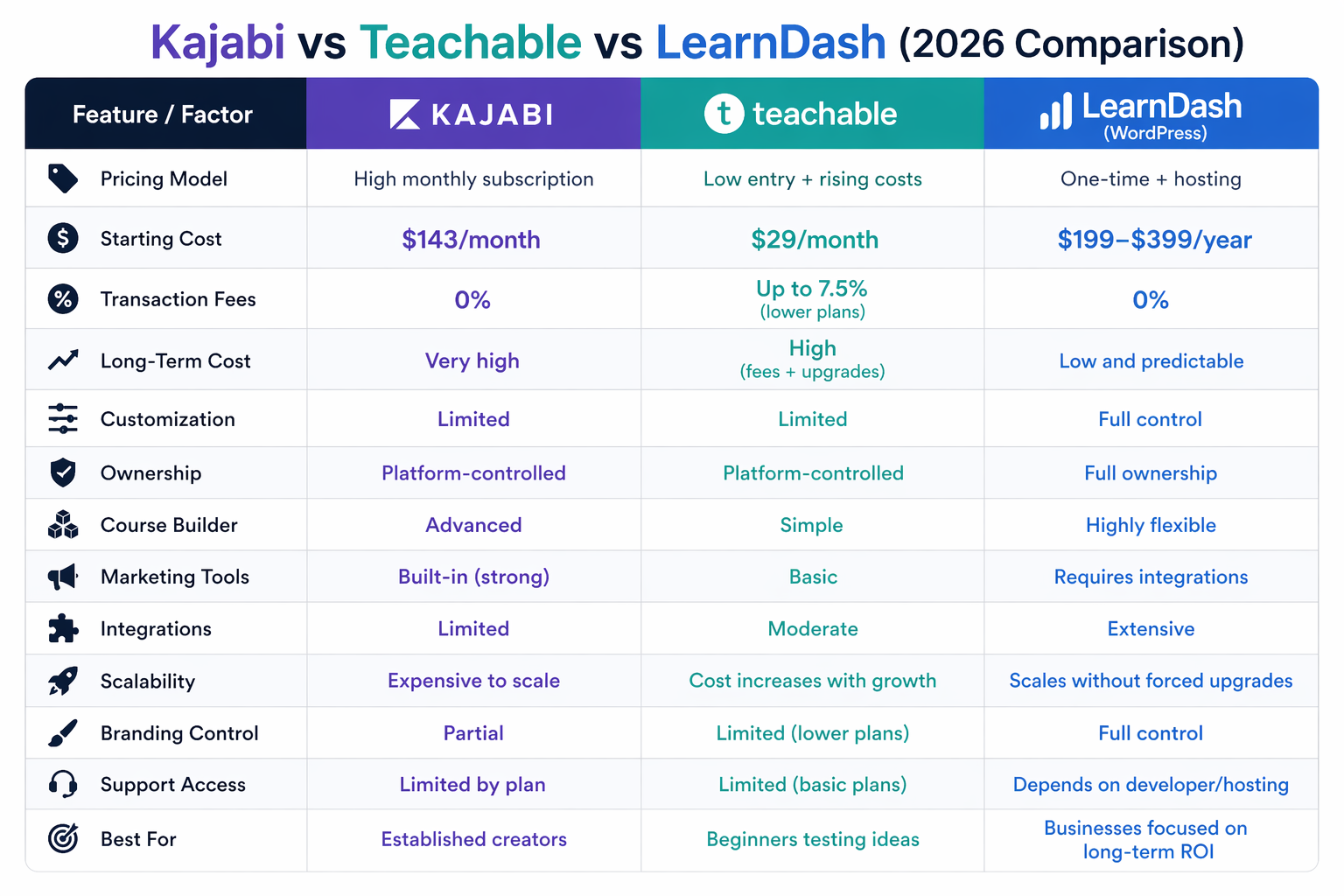
Even though Teachable starts at $29/month, the real cost increases fast due to transaction fees. Kajabi, on the other hand, has no fees but a high fixed cost, which makes LearnDash the most balanced option for long-term growth.
Benefits of Migrating to LearnDash
Switching to LearnDash is not just a technical move. It directly improves how your business runs, how much you earn, and how efficiently you manage your training.
1) Keep More of Your Revenue
With SaaS platforms, you either pay high monthly fees or lose a percentage of every sale.
After the LearnDash migration:
- No transaction fees on your sales
- No forced upgrades to unlock basic features
If you are generating $5,000–$10,000 per month, this alone can save you $3,000 to $9,000+ per year.
That is money you can reinvest into marketing, content, or growth.
2) Lower Long-Term Costs
Instead of paying $200 to $500 every month, your costs become more predictable.
With LearnDash:
- You pay for hosting and setup
- You avoid ongoing platform dependency
Over time, your LMS becomes an asset, not a recurring expense.
3) Full Control Over Your LMS
You are no longer limited by platform rules.
After the LearnDash migration, you can:
- Customize features based on your workflow
- Control user roles, access, and structure
- Adjust your system without upgrading plans
This gives you flexibility that SaaS platforms cannot offer.
4) Scalability Without Cost Pressure
As your LMS grows, your platform should support it, not charge you more for it.
With LearnDash:
- You can handle more users without forced upgrades
- You can expand features without changing plans
Your system grows with your business, not against it.
5) Long-Term Flexibility and Ownership
You are not locked into a single platform.
- You control your data
- You decide how your system evolves
- You are free from sudden pricing changes
This gives you long-term stability and peace of mind.
The 2026 LearnDash Migration Roadmap
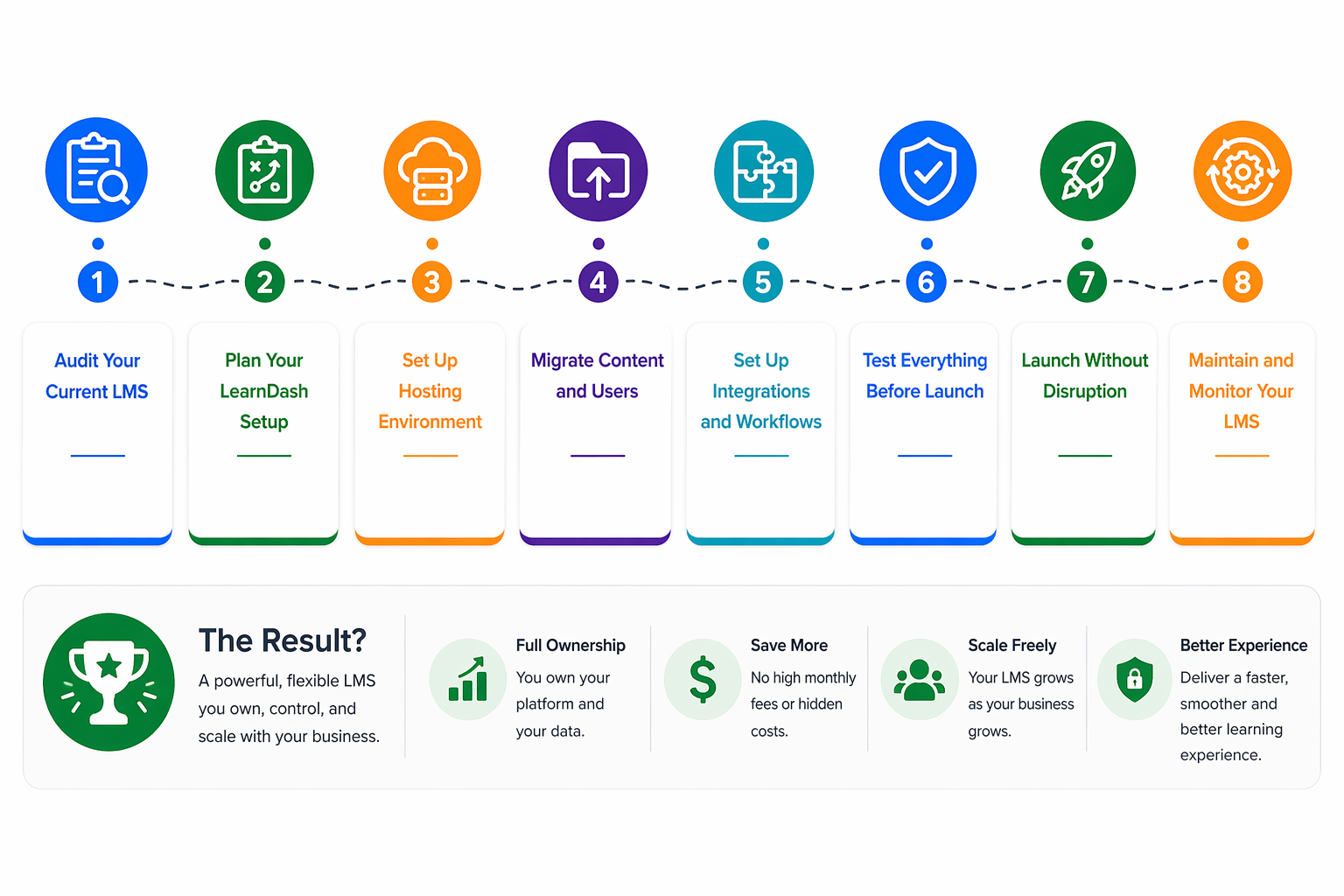
LearnDash Migration from Kajabi/Teachable may sound complex, but with the right process, it becomes simple and controlled.
The key is to move step by step without breaking your existing system or affecting your users.
Step 1: Audit Your Current LMS
Start by reviewing what you already have:
- Courses and content structure
- Number of users and data
- Integrations and tools in use
- Payment and access workflows
This helps you understand what needs to be migrated and what can be improved.
Step 2: Plan Your LearnDash Setup
Before moving anything, define how your new LMS should work.
- Course structure and hierarchy
- User roles and permissions
- Automation and workflows
- Reporting and tracking needs
This is where you fix the limitations of your current platform instead of carrying them forward.
Step 3: Choose Reliable Hosting for Performance
Your LMS performance depends heavily on hosting.
You should:
- Choose managed hosting like Cloudways or SiteGround
- Ensure fast loading and stable uptime
- Support growing users without slowing down
A strong hosting setup keeps your LMS fast, secure, and scalable.
Step 4: Migrate Content and Users Safely
Now comes the most sensitive part.
- Courses, lessons, and media are transferred
- User data and enrollments are mapped correctly
- Access and progress are maintained
A structured LearnDash migration ensures you don’t lose data or disrupt your learners.
Step 5: Build a Flexible System with Integrations
Instead of being locked into one system, you can build your setup using the tools that fit your business.
You can:
- Set up email automation using tools like FluentCRM or other integrations
- Connect CRM and payment systems through plugins or Zapier
- Build custom workflows based on your business needs
- Improve reporting with dedicated analytics and reporting tools
Instead of patching tools together inside a closed system, you create a connected setup that works the way you want.
Step 6: Test Everything Before Launch
Before going live, the system is tested end to end:
- User login and access
- Course navigation and progress
- Payments and enrollments
- Automation and notifications
This prevents issues after launch.
Step 7: Launch Without Disruption
Once everything is ready, you move users to the new system smoothly. Your learners continue without confusion, and your business keeps running without downtime.
Step 8: Maintain and Monitor Your LMS
Launching is not the end. Ongoing maintenance keeps everything running smoothly.
You should:
- Keep WordPress, LearnDash, and plugins updated
- Monitor performance and fix issues early
- Regularly back up your data
- Improve features as your LMS grows
This helps you avoid downtime, security risks, and performance issues.
Make the Switch Without the Risk
Migration is where most creators hesitate. Not because it’s impossible, but because doing it wrong can affect your users, your data, and your revenue. That’s why working with experienced LearnDash experts matters.
At TeknoFlair, we handle the complete LearnDash migration process:
- Full LMS audit and planning
- Secure data and course migration
- Custom LearnDash development
- Integration setup and optimization
- Ongoing support after launch
If you are planning to switch or already feeling limited by your current platform, this is the right time to move.
Hire LearnDash developer support from TeknoFlair and build a system that gives you control, flexibility, and better margins.
Choosing the Right Platform for Your Business
Kajabi is the premium choice. It works well if you are already generating consistent revenue, but for most creators, it is expensive and often more than needed.
Teachable looks affordable, but transaction fees and feature limits increase your costs as you grow. What starts cheap becomes expensive over time.
LearnDash migration gives you a better long-term approach. You keep more of your revenue, control your system, and scale without rising platform costs.
Choose a platform that protects your margins, not one that reduces them.
Read More:
What Are the Best Options for Marketing Automation for Your LearnDash Course?
Scaling LearnDash to 1,000+ Users: Enterprise WordPress LMS Architecture
