







Modern shoppers expect the same smooth buying experience they get from major eCommerce brands. However, many WooCommerce stores still rely on buying journeys filled with unnecessary steps, slow cart interactions, and checkout friction.
When the process feels interrupted, customers often leave before completing their purchase. This is why more businesses are improving the WooCommerce buying process with tools like Fast Cart and CheckoutWC. Together, they help create a faster shopping experience from product discovery to payment.
Why a Faster Buying Process Leads to More Sales
Modern shoppers make decisions quickly. If the process feels slow or confusing, many customers simply leave and purchase elsewhere.
This problem becomes even more serious on mobile devices, where attention spans are shorter. Navigation friction feels more noticeable.
Research from Baymard Institute regularly shows that cart abandonment rates remain extremely high across e-commerce stores. One of the biggest reasons customers abandon checkout is unnecessary friction during the buying process.
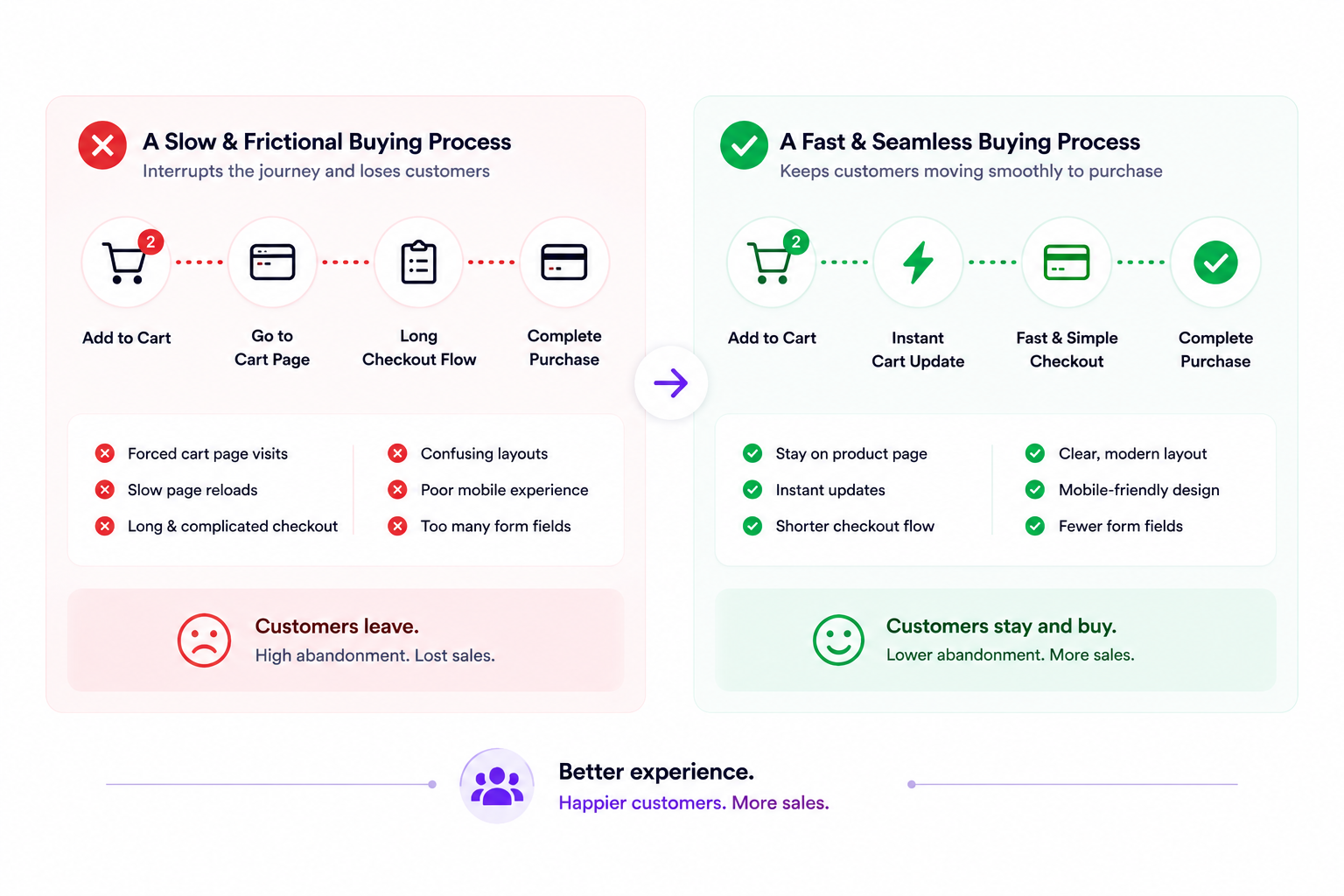
Some common problems include:
- Forced cart page visits
- Slow page reloads
- Long checkout flows
- Confusing checkout layouts
- Poor mobile checkout experiences
- Too many form fields
These interruptions reduce buying momentum much faster than many businesses expect. This is why WooCommerce checkout optimization has become a major focus for stores trying to improve conversions and recurring purchases.
Businesses improving their WooCommerce checkout UX often notice:
- Lower abandonment rates
- Stronger mobile conversions
- Smoother customer journeys
- Improved average order value
- Faster checkout completion
To create a smoother path from product discovery to purchase, many WooCommerce stores are now improving the cart experience itself.
What Is Fast Cart for WooCommerce?
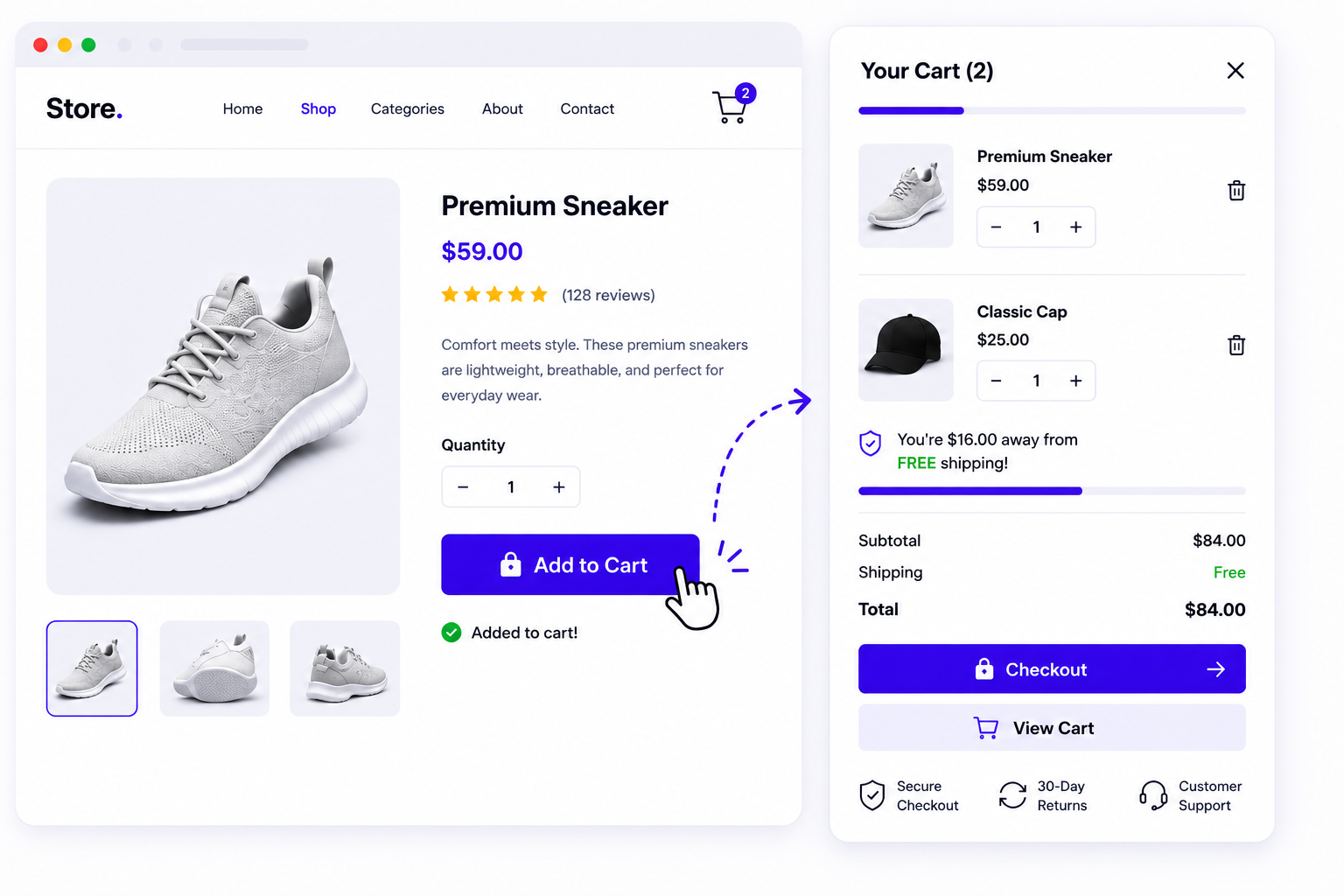
WooCommerce Fast Cart by Barn2 is a plugin designed to simplify the WooCommerce buying process by bringing both the cart and checkout into a single pop-up experience.
Instead of sending customers through separate cart and checkout pages, Fast Cart allows shoppers to review their order, update quantities, and complete checkout directly from a pop-up window without leaving the page they are viewing.
Fast Cart is especially useful for:
- Fashion stores
- Beauty brands
- Electronics stores
- Food and beverage websites
- Subscription product businesses
- Mobile-first WooCommerce stores
If your goal is to create a faster purchase journey without redirecting customers through multiple WooCommerce pages, you can explore the WooCommerce Fast Cart Plugin here to improve the buying experience.
How Fast Cart Improves the WooCommerce Buying Process
One of the biggest reasons customers abandon their purchase journey is unnecessary navigation between multiple pages.
With the default WooCommerce setup, shoppers often move through separate product, cart, and checkout pages before completing an order. Each additional step creates another opportunity for distraction or abandonment.
Fast Cart simplifies this process by keeping customers closer to the point of purchase.
Instead of moving through multiple pages, customers can:
- View their cart instantly
- Update products without page reloads
- Access checkout directly from the popup
- Complete purchases with fewer clicks
This creates a smoother buying experience and helps maintain momentum throughout the purchase journey.
For example, a customer shopping for clothing can add products, review their cart, and proceed to checkout without leaving the collection page they are browsing. The entire process feels faster and more convenient, especially on mobile devices.
Here is a simple comparison:
| Default WooCommerce Experience | Fast Cart Experience |
| Product page → Cart page → Checkout page | Product page → Popup cart → Popup checkout |
| Multiple page loads | Fewer page loads |
| More navigation steps | Faster purchase journey |
| More opportunities for drop-offs | Smoother path to checkout |
| Separate cart and checkout experience | Cart and checkout in one flow |
| Can feel slower on mobile devices | Mobile-friendly buying experience |
Because Fast Cart combines the cart and checkout into a single popup experience, customers spend less time navigating between pages and more time completing their purchase. This makes the buying process feel faster, particularly on mobile devices where every extra click can increase abandonment risk.
What Is CheckoutWC?
CheckoutWC is a WooCommerce checkout optimization plugin designed to create a more conversion-focused checkout experience. The plugin replaces the default WooCommerce checkout layout with a cleaner and more modern design inspired by Shopify-style checkout flows.
Many WooCommerce stores use CheckoutWC because the default checkout often feels outdated, cluttered, or difficult to complete on mobile devices.
CheckoutWC focuses heavily on:
- cleaner checkout layouts
- faster checkout flow
- mobile-first checkout UX
- express payment options
- simplified navigation
- distraction-free checkout design
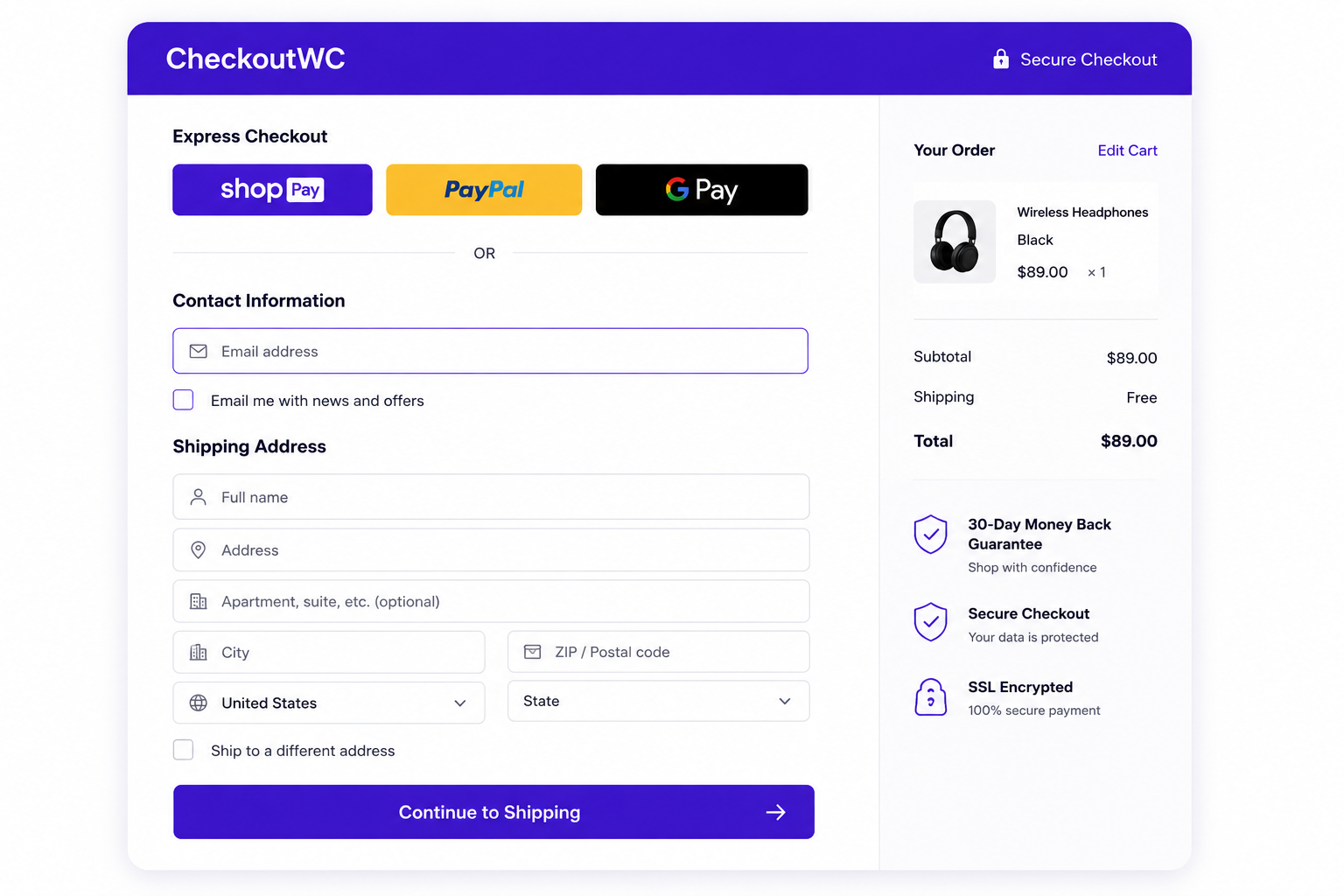
The goal is simple: help customers complete purchases faster with fewer interruptions. This creates a much smoother WooCommerce express checkout experience that feels easier and more trustworthy for customers.
You can explore CheckoutWC here to improve the final step of the buying journey.
CheckoutWC also supports:
- address autocomplete
- one-page checkout
- multi-step checkout
- optimized mobile forms
- express payments
These improvements help reduce checkout friction and improve conversion flow significantly.
How CheckoutWC Reduces Cart Abandonment
CheckoutWC focuses heavily on reducing the friction that usually causes customers to leave before payment.
Many checkout experiences fail because they feel:
- Too long
- Visually overwhelming
- Difficult on mobile
- Distracting
- Confusing to complete
Customers often lose momentum during checkout when they face too many form fields or unnecessary steps. CheckoutWC improves this experience by simplifying the entire buying journey.
The plugin creates a cleaner WooCommerce checkout UX that helps customers move through checkout much faster.
Here is a simple comparison:
| Default WooCommerce Checkout | CheckoutWC Experience |
| Long checkout flow | Simplified checkout |
| Basic WooCommerce design | Modern Shopify-style UX |
| More friction | Faster buying journey |
| Higher abandonment risk | Better conversion flow |
This becomes especially important for stores trying to reduce WooCommerce cart abandonment on mobile devices.
Many businesses notice stronger conversion rates after improving:
- checkout layout
- payment visibility
- mobile usability
- checkout simplicity
Even small checkout improvements can create a major impact on completed purchases.
Why Fast Cart and CheckoutWC Work Better Together
Fast Cart and CheckoutWC improve different stages of the WooCommerce buying process.
Fast Cart simplifies how customers move from product selection to checkout, while CheckoutWC improves the checkout experience itself. Together, they reduce friction across the entire buying journey.
Together, they create a much smoother customer journey from product discovery to payment confirmation.
The process usually looks like this:
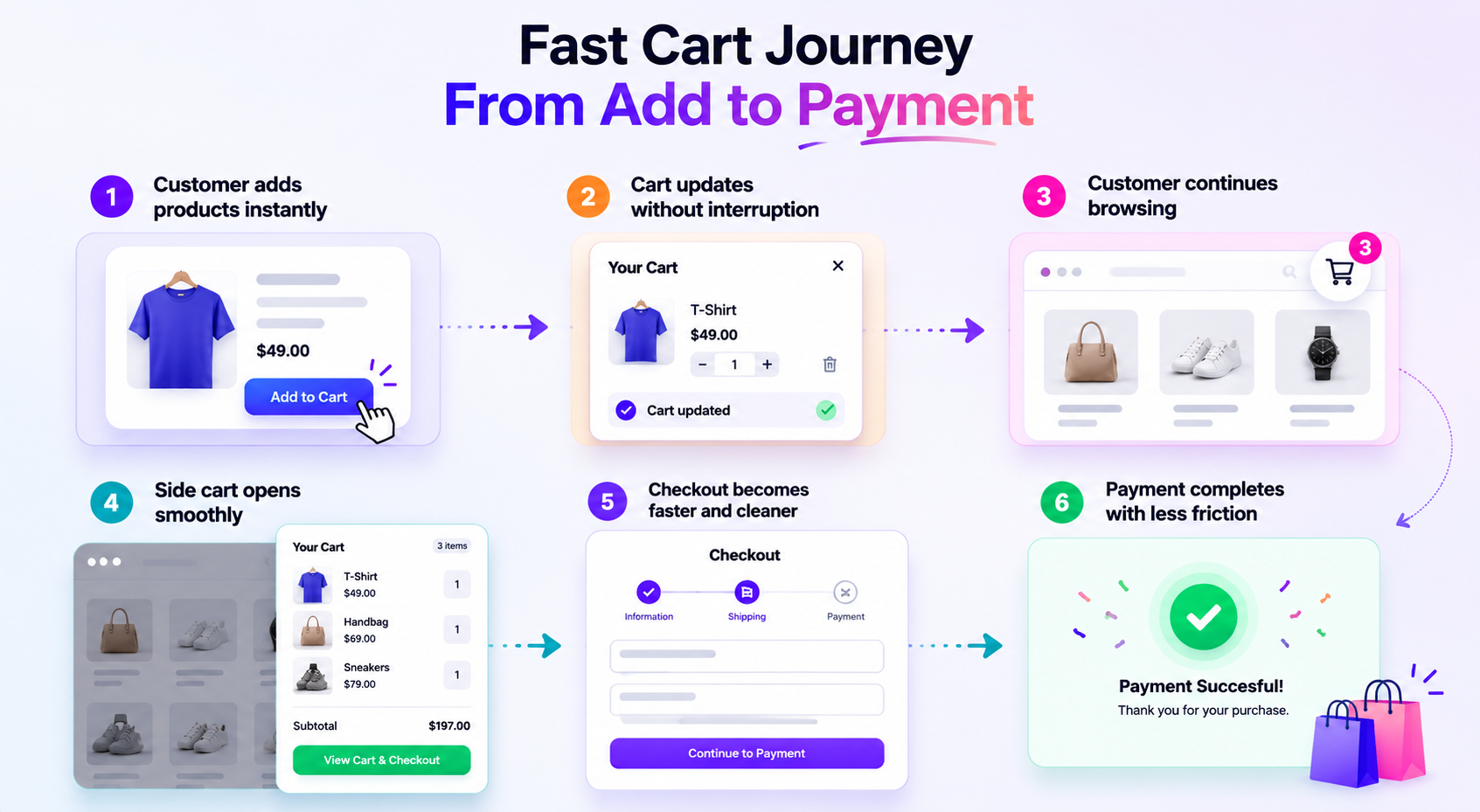
This combination creates a much more modern WooCommerce experience compared to the default setup.
Businesses using both tools often notice:
- faster checkout flow
- lower abandonment rates
- stronger mobile conversions
- smoother user experience
- improved buying momentum
For stores focused on WooCommerce conversion optimization, improving both cart behavior and checkout UX together usually creates much stronger results than optimizing only one stage.
Fast Cart and CheckoutWC vs Default WooCommerce Experience
The difference becomes easier to understand when you compare the entire customer journey instead of looking at individual features. Here is how the default WooCommerce experience compares to a buying process optimized with Fast Cart and CheckoutWC.
| Buying Journey Stage | Default WooCommerce | Fast Cart + CheckoutWC |
| Add to Cart | Redirects or interrupts browsing | Instant popup cart access |
| Cart Review | Separate page required | Review cart in a popup |
| Continue Shopping | Journey interrupted | Shopping continues smoothly |
| Checkout | Standard checkout layout | Popup cart with faster path to checkout |
| Mobile Experience | More friction | Faster and cleaner |
| Purchase Completion | More drop-off opportunities | Smoother path to purchase |
This is why many WooCommerce businesses are combining Fast Cart and CheckoutWC instead of optimizing only one stage of the buying journey. Together, they create a more seamless experience from product discovery to payment completion.
Real WooCommerce Buying Process Improvements Businesses Notice
Businesses improving the WooCommerce buying process often notice measurable changes in customer behavior.
Some common improvements include:
- faster checkout completion
- fewer abandoned carts
- smoother mobile shopping
- stronger conversion rates
- improved customer experience
For example, many stores notice customers browsing more products after adding items to the side cart because the shopping journey feels less interrupted. Others notice stronger mobile conversions because checkout feels easier to complete on smaller screens.
This is why many businesses now treat WooCommerce checkout optimization as a conversion strategy instead of simply a design improvement.
When WooCommerce Stores Usually Need Checkout Optimization
Many businesses start improving their WooCommerce buying process after noticing:
- Abandoned carts increasing
- Mobile conversions dropping
- Slower checkout completion
- Customer frustration
- Outdated checkout experiences
These problems usually become more visible as traffic and product catalogs grow.
At TeknoFlair, businesses often reach out after realizing that their WooCommerce checkout experience is creating unnecessary friction during the buying journey. In many cases, improving conversions requires more than visual design changes. Stores often need faster cart behavior, smoother checkout UX, mobile optimization, and conversion-focused buying flows that help customers complete purchases more easily.
If you are planning to improve your WooCommerce buying process, checkout experience, or mobile conversion flow, you can explore our WooCommerce optimization services to create a smoother and more conversion-focused customer journey.
Final Thoughts
The WooCommerce buying process plays a major role in how customers interact with your store.
Even small friction points around cart behavior, checkout flow, mobile usability, or navigation can interrupt buying momentum and reduce conversions much faster than many businesses expect.
This is why more WooCommerce stores are now focusing on:
- faster checkout experiences
- smoother cart interactions
- mobile-friendly buying journeys
- conversion-focused checkout UX
WooCommerce Fast Cart and CheckoutWC improve different parts of the buying journey. Fast Cart helps reduce friction around the cart experience, while CheckoutWC improves the checkout experience itself.
For stores trying to reduce cart abandonment and improve conversions, optimizing the WooCommerce buying process has become much more important than ever.
FAQs
What is Fast Cart for WooCommerce?
WooCommerce Fast Cart by Barn2 combines a popup cart and popup checkout experience, allowing customers to review their order and move toward payment without navigating through multiple WooCommerce pages.
Is CheckoutWC worth it for WooCommerce stores?
Yes. CheckoutWC helps improve WooCommerce checkout UX by creating a cleaner and more conversion-focused checkout experience.
How do I speed up WooCommerce checkout?
You can speed up WooCommerce checkout by reducing checkout friction, simplifying forms, improving mobile usability, and using plugins like CheckoutWC.
Does CheckoutWC reduce cart abandonment?
CheckoutWC helps reduce WooCommerce cart abandonment by creating a faster and easier checkout experience with fewer interruptions.
What is the best WooCommerce side cart plugin?
WooCommerce Fast Cart by Barn2 is a popular option because it combines popup cart and popup checkout functionality into a single streamlined buying experience.
How can I improve WooCommerce mobile checkout?
You can improve WooCommerce mobile checkout by simplifying forms, reducing checkout steps, improving page speed, and optimizing navigation for smaller screens.
Is a side cart better for WooCommerce conversions?
Yes. A WooCommerce side cart usually creates a smoother shopping flow because customers can continue browsing without unnecessary interruptions.
Can TeknoFlair optimize my WooCommerce checkout?
Yes. TeknoFlair helps businesses improve WooCommerce checkout UX, conversion optimization, mobile checkout flow, and overall buying experience.
READ MORE:
Stop the Revenue Leak: 5 WooCommerce Checkout Optimizations to Recover 25% of Abandoned Carts Today
Maximize Sales with Gamification for WooCommerce: Does It Really Work
