










How many customers add products to your store and never complete the purchase?
If you’re running a WooCommerce store, this isn’t just happening occasionally. It’s happening every single day, and the impact is bigger than most store owners realize.
On average, nearly 70% of online shoppers abandon their carts before completing checkout. That means for every 10 potential buyers, only 3 actually convert. The rest leave, often due to small and fixable issues in your checkout process.
A high volume of visitors means little if they drop off at the final step. The gap between add to cart and completed purchase is where most revenue is lost.
You don’t need to spend more on ads to grow your revenue. Improving your checkout experience can unlock sales that are already within reach.
With the right WooCommerce checkout optimization strategies, you can recover a significant portion of those lost sales, sometimes up to 20 to 25%, without increasing your ad spend.
Let’s break down exactly where you’re losing revenue and how to fix it.
Why Customers Abandon Checkout?
Cart abandonment is rarely a sudden decision. It builds up through small moments of friction that make the checkout feel harder than it should be.
The data highlights exactly where things go wrong:
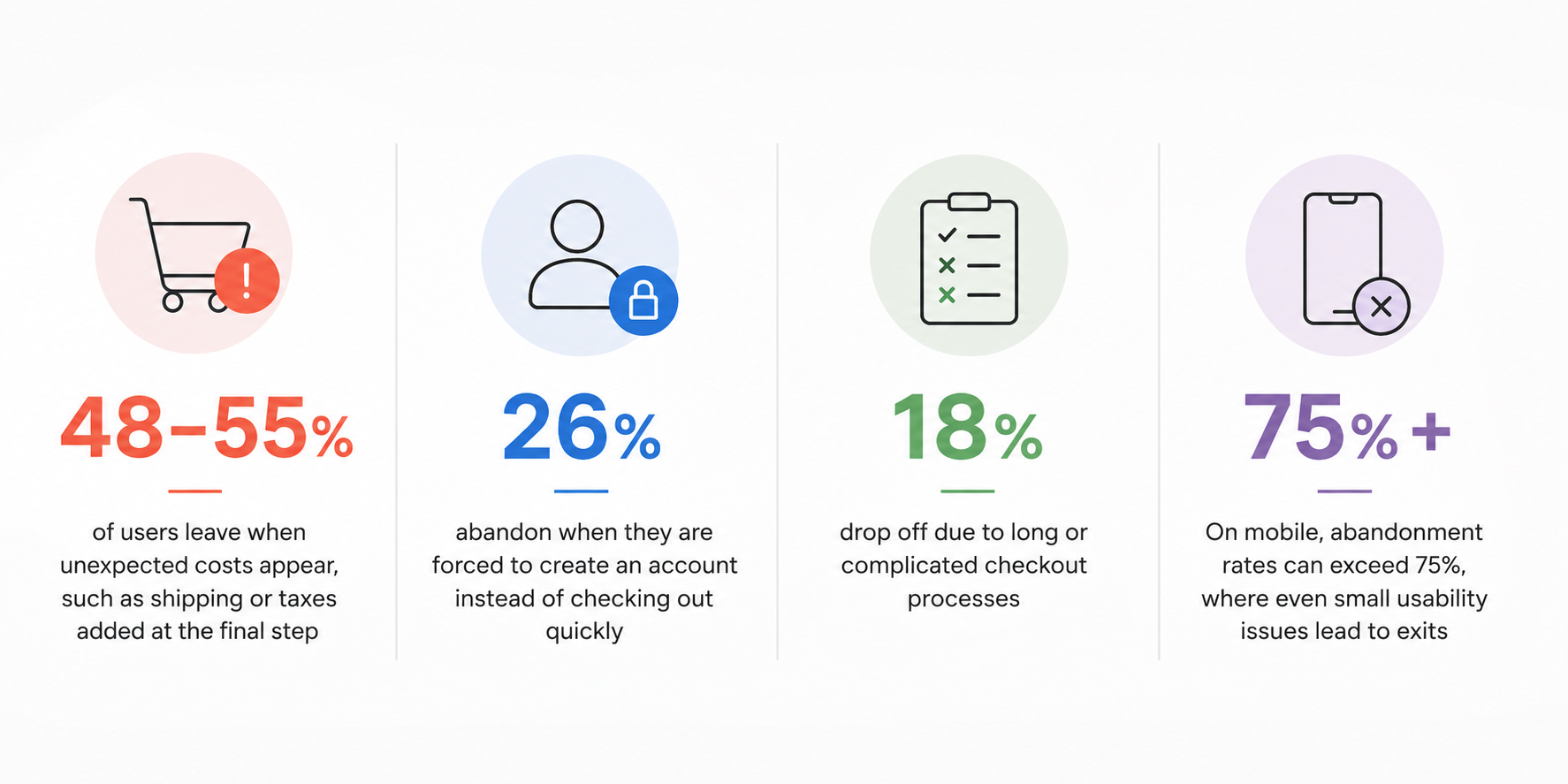
These numbers point to a clear pattern. However, Most users are not leaving because they changed their mind about the product. They leave because the experience becomes frustrating. At this point, the process no longer feels simple or worth the effort.
Common friction points that push users away include:
- Long or confusing forms with unnecessary fields
- Slow loading pages, especially on mobile
- Limited payment options that do not match user preference
- Lack of trust signals like security badges or clear policies
- No clear delivery timeline, creating uncertainty
- Coupon code fields that distract users into leaving to find discounts
- Form errors that are unclear or difficult to fix
- Poor mobile layout with small buttons or hard-to-read fields
Each issue may seem small on its own. Together, they create hesitation. Every extra step increases effort, every delay creates doubt and every unclear detail gives users a reason to leave.
Users rarely think through this consciously. They simply feel that the checkout is taking too long or asking too much, and they exit. Now let’s fix that.
1. Simplify Your WooCommerce Checkout Process
A complicated checkout slows users down. The more effort it takes, the more likely they are to leave before completing the purchase.
Many WooCommerce stores lose conversions simply because they ask for too much information.
Think about it. Does every order really need fields like “Company Name” or “Address Line 2”? In most cases, those fields only add friction.
A shorter, cleaner checkout keeps users focused and reduces hesitation.
What to Fix
- Enable guest checkout so users can buy without creating an account
- Remove unnecessary fields and keep only essential information
- Use autofill and address suggestions to speed up form completion
- Switch to a one page checkout to reduce steps and clicks
A practical benchmark is keeping your checkout within 6 to 8 fields. Anything beyond that starts increasing drop off risk.
For example, one WooCommerce store reduced its checkout fields from 11 to 6. That single change improved completion rates without any redesign or added traffic.
The pattern is clear. Fewer steps make it easier to finish the purchase.
2. Show Total Costs Upfront
Unexpected costs are one of the biggest reasons users abandon checkout. When the final price increases at the last step, it creates frustration and breaks trust.
Users want clarity before they commit. If pricing feels unclear, they hesitate or leave.
What to Fix
- Display shipping costs early on the product or cart page
- Add a shipping calculator before checkout
- Show taxes and additional fees upfront
- Use a progress bar like “Free shipping on orders above X”
For example, when users see they are close to qualifying for free shipping, they are more likely to add another product instead of abandoning the cart.
Clear pricing removes doubt. When users know exactly what they will pay, they are more confident in completing the purchase.
3. Build Trust at Checkout to Reduce Last Minute Drop-offs
When a customer is ready to buy, hesitation often appears at the final step. This usually happens when the store does not feel fully trustworthy or familiar enough to share payment details.
At checkout, users are asking themselves simple questions:
Is this store safe? Will my payment go through securely? What if I need a refund?
If those doubts are not addressed instantly, they leave.
Trust signals help remove that uncertainty and keep users confident enough to complete the purchase.
What to Fix
- Add payment method icons like Visa, Mastercard, and PayPal to show familiar and trusted options
- Display SSL and security badges near the checkout button to reinforce data protection
- Show clear return and refund policy links directly on the checkout page
- Include short customer reviews or ratings near the final step to reinforce credibility
- Display delivery estimates so users know when they will receive their order
You should also use microcopy strategically. Small lines of reassurance can have a big impact at this stage.
For example:
“Secure checkout. Your information is encrypted and protected.”
This reduces hesitation at the exact moment users are deciding whether to proceed or leave.
Trust at checkout is not about design complexity. It is about removing doubt at the right moment
4. Improve Checkout Speed and Mobile Experience
Speed is one of the most underestimated factors in checkout performance. Even a small delay can interrupt user flow and lead to drop-offs.
This becomes even more critical on mobile, where most users are shopping in fast, distracted environments. If your checkout is slow or difficult to use on a phone, you lose a large portion of potential sales.
A slow checkout does not just create inconvenience. It creates uncertainty. Users start questioning whether the process is worth completing.
What to Fix
- Compress images and remove unnecessary visual elements that slow down the page
- Reduce or eliminate unused plugins and scripts that add load time
- Use fast and reliable hosting to ensure consistent performance
- Optimize checkout layout for mobile with large, easy-to-tap buttons
- Make form fields simple, readable, and easy to complete on smaller screens
- Avoid multi step delays that reload or refresh the page unnecessarily
Even a delay of 2 to 3 seconds can noticeably increase abandonment rates. Users rarely wait for slow checkout pages, especially on mobile networks.
A smooth checkout experience should feel instant, simple, and effortless. If users have to wait or struggle to interact with the page, they are far more likely to exit before completing the purchase.
5. Recover Abandoned Carts with Smart Follow-Ups
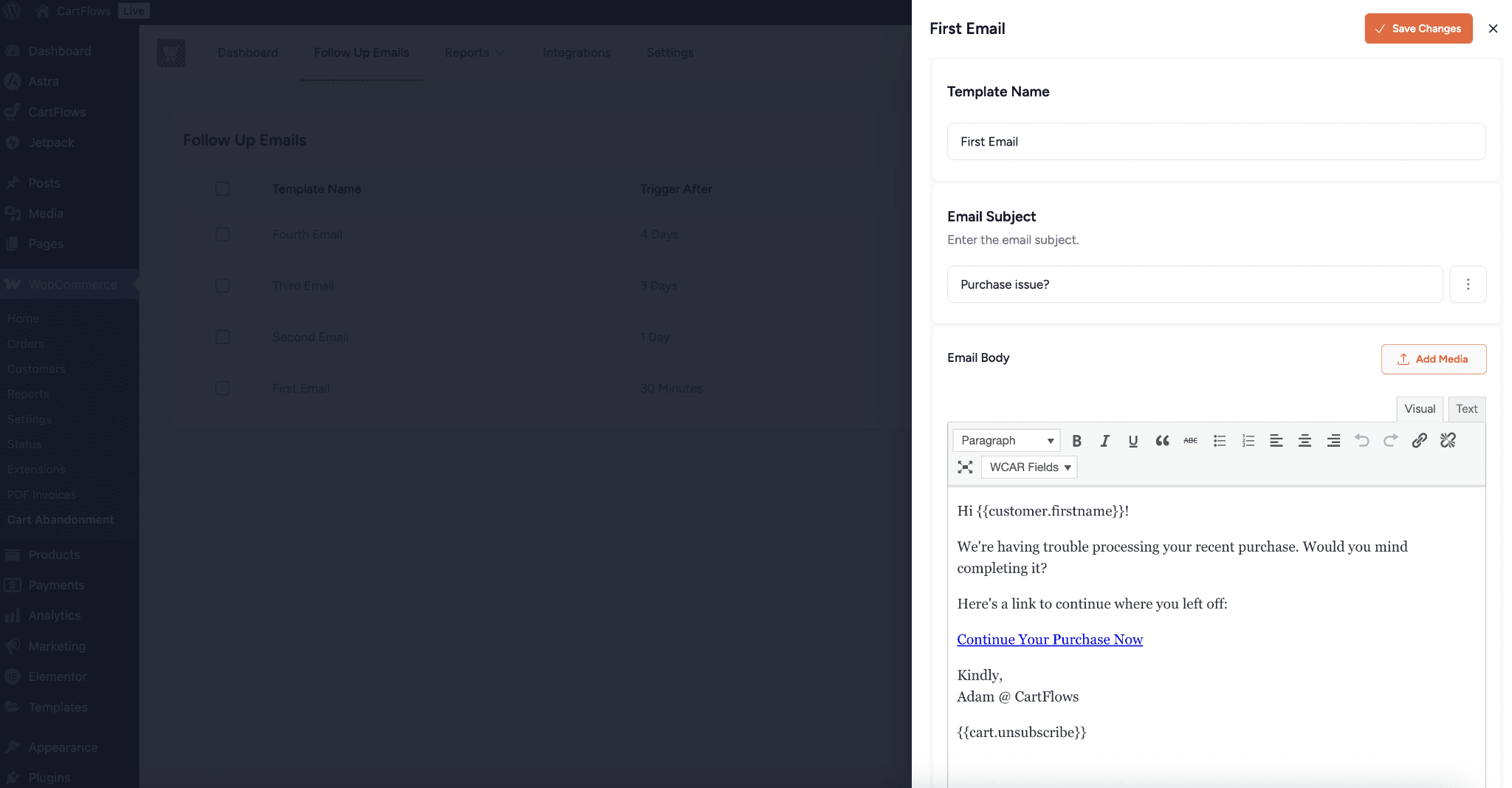
Not every abandoned cart is a lost sale.In many instances, the customer had an interest, but then became distracted, searched for a better price or just took their time to think it through. That’s where a structured follow up program turns into direct revenue recovery system.
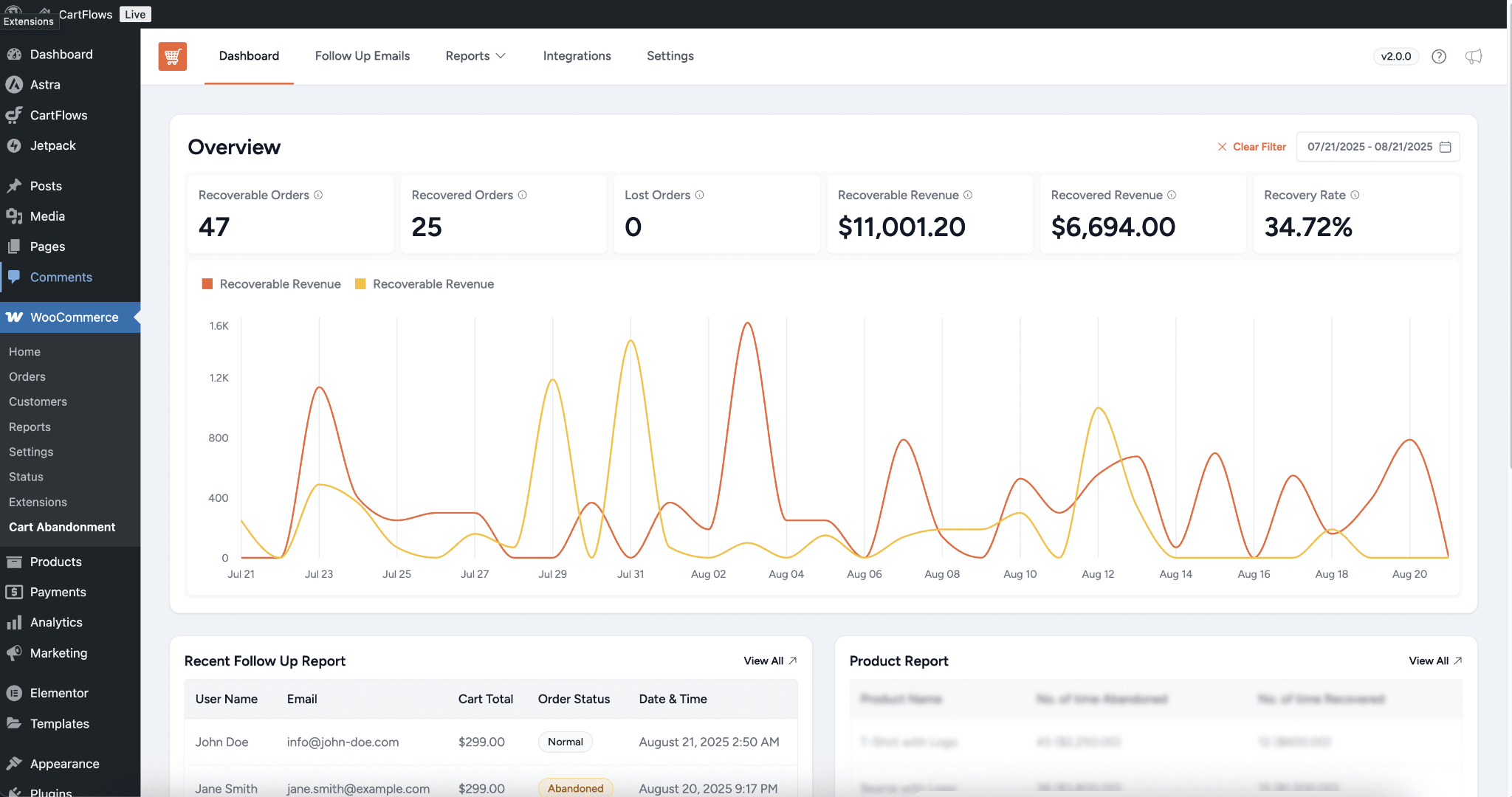
The research always proves that the abandoned cart recovery efforts can recover 10–20% of sales, particularly if the messages arrive at the right time and are relevant but not too aggressive.
The concept is not to “sell again,” but to softly reengage their customer with the place where they were once.
What to Fix
- Send the first abandoned cart email within 1-2 hours, as the product is still fresh in the customer’s mind.
- Keep it simple with a direct checkout link, product image and name to minimise hassle
- Send a brief message after 24 hours, if the person has expressed a hesitation or uncertain feeling
- Follow up with final reminder after 48-72 hours, perhaps with an offer such as free shipping or a slight discount
Beyond email, stronger recovery systems include:
- Exit-intent popups that trigger when users try to leave checkout
- SMS reminders for faster response rates compared to email
- Retargeting ads on platforms like Facebook and Google to reappear in front of users who already showed purchase intent
A practical example of this strategy in action:
A WooCommerce store implementing a simple 3-step email sequence (1 hour, 24 hours, 72 hours) was able to recover a noticeable portion of abandoned carts without increasing traffic or ad spend. Most recovered users returned through the direct checkout link in the email, not through additional browsing.
The goal is not to pressure the customer. It is to remove friction from returning and completing the purchase.
Quick Implementation Checklist
Use this checklist to apply all 5 checkout optimizations step by step. Each one is simple to set up and starts improving conversions fast.
| Step | Tactic | Time to Set Up | Tool |
|---|---|---|---|
| 1 | Enable guest checkout | 5 minutes | WooCommerce settings |
| 2 | Add trust badges on checkout | 10 minutes | Trust badge plugi |
| 3 | Optimize checkout page speed | 1–2 hours | Caching + CDN tools |
| 4 | Simplify checkout fields | 10 minutes | Checkout field editor |
| 5 | Enable exit-intent popup | 15 minutes | Conversion plugin |
These small fixes remove friction from your checkout. You make it easier for buyers to complete their purchase without hesitation.
Can You Really Recover 25% of Abandoned Carts?
Let’s be realistic.
Your results depend on your traffic, product type, and current checkout setup. Still, most WooCommerce stores see quick improvements after applying these tactics.
| Optimization Applied | Expected Cart Recovery | Revenue Impact |
| Guest checkout only | 10–15% recovery | Moderate uplift |
| Faster checkout speed | 15–25% recovery | Noticeable increase |
| Simplified checkout fields | 20–30% recovery | Strong conversion boost |
| Exit-intent popup | 25–35% recovery | High recovery impact |
| All 5 optimizations combined | Up to 25%+ recovery | Maximum revenue gain |
Even one change can bring results. When you apply all five together, you create a smooth checkout experience that keeps buyers from leaving.
What This Means for WooCommerce Stores
For WooCommerce store owners, this is where structured optimization matters more than guesswork. Fixing this is not about adding more plugins or random tweaks. It requires a proper audit of the checkout flow and systematic optimization.
That is where growth happens.
At TeknoFlair, we focus on exactly this problem. We turn high-traffic WooCommerce stores into high-conversion systems by fixing checkout friction, improving UX, and implementing structured recovery strategies.
Our WooCommerce Optimization Service focuses on:
- Checkout flow simplification and field optimization
- Speed and performance improvements for checkout pages
- Conversion-focused UX adjustments
- Abandoned cart recovery setup
- Trust and payment optimization for higher completion rate.
Turn More Checkouts Into Completed Orders
Your checkout page decides whether a sale happens or not. You’ve already brought people to your store, got their attention, and convinced them to add products to the cart. But the last step is where most stores lose them. If you’re ready to stop the revenue leak and improve your WooCommerce conversion rate, start optimizing your checkout today.
Even a small increase in completed orders can lead to a noticeable jump in revenue.
FAQs: WooCommerce Checkout Optimization & Cart Abandonment
1. What is cart abandonment in WooCommerce?
Cart abandonment means a user adds products to the cart but leaves without completing the purchase.
2. What is the average cart abandonment rate?
Most WooCommerce stores see around 60–70% cart abandonment. This means most users don’t finish checkout.
3. Why do customers abandon checkout?
Customers leave when checkout feels difficult or unclear. Common reasons include:
- Extra costs shown at the end
- Forced account creation
- Long or confusing forms
- Slow checkout pages
- Lack of trust or payment issue
4. How can I reduce cart abandonment?
You can reduce it by making checkout simple and fast:
- Enable guest checkout
- Remove unnecessary fields
- Show full cost early
- Improve page speed
- Add trust signals
5. Do abandoned cart emails work?
Yes. They remind users to come back and complete the purchase. Many stores recover 10–20% of lost carts using emails.
6. How much revenue can I recover from abandoned carts?
Most stores recover around 10–20% with proper follow-ups and checkout improvements.
7. Does WooCommerce track abandoned carts by default?
No. You need a plugin to track abandoned carts and send recovery emails.
8. When is a cart considered abandoned?
A cart is considered abandoned after a user leaves and does not return within a set time, usually 30–60 minutes.
9. What is the best way to recover abandoned carts?
Use a mix of:
- Email reminders
- Discounts or free shipping
- Retargeting ads
10. Does guest checkout improve conversions?
Yes. It removes an extra step and makes checkout faster, which helps more users complete their purchase.
