









Tracking CPD looks simple at first. You add courses, assign credits, and let learners complete them. But the real challenge starts after that.
What is the right way to verify CPD records?
How can you effectively track learning outside your LMS?
What is the best way to connect CPD data with your CRM or workflows?
This is where most LearnDash setups fall short. They track learning, but they don’t manage the full process.
That’s exactly what changed with v1.0.3 and v1.0.4. These updates move your system from basic tracking to something much more powerful. Let’s break it down in a simple way.
Why Most LearnDash CPD Systems Fall Short
Many organizations assume that once they install LearnDash, their CPD system is ready. But in reality, gaps appear quickly.
- Learning happens outside the LMS, but it’s not tracked
- There’s no easy way to verify records for auditors
- Admins spend hours managing data manually
- Systems don’t talk to each other
Think of it like keeping your finances in different notebooks. One for expenses, one for income, one for savings. You have all the information, but nothing connects. That creates confusion and extra work.
The same happens with CPD systems that rely only on basic LMS features.
A Smarter Way to Manage CPD in LearnDash
Managing CPD the right way requires more than just tracking courses. You need a system that can handle real-world learning, keep records accurate, and reduce manual work.
This is where the TeknoFlair CPD add-on for LearnDash helps solve the problem.
It brings everything into one system. With TeknoFlair, you can track internal and external learning, verify records instantly, and manage the full CPD lifecycle without relying on manual processes.
Instead of working with disconnected tools, you get a system that actually works together.
This improvement happens in two clear steps.
Version 1.0.3 makes your CPD data complete and reliable
Version 1.0.4 builds on that by automating workflows and connecting systems
Let’s see how version 1.0.3 and version 1.0.4 work together to solve these challenges.
CPD/CEU Add-on v 1.0.3 Overview
Version 1.0.3 takes the CPD system beyond basic course tracking and turns it into something much more practical and real-world ready.
Before this update, the system mainly focused on tracking learning inside the LMS. But in reality, professional development does not happen in just one place. People attend workshops, join webinars, participate in conferences, and complete training outside the platform.
This version solves that gap.
It introduces three major improvements:
- A way for external people (like employers or auditors) to verify CPD records without needing access to your system
- A complete system to track external learning activities
- A cleaner experience for both learners and admins to manage everything easily
Now, your CPD system is showing a complete and trusted picture of learning.
1. Verify CPD Records Instantly (Auditor Verification)
One of the biggest improvements in this version is how easy it is to verify CPD records. Instead of exporting data or sharing admin access, you now have two simple options.
Option 1: Shareable Verification Link
Each learner can generate their own private link from their dashboard.
They can send this link to:
- Employers
- HR teams
- Certification bodies
When someone opens the link, they see:
- Total credits
- Completed courses
- Certificates and expiry dates
- External credits (manual + approved claims)
No login is required. Think of it like sharing a Google Drive link that is quick and controlled.
Option 2: Search-Based Verification Portal
Admins can also create a search page where authorized people can look up learners.
How it works:
- The verifier enters a name or email
- Views the CPD summary
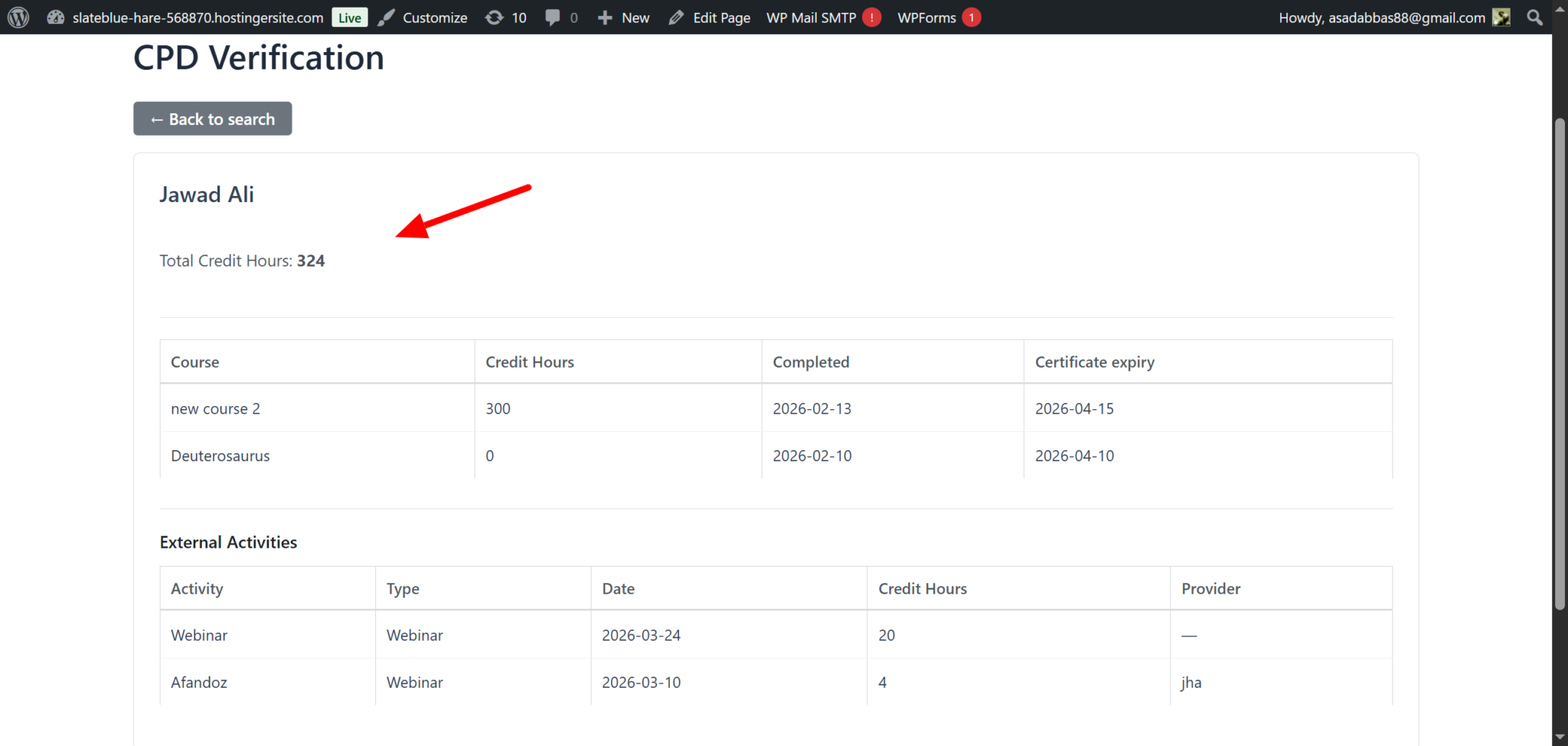
For added privacy, you can:
- Keep it public
- Or require an access code
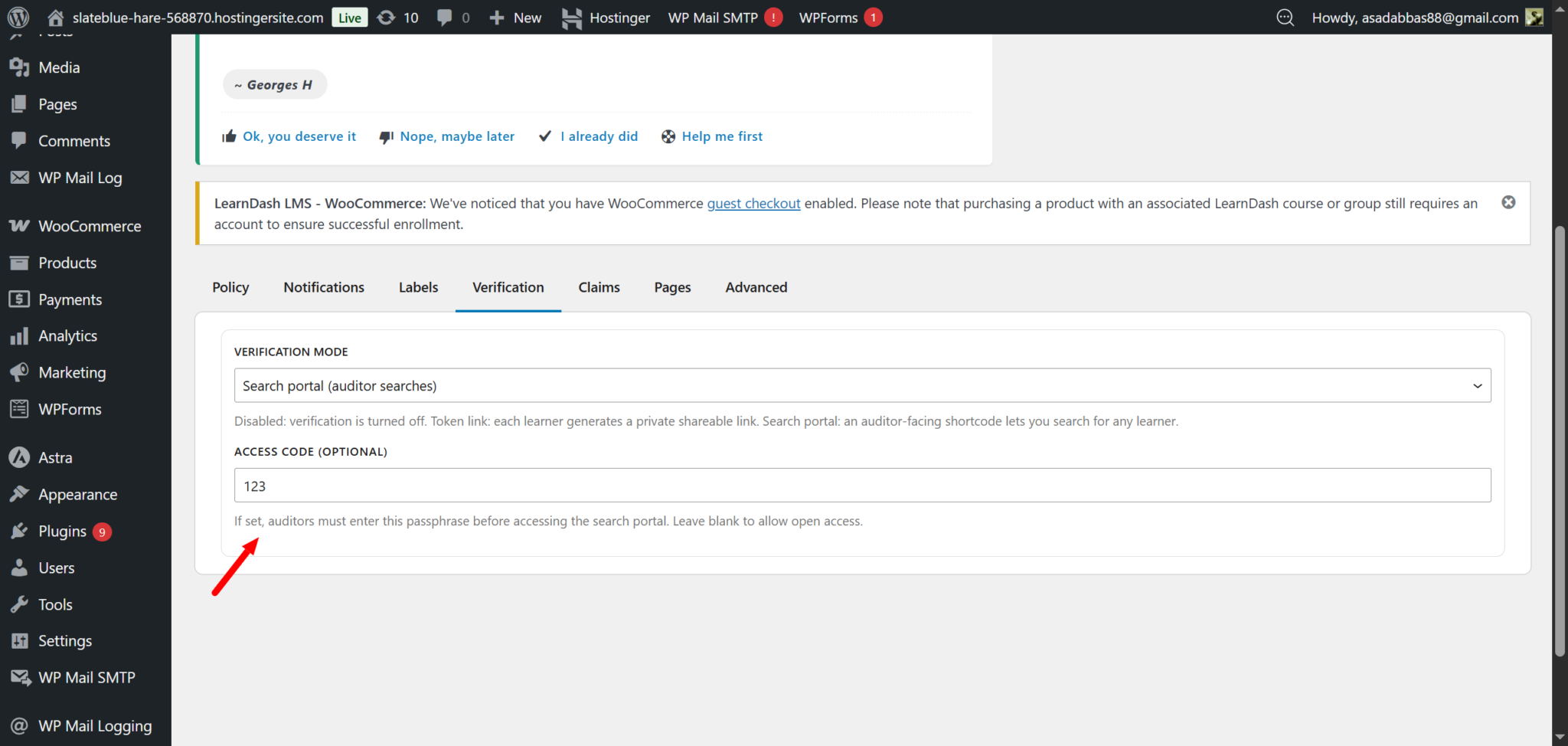
This prevents unwanted access while still making verification easy. It saves time during audits and builds trust with external bodies.
2. Record Learning from Anywhere (Admin + External Activities)
Most LMS platforms only track what happens inside courses. But real professional development does not stay inside a system.
People attend workshops, join webinars, sit in internal training sessions, and take external courses. If these activities are not recorded, your CPD data stays incomplete.
This update solves that problem by letting admins record any valid learning activity directly inside the system.
Instead of managing separate spreadsheets or chasing records, everything lives in one place.
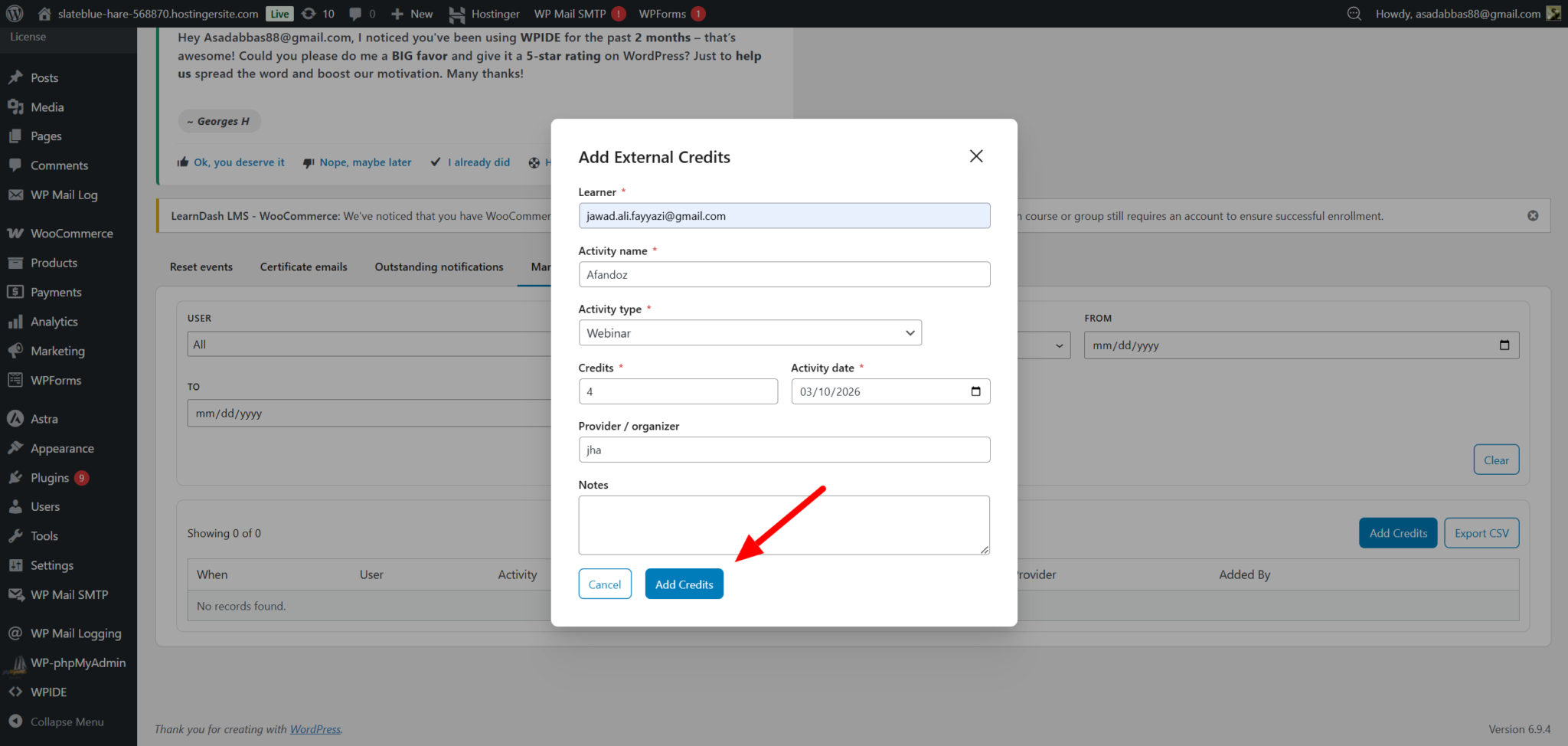
What this looks like in practice
When adding an activity, admins can include key details like:
- Activity name and type (webinar, workshop, conference, etc.)
- Credits awarded with flexible values
- The actual date of the activity
- Optional provider and notes for context
Once saved, the impact is immediate:
- Credits update instantly in the learner’s total
- The activity appears in their dashboard
- It becomes part of the verification record
There is no delay, no manual syncing, and no confusion.
Before this, your LMS only showed course-based learning. Now you move from partial tracking to a complete learning record.
3. Let Learners Add Their Own Learning (With Proper Control)
Even with admin input, there is still a gap. Learners often complete activities independently. They attend conferences, complete external courses, or participate in industry events that admins may not be aware of.
If there is no way to capture this, valuable learning gets lost.
This feature solves that by allowing learners to submit their own activities while keeping full admin control.
How it works:
Learners can submit a request directly from their dashboard by providing:
- Activity details and claimed credits
- A short explanation of the learning
- Proof such as a certificate or confirmation
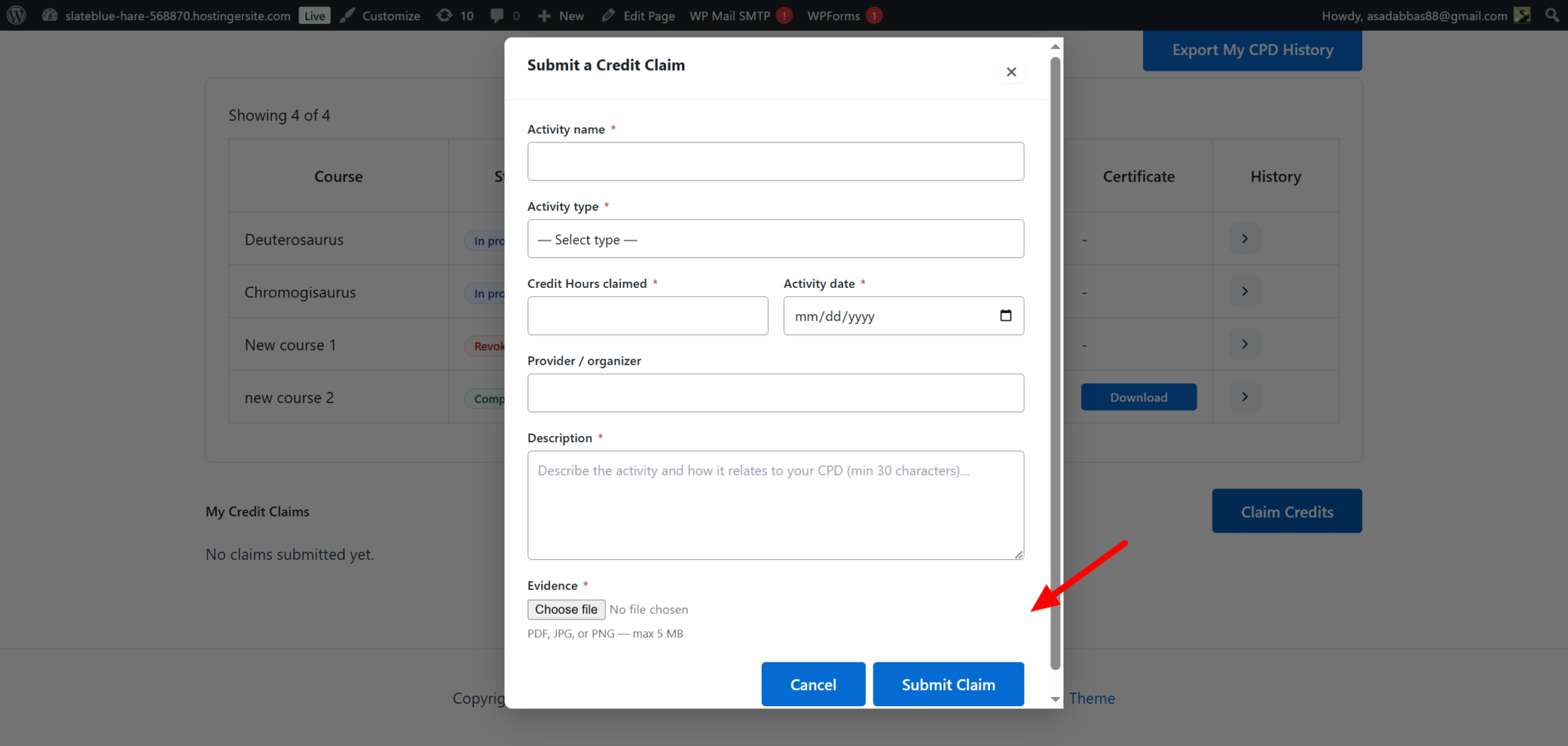
Once submitted, the system handles it in a controlled way.
- The request is marked as pending
- Admins are notified automatically
- No credits are added yet
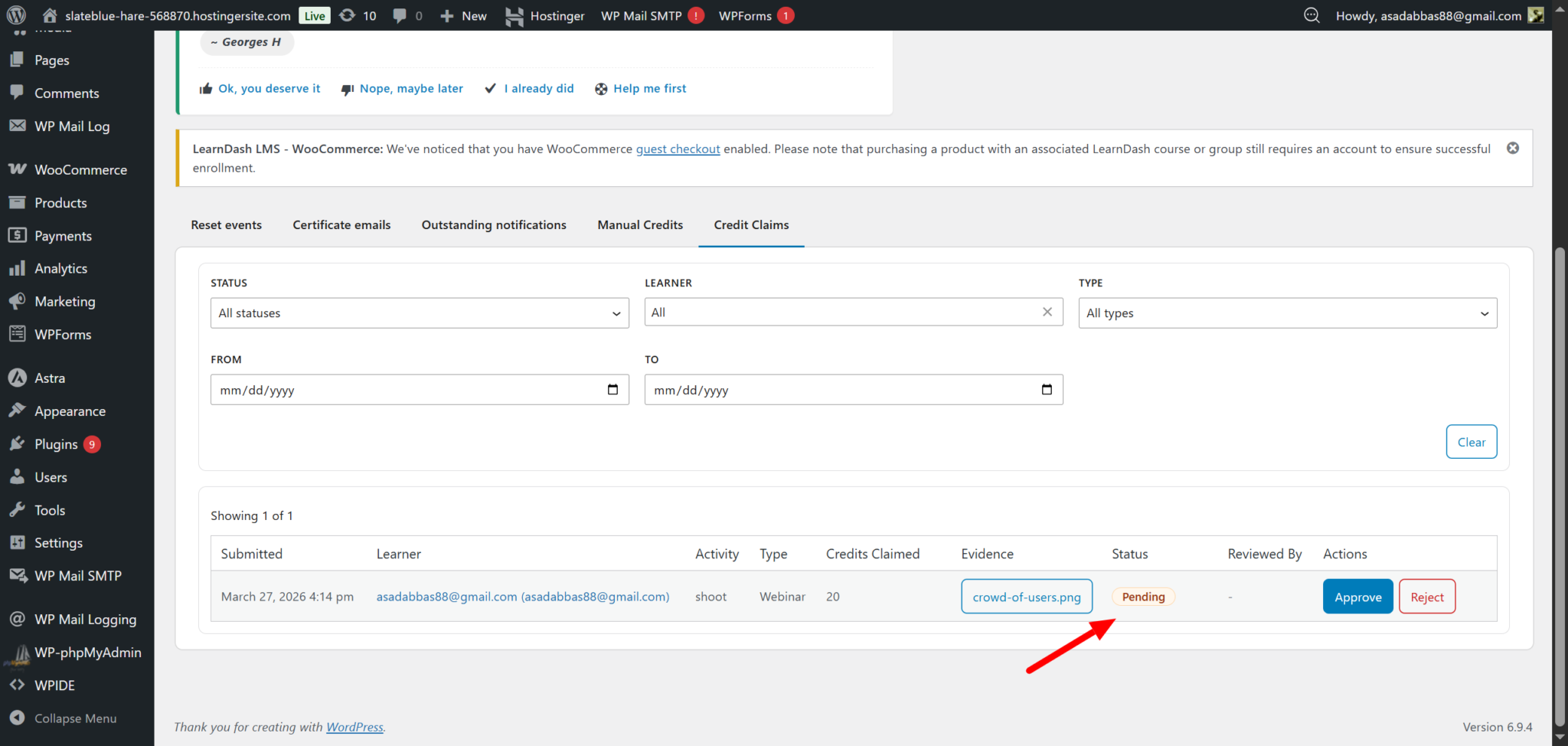
Admins then review the submission, check the evidence, and decide. The dashboard keeps everything transparent:
- Pending → waiting for review
- Approved → added to total credits
- Rejected → clearly explained
With a quality filter for learning data, you can keep the data accurate.
CPD/CEU Add-on v 1.0.4 Overview
Version 1.0.4 takes everything built in the previous version and pushes it one step further.
If v1.0.3 focused on making your CPD system complete and reliable, this version focuses on making it connected and automated.
Until now, most LMS setups have worked in isolation. You could track learning, but that data stayed inside your system. If you wanted to use it elsewhere, you had to export it, update it manually, or connect tools separately.
This version removes that limitation. It introduces three major capabilities:
- Direct connection between your CPD system and your CRM
- No-code automation workflows triggered by learning activity
- Real-time data sharing with external systems
Now, it becomes an active system that communicates, triggers actions, and works with your entire tech stack.
1. Connect CPD Activity with Your CRM (WP Fusion Integration)
One of the biggest upgrades in this version is how your LMS connects with your CRM.
Instead of manually updating contacts or exporting data, your system now updates everything automatically based on learner activity.
What this looks like in practice?
When certain actions happen inside your CPD/ CEU system, they can trigger updates in your CRM.
For example:
- When a learner completes a course
- When they earn credits
- When a certificate is issued
- When their progress is reset
Each of these actions can apply or remove tags in your CRM. These Tags help you organize and manage users inside your CRM.
With this integration, you can:
- Segment learners based on progress
- Trigger email campaigns automatically
- Track compliance status in real time
Now, your CPD activity directly powers your marketing, communication, and compliance workflows
2. Build Workflows Without Coding
Managing learners often involves repetitive tasks.
- Sending notifications
- Assigning follow-up courses
- Informing managers
- Updating internal systems
Doing this manually takes time and creates delays. Using integrations like Uncanny Automator and AutomatorWP, you can automate workflows without any coding.
What you can automate
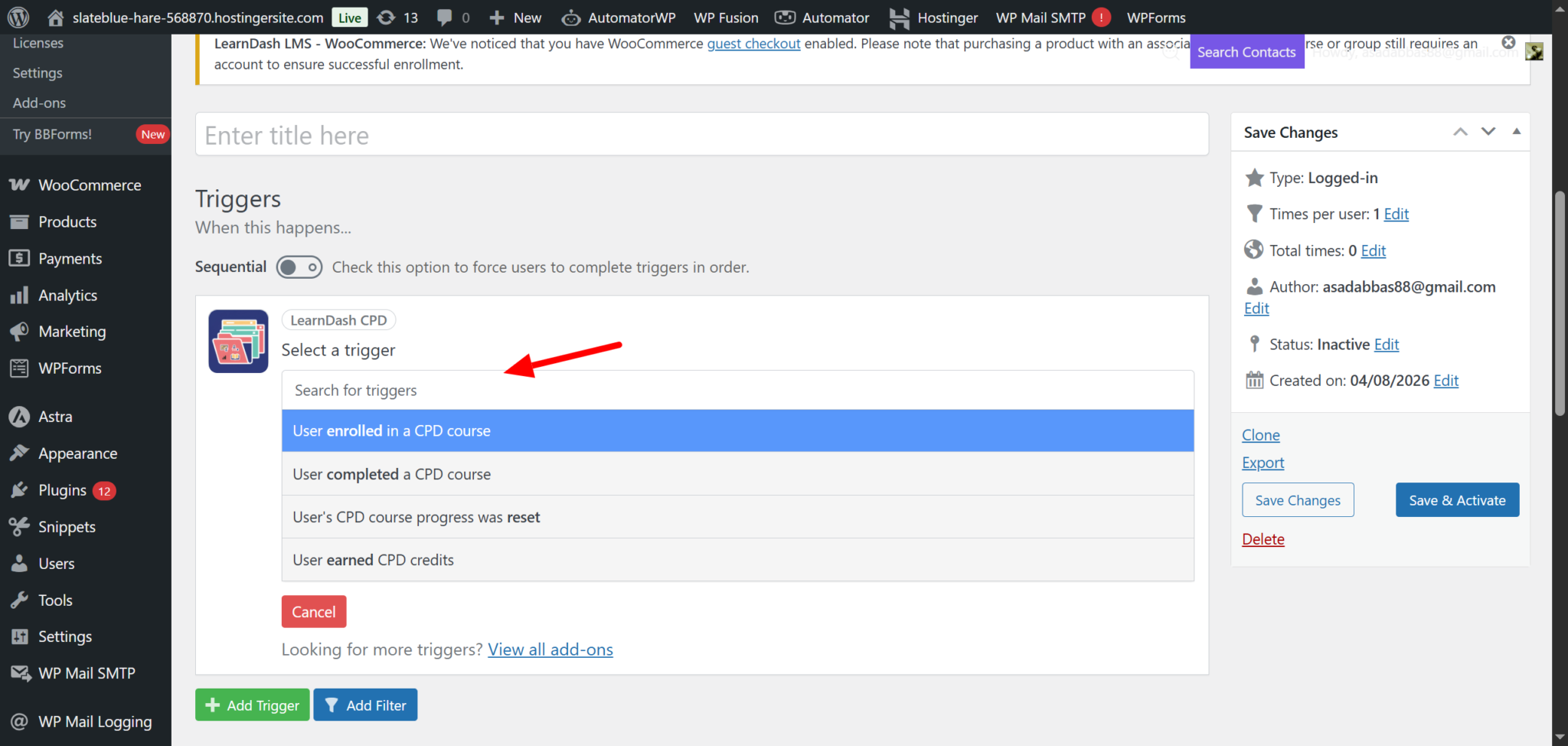
Your CPD system can now trigger workflows when key events happen, such as:
- A learner completes a course
- Credits are earned
- A certificate is issued
- Progress is reset
These triggers can then connect to different actions across your tools.
Examples:
- Send a Slack message when a certificate is issued
- Enroll a learner in the next course automatically
- Notify a manager when required training is completed
- Trigger an email when credits reach a certain level
This feature turns your LMS from a tracking system into a working system. Instead of reacting manually, your system starts handling tasks for you.
That means less admin work, faster processes, and better learner experience.
3. Send CPD Data Anywhere with Webhooks
While CRM and automation tools cover many use cases, some organizations need more flexibility.
They may use:76
- Custom dashboards
- HR systems
- Reporting tools
- External platforms
This is where webhooks come in.
Webhooks allow your system to send data instantly to any external platform. Whenever something happens inside your CPD system, the data is shared in real time.
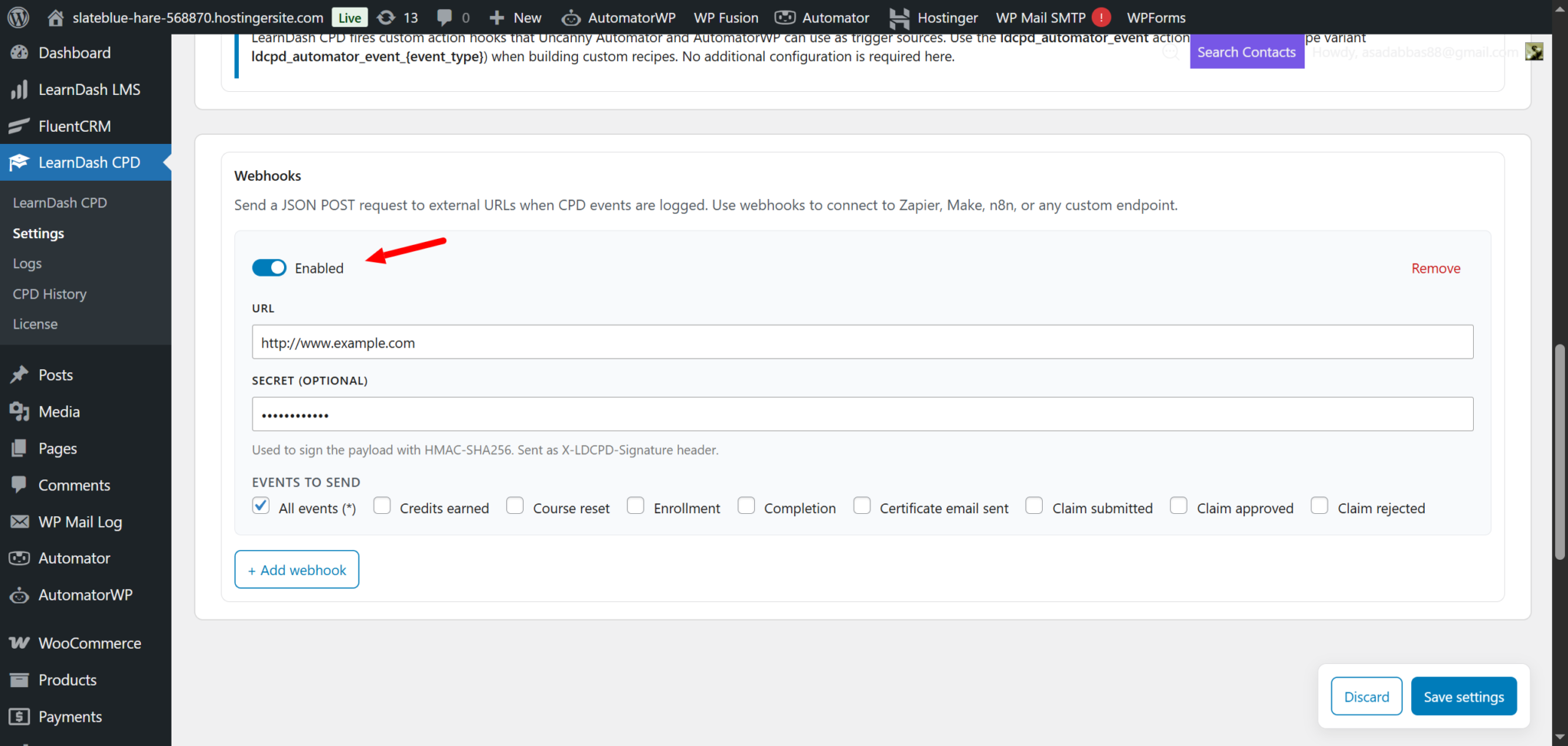
You can share different types of events
- Course completions
- Credits earned
- Certificates issued
- Progress resets
Each event sends structured data that external systems can understand and use.
Key controls available:
Admins can:
- Add multiple webhook connections
- Choose which events trigger each connection
- Enable or disable them anytime
- Secure data sharing when needed
Now, you are no longer limited to LMS tools. You can connect your CEU system to anything you use
Think of it as opening a direct communication channel between your LMS and the rest of your business systems.
How This Works for Training Providers
Managing learners becomes much easier when everything stays in one place. You can record all learning activities, including external ones, without switching between systems. It also becomes simple to manage credits and guide learners through the next steps automatically.
Result: You deliver a smoother learning experience while spending less time on manual work
Ready to Build a Smarter LearnDash CPD System?
If you are still managing CPD manually or struggling with disconnected systems, this is your chance to fix it.
You don’t need more tools, but only ONE system that actually works together.
- Automate CPD tracking
- Integrate LearnDash with your systems
- Build a scalable LMS
Then it’s time to take the next step.
Let’s build a LearnDash system that works for your organization
