














Continuing Professional Development (CPD) is not optional in regulated industries. Healthcare professionals, lawyers, accountants, engineers, and corporate teams must complete structured CPD hours every year. They must track them accurately. They must prove compliance during audits.
If you are running CPD programs on LearnDash, you already know the gap. The system works well for course delivery, but CPD management demands more structure.
Many organizations end up relying on:
- Spreadsheets to calculate CPD hours
- Manual updates after every course completion
- Repetitive reminder emails
- Separate documentation for audit preparation
These processes may work temporarily, but they do not scale. As your learner base grows, so does the risk.
The Real Problem With CPD on LearnDash
LearnDash is a powerful LMS platform that delivers structured learning experiences. It allows you to create courses, monitor learner progress, and issue completion certificates with ease.
For general online education, that is sufficient. For structured CPD compliance, it is not. CPD programs demand structure, precision, and accountability.
You must be able to:
- Assign defined CPD credit hours to each course
- Track annual or renewal-based CPD targets
- Monitor who is compliant and who is falling behind
- Generate audit-ready compliance reports instantly
- Manage CPD at both individual and group levels
By default, LearnDash tracks completion, not compliance. It does not manage CPD cycles or structured credit frameworks natively.
As your program grows, this limitation creates operational friction. Manual tracking increases workload, introduces reporting risks, and limits your ability to scale confidently.
Your LMS should simplify compliance management. It should support growth, not slow it down.
Introducing: TeknoFlair’s LearnDash Continuing Professional Development Add-On
The LearnDash Continuing Professional Development Add-On extends LearnDash with a lightweight, secure, and scalable CPD management system. Specifically built for regulated environments.
This solution introduces scheduled progress resets, certificate lifecycle management, and comprehensive CPD history tracking for both administrators and learners. It is ideal for industries where recurring training, certificate validity, and audit-ready records are non-negotiable.
Core Features Built by TeknoFlair for Compliance and Scale
1. Scheduled Progress Reset (Group-Level Control)
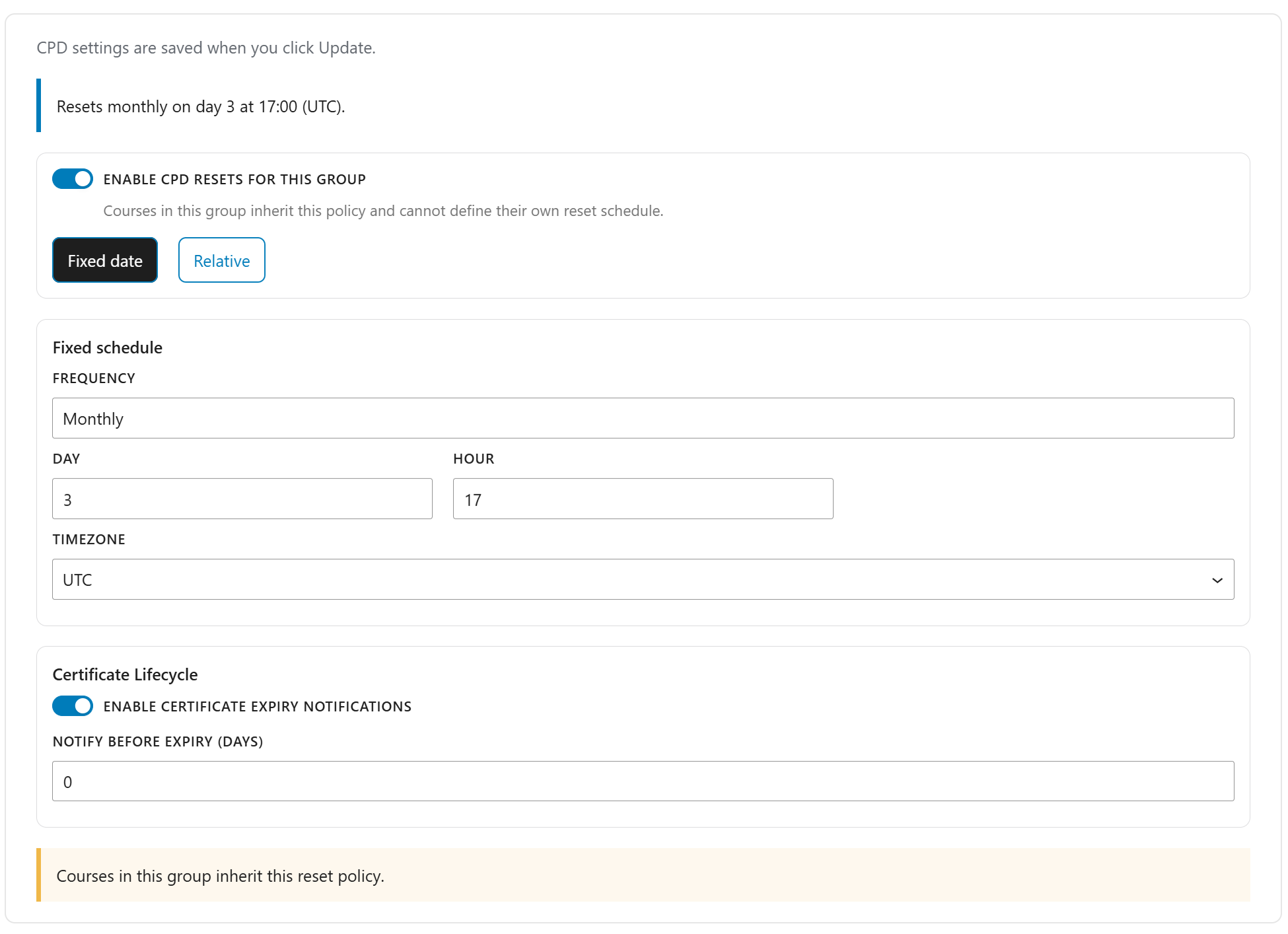
Many organizations operate on recurring compliance cycles. Training must reset monthly, annually, or based on defined accreditation periods.
The plugin allows you to configure reset policies at the group level, ensuring consistency across departments or organizations.
- Configure reset policies per group
- Automatically reset progress on defined schedules (monthly, yearly, custom)
- Apply resets to all courses within the group
- Prevent conflicting course-level reset settings
Administrators no longer need to track renewal cycles manually.
2. Scheduled Progress Reset (Course-Level Flexibility)
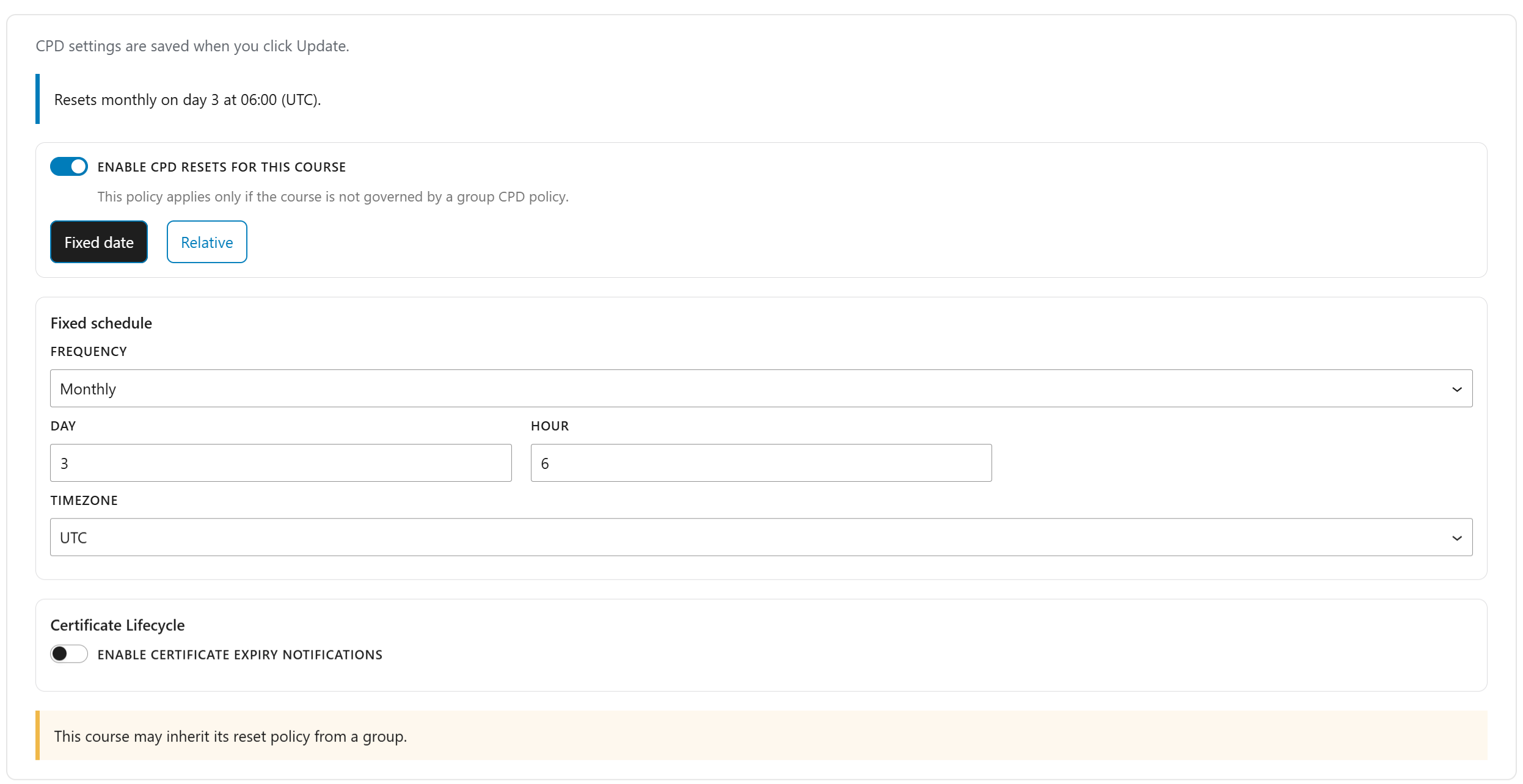
This feature allows you to define reset policies at the individual course level, provided the course is not governed by a group reset policy.
- Configure standalone course reset schedules
- Enable resets only when not controlled by group rules
- Display clear UI messaging when a course is managed by group policy
This delivers flexibility for hybrid training models that combine compliance-based and standalone programs.
3. Reset Event Logging & Audit Trail
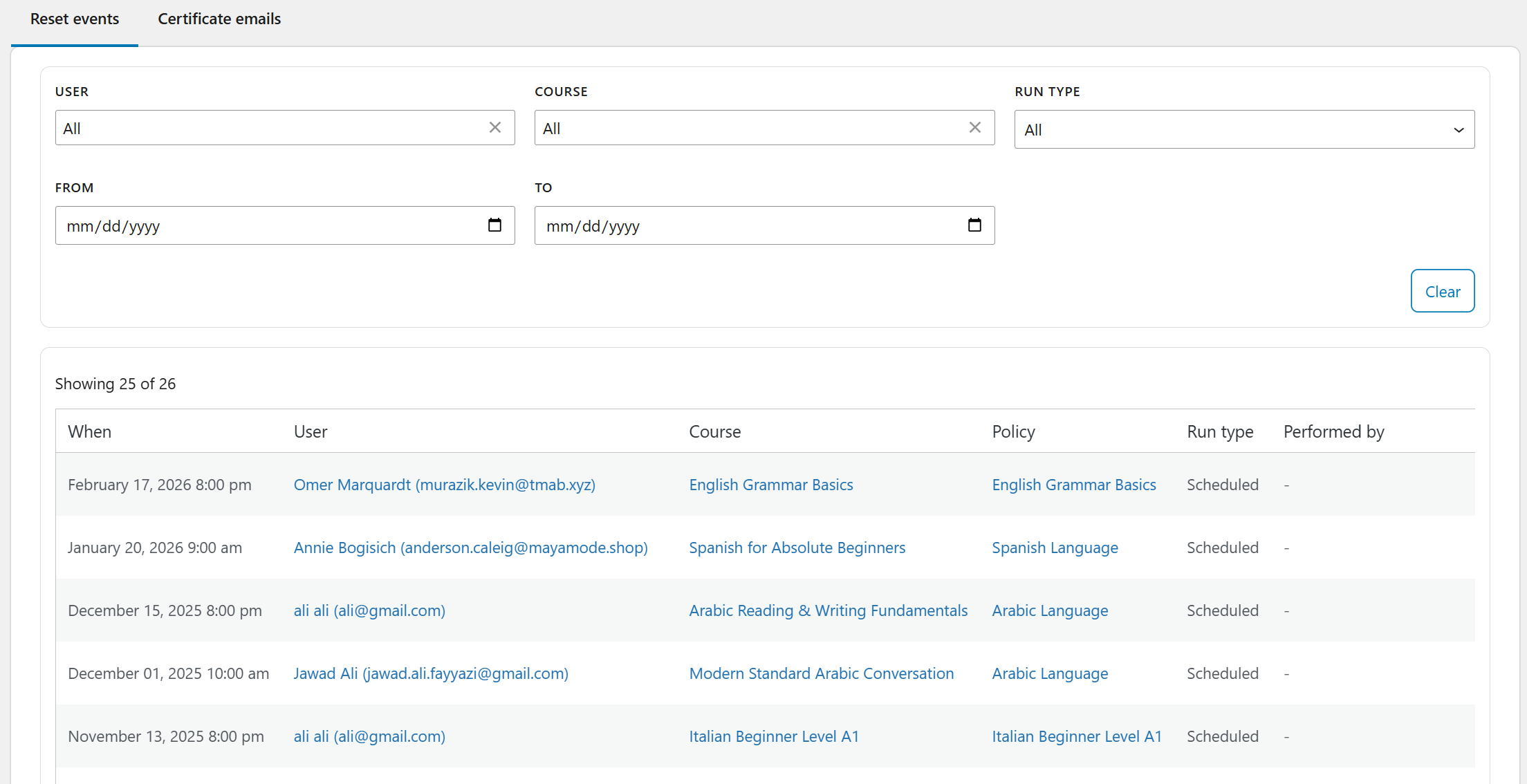
The plugin includes a dedicated reset event log that records every action automatically.
It tracks:
- User affected
- Course or group involved
- Policy applied
- Date and execution context (cron, manual, system)
- Filterable logs by user, date, course, or group
This creates a fully audit-ready compliance history suitable for internal reviews or regulatory inspections.
4. Certificate Expiration & Automated Email Notifications
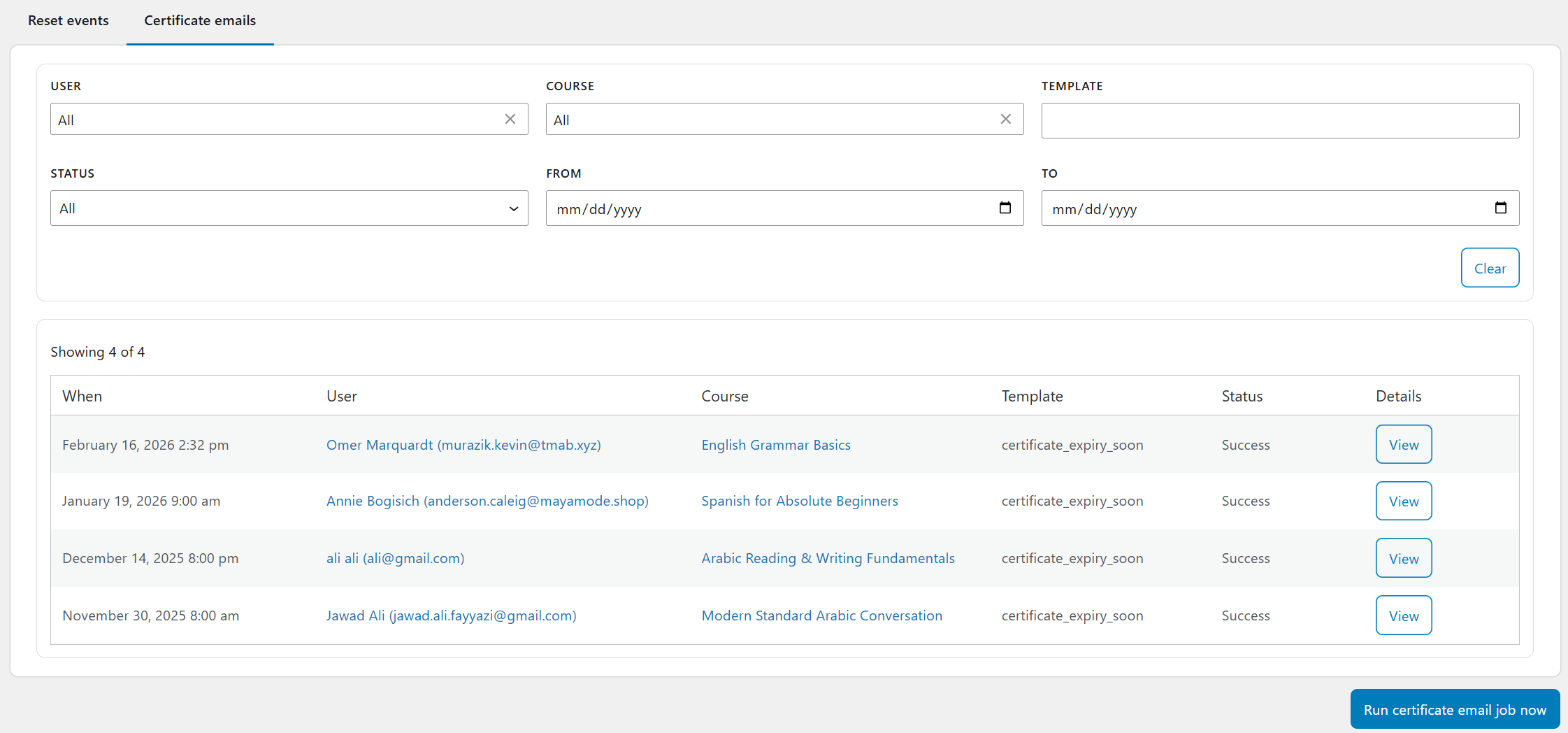
The system tracks certificate issuance and expiry automatically and notifies learners before expiration.
- Monitor certificate issue and expiry dates
- Send automated pre-expiry reminders
- Log all email notifications for full traceability
This reduces expired certifications and strengthens regulatory reliability.
5. CPD History – Administrative View
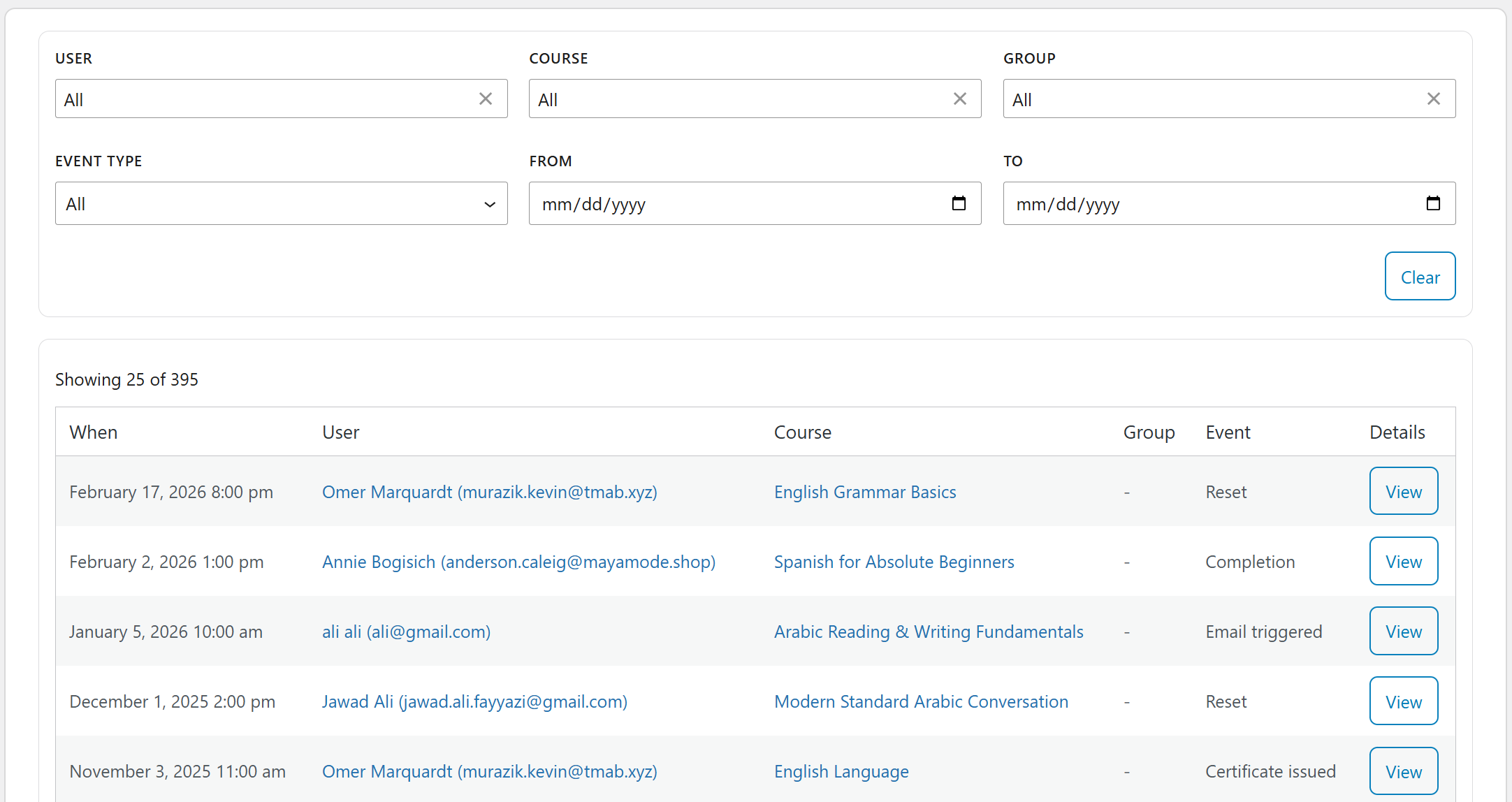
The CPD Admin View provides a complete per-user CPD profile in one structured dashboard.
It includes:
- Enrolled vs completed vs revoked courses
- Earned certificates with download access
- CPD points or credits earned
- Full reset history timeline
This gives support teams and compliance managers a single source of truth.
6. CPD History – Learner Dashboard (Frontend)
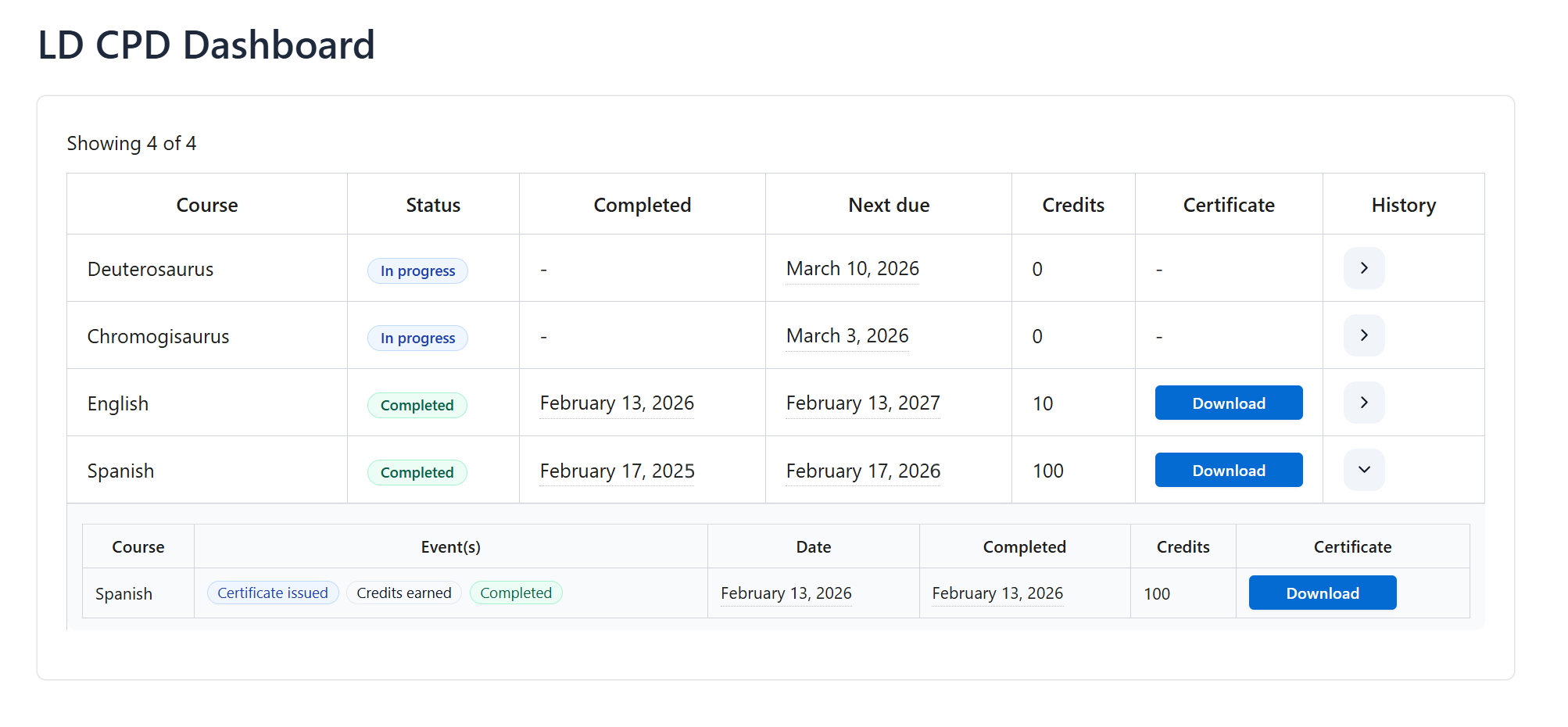
The system includes a frontend CPD dashboard accessible via shortcode, giving learners full visibility into their professional development record.
Learners can view:
- Current course progress and completion status
- Downloadable certificates
- CPD points or credits earned
- Historical completions and reset events
This improves accountability, reduces support queries, and enhances learner confidence in the system.
CPD Lifecycle & Event Tracking: Built for Compliance and Auditability
A compliant CPD system must do more than track completions. It must record every critical event in the learner journey with full context and traceability.
The TeknoFlair LearnDash Continuing Professional Development Add-On enhances LearnDash with a structured lifecycle model that captures, logs, and governs every compliance-sensitive action. These events drive reset behavior, certificate lifecycle management, reporting accuracy, and audit readiness.
User Enrollment Tracking
When a learner enrolls in a course, the system records an Enrollment event in the CPD history log.
This event captures the user, course, associated group (if applicable), and timestamp. It creates the foundation for future reset calculations and compliance reporting.
Enrollment is no longer just access granted, it becomes a tracked compliance milestone.
Policy Resolution & Enrollment-Based Reset
Before any reset occurs, the system determines the effective reset policy using structured precedence:
- Course-level policy
- Group-level policy
- Global fallback policy
If the resolved policy defines resets based on the enrollment date, the system automatically evaluates upcoming reset timelines.
When a reset is triggered:
- User progress is reset
- Any previously earned certificate is revoked
- A detailed Reset event is logged
The reset log includes policy source, calculation basis, and execution mode (cron, manual, or system-triggered). This ensures complete transparency for administrators.
Completion & Certificate Issuance
When a learner completes a course, the system logs multiple compliance-critical events.
A Completion event records the achievement. A Certificate Issuance event captures issue and expiry dates, along with a certificate download URL snapshot.
This snapshot ensures that administrators and learners can access historical certificates, even if they are expired or revoked. In addition, a Points / Credits Earned snapshot is logged to support structured CPD tracking.
Completion becomes part of a permanent compliance record, not just a status update.
Certificate Expiry Monitoring & Notifications
Certificates often have defined validity periods. Allowing them to expire unnoticed creates compliance risk.
The system continuously monitors certificate expiry timelines and triggers notifications when expiration approaches. Each outgoing message is logged as an Email Triggered event, including timing and delivery context.
This creates a traceable communication history that strengthens audit defense and reduces certification lapses.
Completion-Based Reset & Certificate Revocation
In some compliance models, reset cycles are calculated based on the completion date rather than enrollment.
The system applies the same structured policy resolution model to determine the effective reset rule. If a completion-based reset is due:
- User progress is reset
- The issued certificate is revoked
- A contextual Reset event is logged
It records every action with its policy source and execution context to ensure complete administrative clarity.
Audit-Ready Event History
The system stores all lifecycle events in structured, audit-ready history logs. These events include enrollment, completion, certificate issuance, resets, and notifications.
Administrators gain full visibility into compliance activity. Learners access relevant history through their CPD dashboard, improving transparency and trust.
This lifecycle architecture transforms LearnDash from a course delivery platform into a compliance-grade CPD management system built for regulated environments.
Scale CPD With Smart Reporting Using LearnDash Email Insights
Managing CPD at scale requires more than tracking credits. It requires visibility across teams, departments, and organizations. Without structured reporting, compliance becomes reactive and difficult to control.
That is where TeknoFlair LearnDash Email Insights adds that intelligence layer to your CPD system. It transforms raw data into actionable oversight through its powerful Group Report feature.
With Group Reports, you can:
- Track CPD progress by department, organization, or cohort
- Identify learners who are falling behind in required credit hours
- Automatically send reminder emails before compliance gaps widen
- Share structured progress summaries with managers or compliance officers
This creates accountability at every level of your organization. Managers gain clarity. Administrators reduce manual follow-ups. Learners receive timely guidance.
Instead of chasing learners at the end of a compliance cycle, your system proactively monitors progress and prompts action.
Who This Plugin Is Built For
The TeknoFlair LearnDash CPD solution is built for organizations that operate in regulated environments where compliance is mandatory, recurring, and non-negotiable.
This system is ideal for:
- Medical and healthcare training providers
- Legal associations and bar councils
- Accounting and finance institutes
- Engineering councils and technical accreditation bodies
- Corporate compliance and HR departments
- LMS agencies building regulated training platforms
If your learners must complete mandatory CPD hours and maintain valid certifications, basic course tracking is not enough.
How TeknoFlair Turns LearnDash Into a Compliance-Ready Platform
Most LMS platforms focus on delivering courses. They help you publish content, track completion, and issue certificates.
Very few are built to manage compliance cycles, certificate validity, reset governance, and audit-ready history.
With the TeknoFlair LearnDash Continuing Professional Development Add-On and LearnDash Email Insights, you move beyond course delivery and into structured compliance automation.
You can:
- Automate CPD tracking and renewal cycles
- Eliminate spreadsheet-based reporting
- Reduce administrative workload
- Improve learner accountability with transparent dashboards
- Provide audit-ready documentation on demand
- Position your LearnDash website as a professional compliance platform
TeknoFlair builds tools that make LearnDash smarter, stronger, and ready for professional training environments.
Click here to explore the complete features of TeknoFlair LearnDash Email Insights.
Stop Managing CPD Manually
If you are still tracking CPD in spreadsheets, you are limiting your growth.
Automation creates control. Control builds credibility. Credibility attracts professional clients.
Turn your LearnDash website into a fully automated CPD management system today.
Click here to explore the LearnDash CPD Add-On
