



Most LearnDash sites work perfectly at the start. You publish a few courses. You enroll a few hundred users. The site feels fast. Reports load instantly. Admin work stays manageable.
At 1,000+ users, small weaknesses turn into real problems. The issue is not LearnDash. LearnDash is powerful. WordPress is flexible. But neither will scale on weak infrastructure or poor structure.
Then growth begins. You reach 800 users. Traffic spikes. More learners log in at the same time. Reports take longer to load. Admin tasks increase. The dashboard feels slower.
If you want to support 1,000+ users without chaos, TeknoFlair builds your LMS like an enterprise system from day one.
What an Enterprise LMS Really Means
An enterprise LMS is not just a course platform. It is a structured training system designed for scale.
It must handle:
- 1,000+ active users
- High numbers of simultaneous logins
- Large datasets and reporting queries
- Automated enrollments and renewals
- Ongoing compliance tracking
- Time-stamped audit logs
- Secure user access and data protection
A small LMS focuses on delivering lessons. An enterprise LMS focuses on reliability, control, and automation. In a small system, you can fix problems manually. In an enterprise system, manual fixes break the workflow.
When you scale, systems matter more than features.
You need:
- Clean user architecture
- Clear role management
- Automated processes
- Structured reporting
- Stable infrastructure
Enterprise readiness is about building a stable foundation that supports growth without increasing admin stress.
Let’s understand the scaling process step by step.
Step 1: Fix the Foundation First
If your foundation is weak, scaling will fail. Most LearnDash performance issues at 1,000+ users do not come from the LMS itself. They come from poor hosting, bad caching setup, and overloaded WordPress installations. Before you optimize courses or automation, you must secure the infrastructure.
Use Enterprise-Grade Hosting
Shared hosting cannot handle large LMS traffic. When hundreds of users log in at the same time, the server struggles to process database queries, progress tracking, and reporting requests. Pages slow down. Admin dashboards freeze. Reports time out.
For enterprise scale, use managed cloud or VPS hosting that offers:
- Dedicated server resources
- High PHP memory limits
- Scalable CPU and RAM
- Server-level caching
- Daily backups and staging environments
Your LMS is a system that processes constant user activity. It requires stability and power, not budget hosting.
Optimize Performance from the Start
Once the hosting is strong, performance layers must support it. LearnDash stores user progress, quiz attempts, and course data in the database. As users grow, database queries increase. Without optimization, performance drops.
Implement:
- Object caching, such as Redis to reduce repeated database calls
- Proper page caching that excludes logged-in user conflicts
- A CDN to reduce global load times
- Database cleanup routines to remove unnecessary data
- Image and script optimization to reduce page weight
Avoid installing unnecessary plugins. Each plugin adds database calls and background processes. At scale, even small inefficiencies multiply.
Keep the System Lean
Enterprise performance depends on discipline. Audit your LearnDash plugins regularly. Remove tools you do not use. Test updates in staging before pushing live. Monitor server performance consistently.
A fast LMS does not happen by accident. It happens when infrastructure, caching, and database optimization work together.
Step 2: Structure Users the Right Way
Once your LMS exceeds 1,000 users, user structuring becomes an important aspect. Each user creates data like course completion, quiz attempts, certificates, and activity data. If you fail to structure your users, your reporting will be slow.
At scale, structure is not optional. It is operational control.
Use LearnDash Groups as Your Core Framework
LearnDash Groups should act as the backbone of your enterprise setup. Instead of managing users individually, you manage them in structured clusters. This reduces manual effort and improves reporting accuracy.
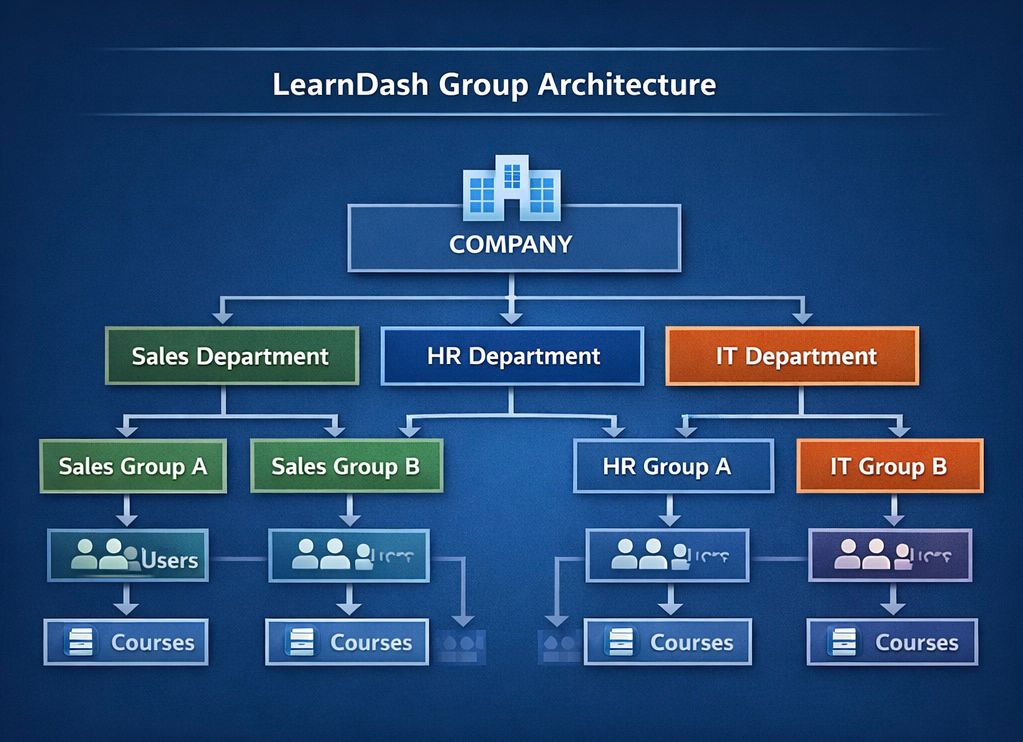
Organize users by:
- Department
- Organization or client
- Location
- Cohort or intake batch
- Role or job function
This structure allows you to control access, reporting, and enrollments at scale.
With proper group architecture, you can:
- Enroll hundreds of users in bulk
- Assign group leaders or managers
- Generate group-level reports instantly
- Restrict visibility based on role
- Manage renewals or compliance by department
Without groups, your LMS becomes a flat list of users. With groups, it becomes a controlled system.
Plan for Growth, Not Just Current Size
Do not design your structure for 300 users if your goal is 3,000. Create naming conventions and hierarchy rules early. Keep categories clean. Avoid duplicate course structures.
A clear user framework reduces long-term friction. It also improves reporting speed because data stays organized and predictable.
When users are structured properly, scaling becomes manageable instead of chaotic.
Step 3: Automate Everything That Repeats
Manual processes are the quickest way to sabotage an enterprise LMS. If your team is manually enrolling, resetting and tracking, scaling will add to administrative burden rather than the bottom line.
Automation is what separates a basic LMS from an enterprise system.
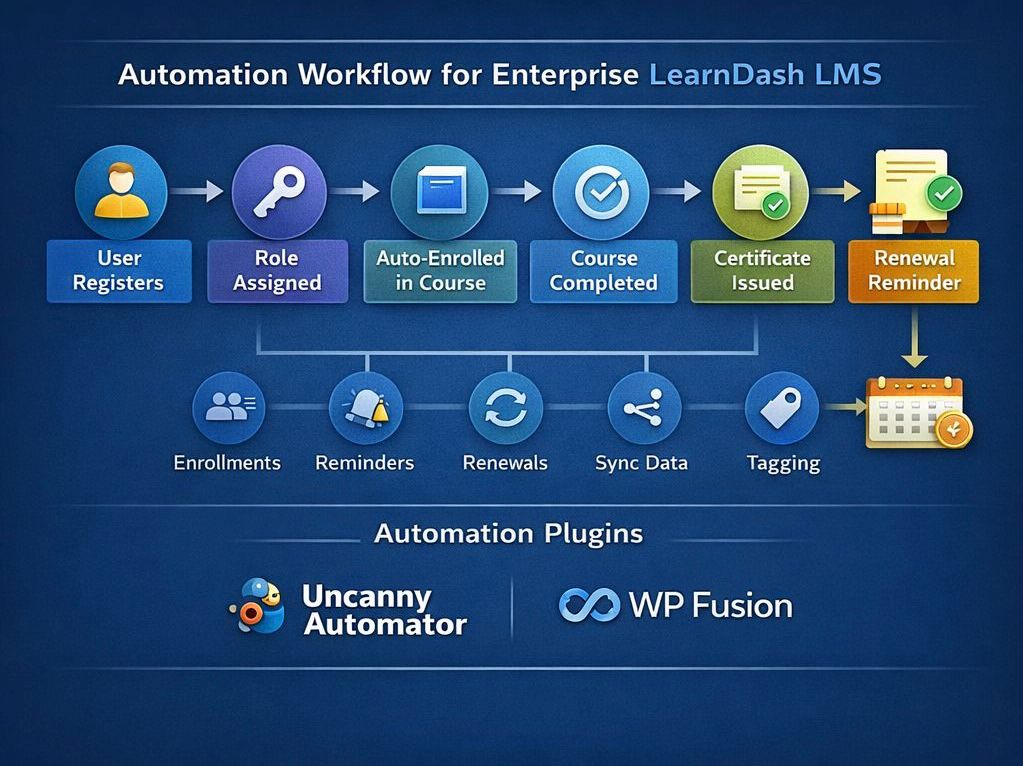
Automate Enrollments
Users should enter the right courses without manual action. Build workflows that assign courses based on:
- User role
- Group membership
- Purchase activity
- Registration type
This ensures accuracy and removes repetitive admin work.
Automate Certificate Expiry and Renewals
In compliance-driven industries, certificates often expire. Managing renewals manually creates risk and delays.
Your system should:
- Assign expiry dates automatically
- Trigger renewal notifications
- Reset courses when required
- Track renewal cycles per user
- Log renewal history for audits
Automation ensures no learner slips through compliance gaps.
Automate Progress Monitoring and Alerts
Enterprise clients expect visibility. Instead of manually checking progress, configure automated alerts for:
- Incomplete courses
- Expiring certifications
- Missed deadlines
- Compliance gaps by department
This turns your LMS into a proactive system rather than a reactive one.
Automation saves time, protects accuracy and improves reporting.
Step 4: Build Compliance-Ready Reporting
At the enterprise level, reporting is not optional. It is a requirement. Large organizations need proof of training, proof of completion, and proof of policy enforcement. Real-time reporting dashboards such as LearnDash ProPanel can improve visibility for administrators.
Your reporting system should clearly show:
- Who enrolled in a course
- Who completed it
- When they completed it
- When their certificate expires
- Whether renewal requirements were met
- Under which policy was the course assigned
This level of detail protects organizations during audits and internal reviews.
Create Structured, Audit-Ready Logs
Every important action inside the LMS should be recorded. This includes enrollments, completions, resets, certificate issuance, and renewals. These logs must be time-stamped and tied to specific users and groups.
Structured logs allow you to:
- Track compliance history over time
- Identify training gaps quickly
- Respond to audits with confidence
- Provide proof to regulators or stakeholders
Without structured tracking, reporting becomes guesswork.
Make Reports Actionable
Enterprise reporting should not only show data. It should highlight risk.
Build dashboards that help administrators identify:
- Expiring certificates
- Incomplete mandatory training
- Departments with low completion rates
- Users overdue for renewal
When reports surface problems early, organizations can fix issues before they become compliance failures.
Step 5: Secure the System at Every Level
As your user base grows, security becomes strategic. With 1,000+ users logging in, accessing certificates, and generating records, your LMS stores sensitive data. A single vulnerability can damage reputation and trust.
Enterprise security starts with control.
Implement Role-Based Access Control
Not every user should see everything. Define clear permission levels inside WordPress and LearnDash.
Common roles include:
- Super administrators
- Site administrators
- Group leaders or managers
- Instructors
- Learners
Each role should have access only to what they need. Limiting access reduces human error and prevents unauthorized changes.
Protect User Data and Login Access
Strong technical safeguards must support your LMS. Implement:
- SSL encryption across the site
- Secure login practices and strong password policies
- Firewall protection
- Two-factor authentication for admins
- Regular system updates and patch management
These measures reduce the risk of breaches and data leaks.
Maintain Ongoing Security Discipline
Security is not a one-time setup. Monitor activity logs. Review admin access regularly. Remove inactive users. Test updates in staging before deploying live.
An enterprise LMS must remain stable and protected at all times.
Step 6: Optimize User Experience at Scale
When your LMS grows beyond 1,000 users, complexity increases. More courses, more groups, and more compliance rules can quickly overwhelm learners. If users feel confused, they disengage.
A well-structured user experience ensures the interface reduces cognitive load, not adds to it.
Design a Clear, Focused Dashboard
Your dashboard should act as a control center. It must highlight what matters most instead of displaying everything at once.
Show users:
- Active courses
- Progress percentage
- Upcoming deadlines
- Expiring certificates
- Required renewals
Keep navigation simple and predictable. When users log in, they should instantly know their next action.
Maintain Clean Course Architecture
As courses increase, organization becomes critical. Avoid deep nesting or inconsistent naming. Group courses logically by category or department. Use clear labels and consistent formats.
A structured hierarchy improves:
- Navigation speed
- Reporting accuracy
- User confidence
- Completion rates
When the structure is clean, scaling feels controlled instead of chaotic.
Manage Notifications with Discipline
Too many emails reduce engagement. Too few create confusion. Balance is key.
Send notifications for:
- Enrollment confirmation
- Completion confirmation
- Certificate issuance
- Expiry and renewal reminders
Avoid unnecessary alerts. Communication should support progress, not distract from it.
Step 7: Avoid the Scaling Mistakes That Break Enterprise LMS Sites
Scaling problems rarely appear overnight. They build slowly through small technical decisions that seem harmless at the beginning. At 200 users, these issues stay hidden. At 1,000+ users, they become operational risks.
If you want predictable growth, you must avoid the common mistakes that weaken enterprise LearnDash environments.
Relying on Cheap or Shared Hosting
Many LMS owners start with shared hosting to reduce costs. This works at low traffic levels. But as concurrent logins increase and reporting queries grow heavier, shared servers struggle to respond.
Slow dashboards, delayed reports, and timeouts during peak hours are clear signs of infrastructure limits. When performance drops, user trust drops with it.
Enterprise LMS platforms require:
- Dedicated resources
- Scalable CPU and RAM
- Strong database performance
- Reliable uptime
Infrastructure should support growth, not restrict it.
Installing Too Many Plugins
WordPress’s flexibility is powerful, but excessive plugins create hidden strain. Each plugin adds database calls, scripts, and background tasks. At scale, this increases load time and server pressure.
Over time, performance issues appear in:
- Slower admin panels
- Delayed course progress updates
- Heavy reporting queries
- Increased risk of plugin conflicts
Keep your environment lean. Use only tools that directly support your LMS strategy. Review plugins regularly and remove unnecessary ones.
Ignoring Automation Until It Is Too Late
Manual processes feel manageable in the early stages. Admins manually enroll users, reset courses, and track certificates. As your LMS grows, these repetitive tasks consume time and increase human error.
At enterprise scale, manual workflows create:
- Enrollment delays
- Missed renewal deadlines
- Compliance gaps
- Inconsistent reporting
If a task repeats, it should be automated. Automation reduces friction and protects accuracy as your user base expands.
Designing Reporting as an Afterthought
Many LMS sites focus on course creation but ignore reporting architecture. Later, when compliance demands structured reports, the system lacks clear tracking logic.
Without proper reporting design, you face:
- Incomplete audit trails
- Difficult data extraction
- Poor visibility into departmental progress
- Reactive compliance management
Reporting should be built into your architecture from the beginning. It must connect directly to course completions, certificate expiries, and policy rules.
Skipping Database Maintenance
Large LMS platforms store continuous user activity data. Every quiz attempt, login record, and progress update adds to the database. Over time, unused or outdated records accumulate.
A bloated database causes:
- Slower queries
- Delayed reports
- Higher server load
- Reduced backend performance
Regular optimization and cleanup are essential. Database maintenance is not optional at scale. It protects long-term performance and system health.
Step 8: Create a Clear Enterprise Architecture
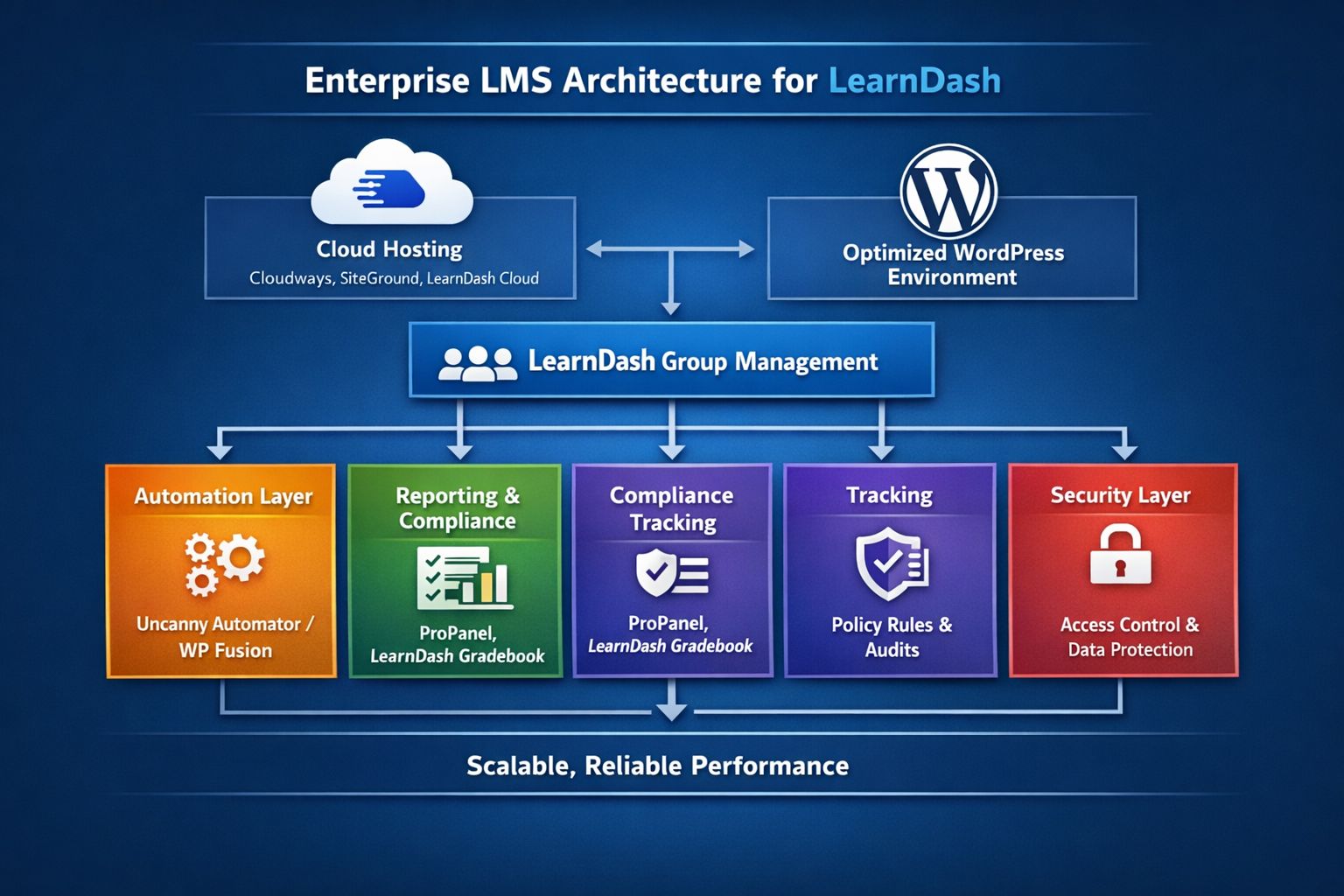
Scalability becomes predictable only when your LMS is built with intent. At 1,000+ users, performance does not depend on one tool or one setting. It depends on how every layer of your system works together. The official LearnDash add-ons ecosystem supports advanced scaling needs.
To scale confidently, each technical and operational layer must support the next.
Build on Cloud-Based Hosting
Enterprise growth requires infrastructure that expands with demand. Cloud-based hosting provides dedicated resources, flexible scaling, and better uptime compared to shared environments. When traffic increases or reporting load spikes, your server must absorb the pressure without slowing down.
Platforms such as Cloudways, SiteGround, or Pressidium offer managed cloud environments that are better suited for high-traffic LearnDash sites. Some organizations also consider managed platforms like LearnDash Cloud for simplified infrastructure. These providers support scalable resources, advanced caching, and optimized WordPress performance.
Reliable hosting ensures:
- Faster page loads during peak activity
- Stable concurrent logins
- Better database performance
- Reduced downtime risk
Without strong hosting, every other optimization loses impact.
Optimize the WordPress Environment
A clean WordPress setup strengthens long-term scalability. Remove unused themes and plugins. Configure caching properly. Increase PHP memory limits when needed. Keep the environment lightweight and efficient.
An optimized WordPress core improves:
- System stability
- Faster backend performance
- Cleaner updates and maintenance
- Lower server strain
WordPress should act as a stable framework, not a bottleneck.
Structure LearnDash with Clear Group Architecture
LearnDash must be organized for scale. Groups allow you to manage departments, clients, and cohorts efficiently. Instead of managing individuals, you control structured clusters.
This improves:
- Bulk enrollment
- Reporting by department
- Role-based access
- Easier compliance tracking
When group architecture is clear, management becomes streamlined and predictable.
Add an Automation Layer
Enterprise LMS platforms cannot rely on manual workflows. Automation should control recurring tasks such as enrollments, certificate renewals, deadline reminders, and course resets.
Tools like Uncanny Automator or WP Fusion can connect LearnDash with other systems and trigger actions automatically. These integrations allow you to assign courses based on user roles, sync data with CRM platforms, send renewal reminders, and manage access without manual intervention.
A strong automation layer:
- Reduces admin workload
- Prevents compliance gaps
- Improves consistency
- Minimizes human error
Automation transforms your LMS from reactive to proactive.
Implement Structured Reporting and Compliance Tracking
Reporting must provide visibility at every level. Administrators need dashboards that reveal progress, expiring certifications, and compliance risks instantly. Compliance tracking should connect directly to course completion, policy rules, and renewal cycles.
Structured reporting ensures:
- Audit readiness
- Real-time performance tracking
- Clear departmental insights
- Faster decision-making
When reporting and compliance integrate seamlessly, your LMS becomes a strategic tool rather than just a training platform.
Strengthen Security Across All Layers
Enterprise systems require disciplined security management. Role-based access control, encrypted connections, regular updates, and secure login practices protect sensitive data.
Strong security ensures:
- Controlled access
- Data integrity
- Reduced vulnerability risks
- Long-term platform trust
Security is not a final step. It supports every layer above it.
The Real Truth About Scaling LearnDash
LearnDash can support 1,000+ users. WordPress can power enterprise training systems. But only when built correctly.
Scaling is about reducing operational friction as your user base expands. It is about having:
- Strong infrastructure that handles peak traffic effortlessly
- A structured user and group framework for organized management
- Automated workflows for enrollments, certificates, and compliance
- Clear, audit-ready reporting for stakeholders and regulators
- Role-based access and security controls to protect sensitive data
- A clean, intuitive interface that keeps learners engaged
At TeknoFlair, we help you design and implement this enterprise-grade architecture. We walk you through hosting optimization, LearnDash group setup, automation configuration, reporting setup, and security best practices. So your LMS system can scale successfully while ensuring performance, compliance, and satisfaction.
Scaling LearnDash is achievable but only with the right strategy and support. TeknoFlair makes it practical and predictable.
