





Most healthcare training providers for nurses already use platforms like LearnDash to deliver courses. The difficulty begins when they need to track CPD hours for nurses across multiple learners.
Each part of the record exists in a different place.
The LMS stores course completion data.
Teams store certificates separately or download them manually.
Teams often calculate CPD or CEU hours outside the system.
This creates gaps in visibility.
Training administrators do not have a single view of:
- Total CPD hours per nurse
- Progress toward renewal requirements
- Complete and verified learning records
As the number of learners grows, these gaps become harder to manage. Tracking CPD for a small group is simple, but managing hundreds of nurses across departments takes time.
When it is time for audits or license renewal in the UK or USA, teams often gather data from different sources. This slows reporting and increases the risk of errors.
A centralized system connects training, tracks CPD hours for nurses, and reports in one place. It removes complexity and gives full control over continuing education data.
What You Actually Need to Track CPD Hours Properly
For training providers and healthcare organizations, CPD tracking for nurses should not rely on multiple tools or manual processes. It should work as a connected system that gives full visibility of every learner’s progress.
To manage CEU requirements effectively, your system needs to capture and organize key data in one place.
This includes:
- Course name linked to each training activity
- CPD or CEU credit value assigned to the course
- Completion date recorded automatically
- Certificate stored with the learner record
- Total hours calculated per nurse
- Progress tracked against the renewal cycle
Beyond tracking data, the system should make this information easy to access and manage.
You should be able to:
- View CPD records for each nurse without switching between tools
- Access certificates and course history instantly
- Monitor progress across departments or training groups
When everything is structured and connected, CPD tracking becomes easier to manage, easier to report, and easier to scale across larger training programs.
Manual Tracking vs Automated CPD System
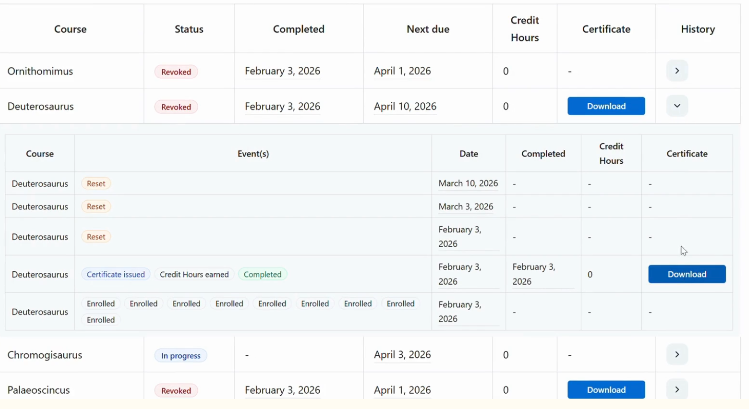
Managing CPD, continuing education, or CEU tracking manually may seem manageable at first. But as training programs grow, the limitations become clear.
An automated system brings structure, accuracy, and visibility that manual methods cannot provide.
| Manual Tracking | Automated CPD System |
| Data is scattered across spreadsheets, emails, and files | All CPD records are stored in one centralized system |
| CPD or CEU hours are calculated manually | Credits are tracked automatically based on course completion |
| No single view of learner progress | Real-time visibility of CPD hours per nurse |
| High risk of missing or incorrect entries | Accurate and consistent records across all learners |
| Certificates stored separately from training data | Certificates linked directly to learner records |
| Reporting requires manual effort and data collection | Reports are generated instantly for audits and renewal |
With manual tracking, teams spend time managing data instead of managing training.
An automated CPD system connects course delivery, credit tracking, and reporting into one workflow. This reduces errors and ensures that training records are always ready when needed.
For healthcare organizations in the UK or USA managing continuing education, this shift is not just about saving time. It is about maintaining reliable records and staying prepared for compliance at any stage.
Step-by-Step: How to Track CPD Hours for Nurses in LearnDash
Continuing education hours in LearnDash become effective when the process is structured and connected. Instead of managing separate records, you create a system where training, credits, and reporting work together.
Here is how healthcare training providers can manage CPD tracking in a clear and scalable way.
Step 1: Create Structured Nursing Courses
Start by organizing your training programs clearly inside LearnDash. Each course should represent a defined learning activity that contributes to CPD.
This creates a strong foundation for tracking and reporting later.
Step 2: Assign CPD or CEU Credit Values
Define the credit value for each course based on its duration or importance.
When CPD or continuing education hours are assigned at the course level, every completion automatically contributes to the learner’s total.
Step 3: Enroll Nurses into Training Programs
Add nurses individually or in groups based on departments, roles, or training requirements.
This helps training providers manage large numbers of learners while keeping records easy to access.
Step 4: Track Course Completion Automatically
Once training begins, LearnDash records course progress and completions in real time.
This ensures that every completed activity is captured without external tracking.
Step 5: Automatically Record CPD Hours
When a nurse completes a course, the assigned credits are recorded automatically. There is no need to enter hours manually or match certificates with spreadsheets.
Step 6: Store Certificates and Training Records in One Place
All certificates and learning records should be stored within the same system.
This allows teams to:
- Access certificates instantly
- Link records directly to completed courses
- Avoid searching across emails or shared folders
Centralized storage keeps records complete and easy to verify.
Step 7: Generate Reports for License Renewal and Audits
When it is time for reporting, the system should allow quick access to complete CPD data.
Training providers can:
- Export learner records
- Review total CPD hours
- Prepare audit-ready reports
A structured workflow like this connects training delivery with CPD tracking and reporting. So, records are always ready when needed.
How This Makes License Renewal Easier
For training providers, hospitals, and regulatory bodies, this process often involves collecting data from multiple sources, verifying CPD hours, and preparing reports under time pressure.
A structured CPD system changes how this process works.
With everything connected in one place:
- CPD or continuing education hours are already calculated and updated
- Course completions are linked directly to learner records
- Certificates are stored alongside training data
- Progress is visible across all nurses in real time
This removes the need to:
- Search through emails or shared folders
- Recalculate hours manually
- Cross-check records from different systems
When it is time for renewal, the data is already organized and ready to use.
Training teams can:
- Access complete CPD records instantly
- Generate reports without manual effort
- Submit accurate data with confidence
This level of readiness is critical for organizations managing compliance in the UK or USA. It reduces delays, improves accuracy, and keeps renewal and audit processes smooth.
Is a CPD Tracking Add-on Necessary for LearnDash?
LearnDash helps manage courses and track learner progress effectively. However, CPD tracking requires more structure, especially when managing credit values, maintaining records, and preparing reports across multiple learners.
This is where adding a dedicated CPD tracking layer becomes important.
Add CPD Tracking to LearnDash with TeknoFlair
LearnDash provides a strong foundation for delivering training. To manage CPD, continuing education, or CEU tracking effectively, you need to extend that foundation with a structured system.
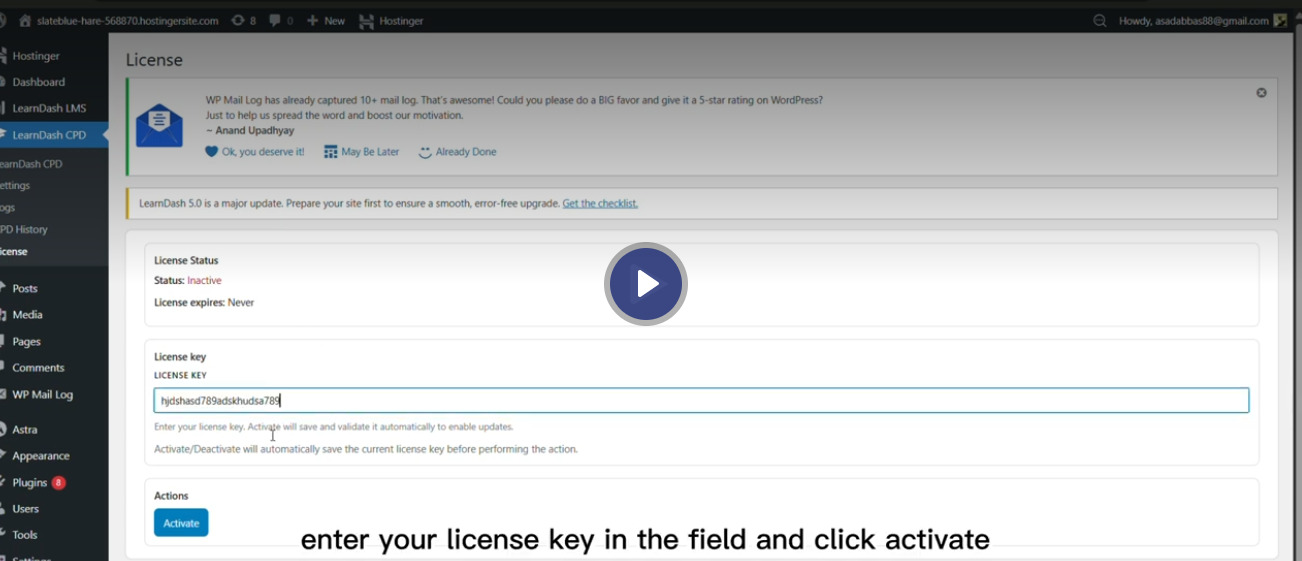
The TeknoFlair LearnDash CPD add-on connects training delivery with CPD tracking and reporting. So, your team does not need to rely on external tools or manual processes.
How TeknoFlair Improves CPD Tracking
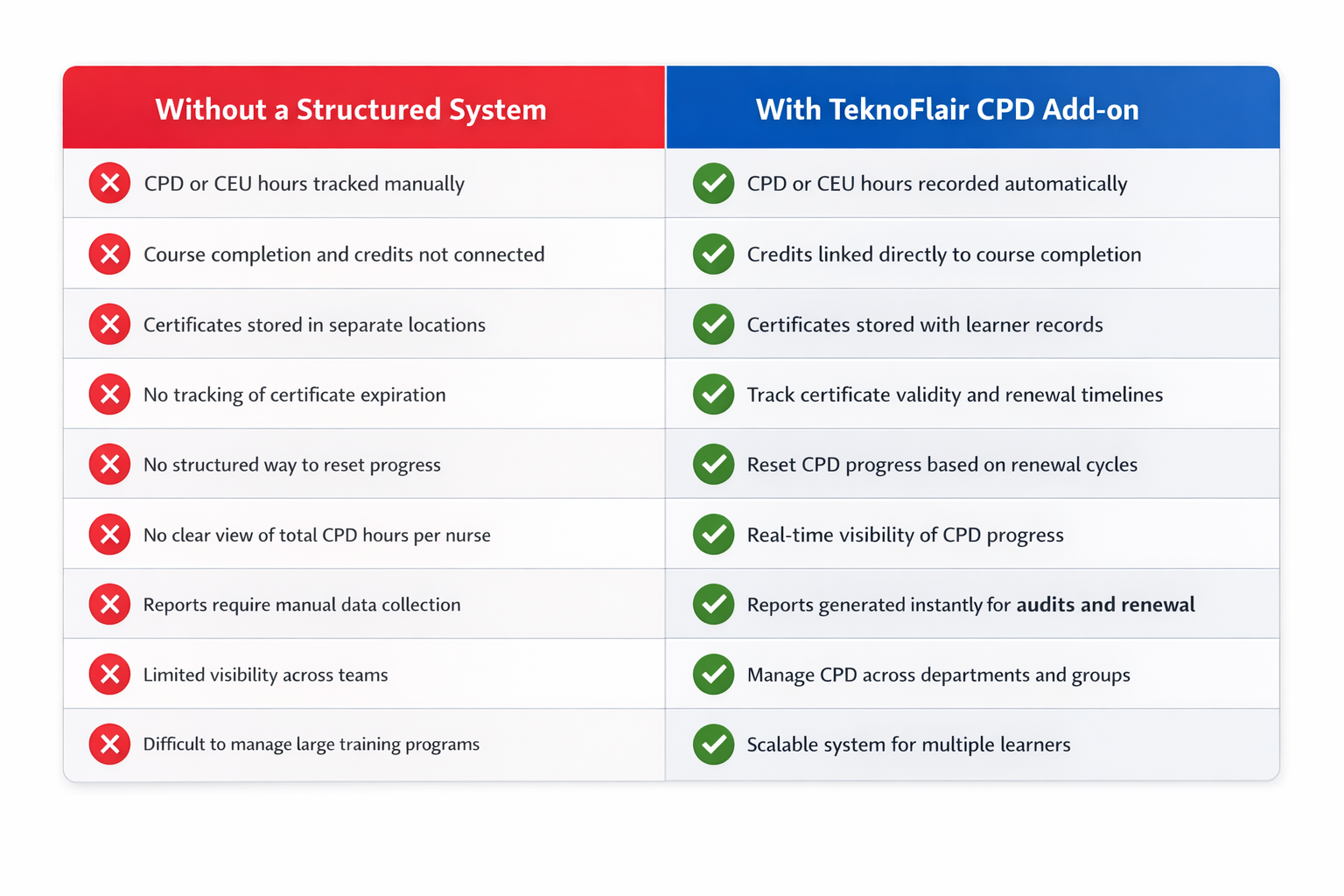
This creates a system where training, tracking, and reporting work together without gaps for scalable training operations.
Keep CPD Records for Nurses Accurate and Ready
Training alone is not enough without a connected system, CPD records become difficult to manage.
It becomes hard to track total hours, manage certificate expiry, and reset progress for new cycles if data is spread across different tools. This causes missing records, delays in renewal, and added pressure during audits.
A structured system brings control back. It keeps records clear, progress visible, and reports ready when needed. For healthcare organizations in the UK and the USA, TeknoFlair provides a more reliable way to manage CPD tracking.
Meta Title:
Best Way to Track CPD for Nurses Online | TeknoFlair
Meta Description:
Track continuing professional development hours for nurses with a structured system. Reduce errors and stay audit-ready easily for faster license renewal.
