













How much time do you spend creating and sending reports every week? If you are doing it manually, it starts draining your team’s time and increasing your workload.
At the same time, managing communication becomes just as difficult. You send emails, share updates, and rely on reports to track progress, but you are not always sure what happens after hitting “send.”
You don’t know if the report reached the right person or if someone missed an important update. As your training program grows, emails, reports, and updates become harder to manage.
You send information, but still get messages like “Can you share the report again?” or “I didn’t receive it.”
Now imagine if all of this could run automatically without extra effort.
LearnDash Email Insights helps you fix this. It works directly within your LearnDash LMS and can generate, send, and manage reports without guesswork.
Why LearnDash Email Reporting Feels Limited
LearnDash works well for delivering courses, but email reporting is basic. Many training providers face the same issues:
- Reports are not consistent across different teams or groups
- You spend extra time double-checking data before sending
- Important updates can be delayed or forgotten
- You have no central place to manage all reporting emails
- Scaling your training program increases admin workload
- You repeat the same reporting tasks every week
- There is no clear audit trail for past reports
When you run CPD/CEU or compliance-based training, these gaps matter. You need reliable reporting and clear communication. Without that, things quickly become hard to manage.
What Is LearnDash Email Insights?
LearnDash Email Insights is a powerful add-on that improves reporting and email communication inside LearnDash. It extends LearnDash’s default reporting capabilities and helps you handle everything.
With this plugin, you can:
- Automatically generate reports
- Share course progress, group performance, and quiz results
- Send reports to users, groups, or custom email lists
- Schedule reports in advance so they go out on time.
This makes it easier to manage learning data, keep everyone informed, and maintain a more structured and reliable training workflow.
How Email Insights Works
The process is simple and practical. It is easy to use, even without technical knowledge.
- You create a report
- You choose what data to include
- You select who should receive it
- You set when it should be sent
Once you set this up, the system sends reports automatically. You do not have to repeat the same task again and again.
Key Features That Make a Difference
1. Flexible Email Delivery
You can decide who receives the reports:
- Individual users
- Group members
- Group leaders
- Custom email addresses
This helps you send the right information to the right people without confusion.
2. Automated Report Scheduling
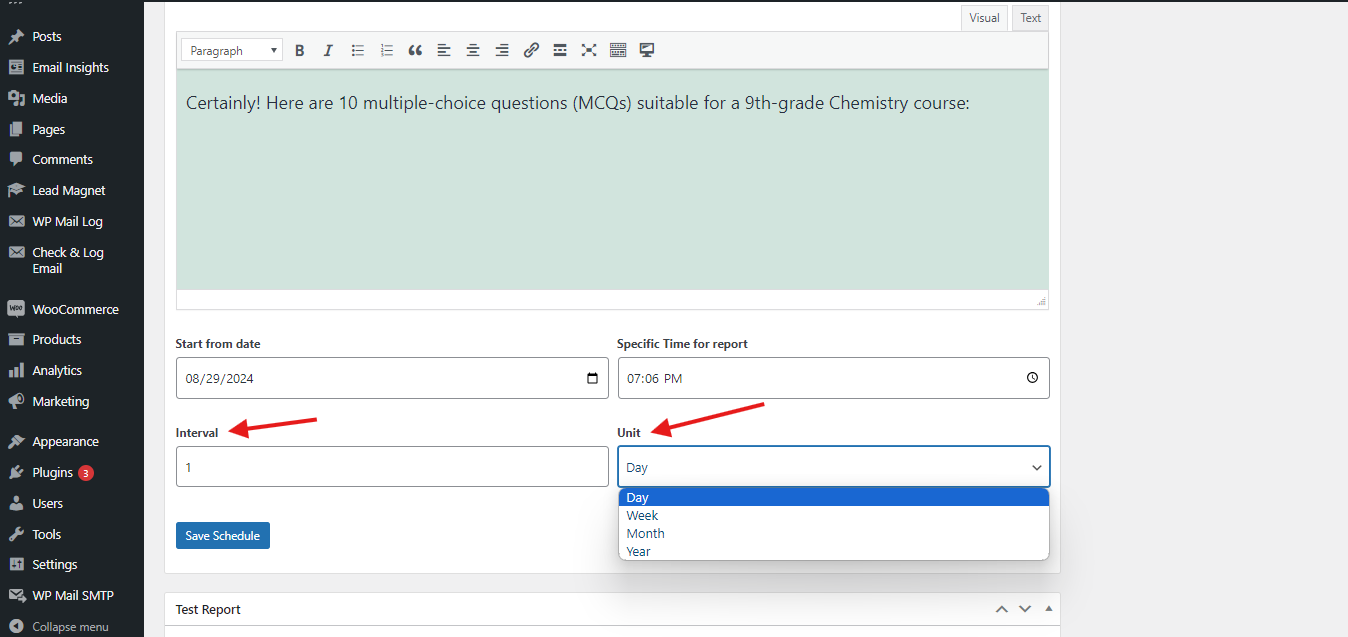
You can schedule reports to go out daily, weekly, or at any interval you choose. This removes the need to create reports manually. Your reports go out on time, every time.
3. Multiple Report Types
You can generate different types of reports based on your needs:
- Course progress reports
- Group progress reports
- Quiz progress reports
- Quiz result reports
This gives you flexibility. You can track exactly what matters to your training program.
4. Clear Reporting Structure
All your reporting is organised in one place. You do not need to switch between tools or export data repeatedly.
This keeps your workflow simple and easy to manage.
5. Troubleshooting & Debugging
If emails fail or users complain:
- You can check the logs
- Identify issues quickly
Saves admin time and reduces manual checking.
Setting Up Email Insight
Getting started with Email Insights is simple and only takes a few minutes. Once set up, you can manage all your reports and communication from one place.
- Install the Plugin
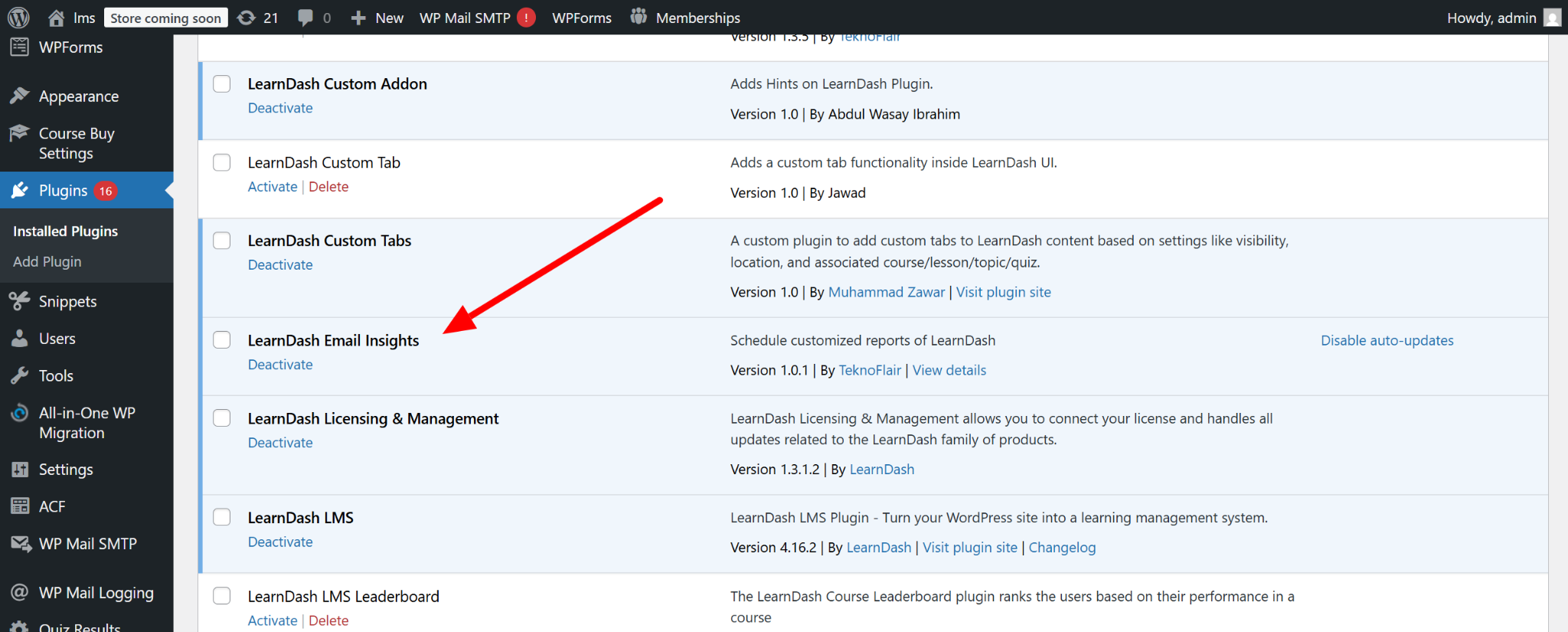
Start by downloading the plugin from your account. Upload it to your WordPress dashboard and activate it.
- Activate Your License
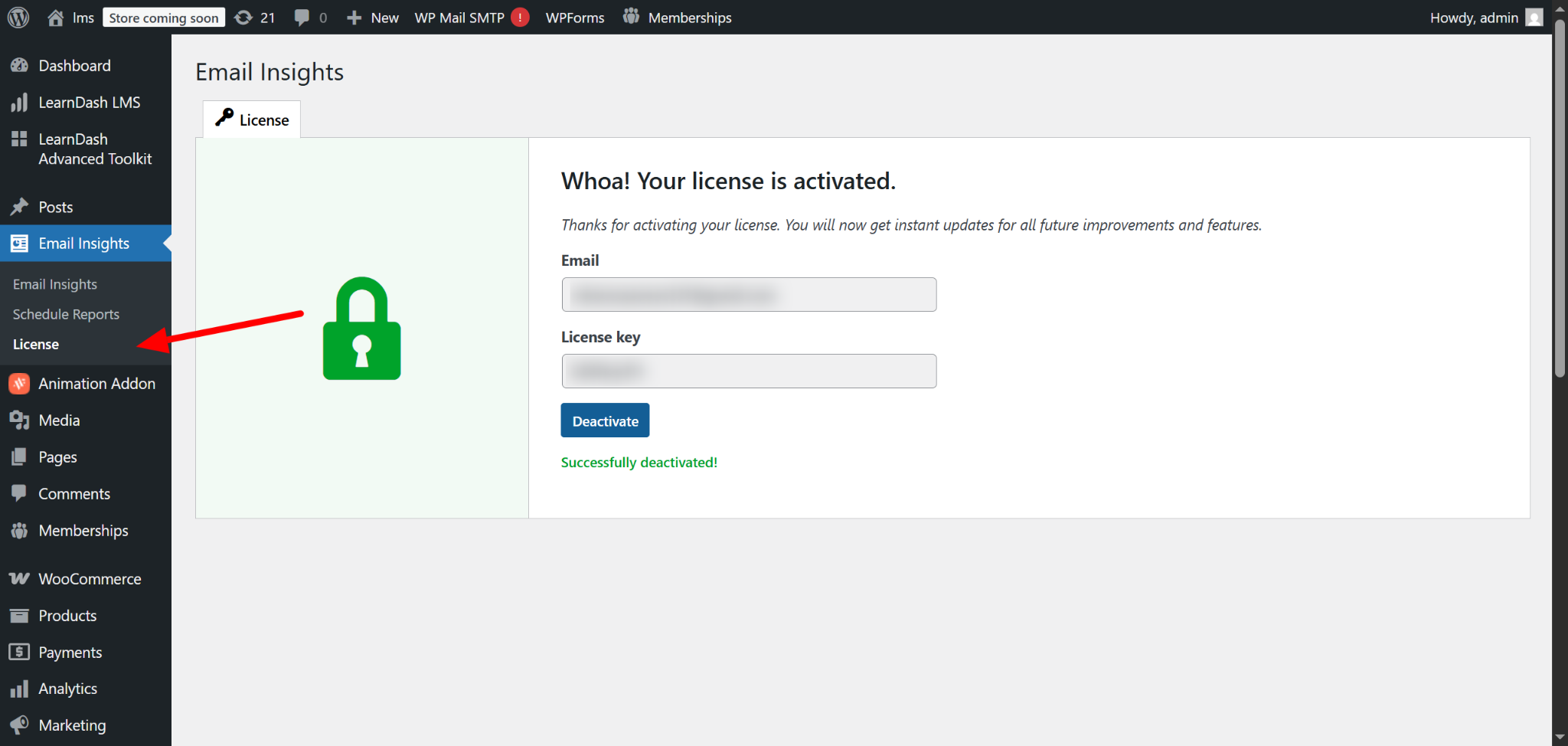
To access full features and receive updates, you need to activate your license.
- Go to LearnDash Email Insights
- Open the License section from the report menu
- Enter your email and license key
- Click Activate
Once activated, your plugin is ready to use without limitations.
- Access the Reporting Section
Once activated, you will find the Email Insights section in your admin menu. This is where you manage all reports.
Creating and Scheduling Reports
This is how you set up your reports and let the system handle them automatically.”
Step 1: Create a New Report
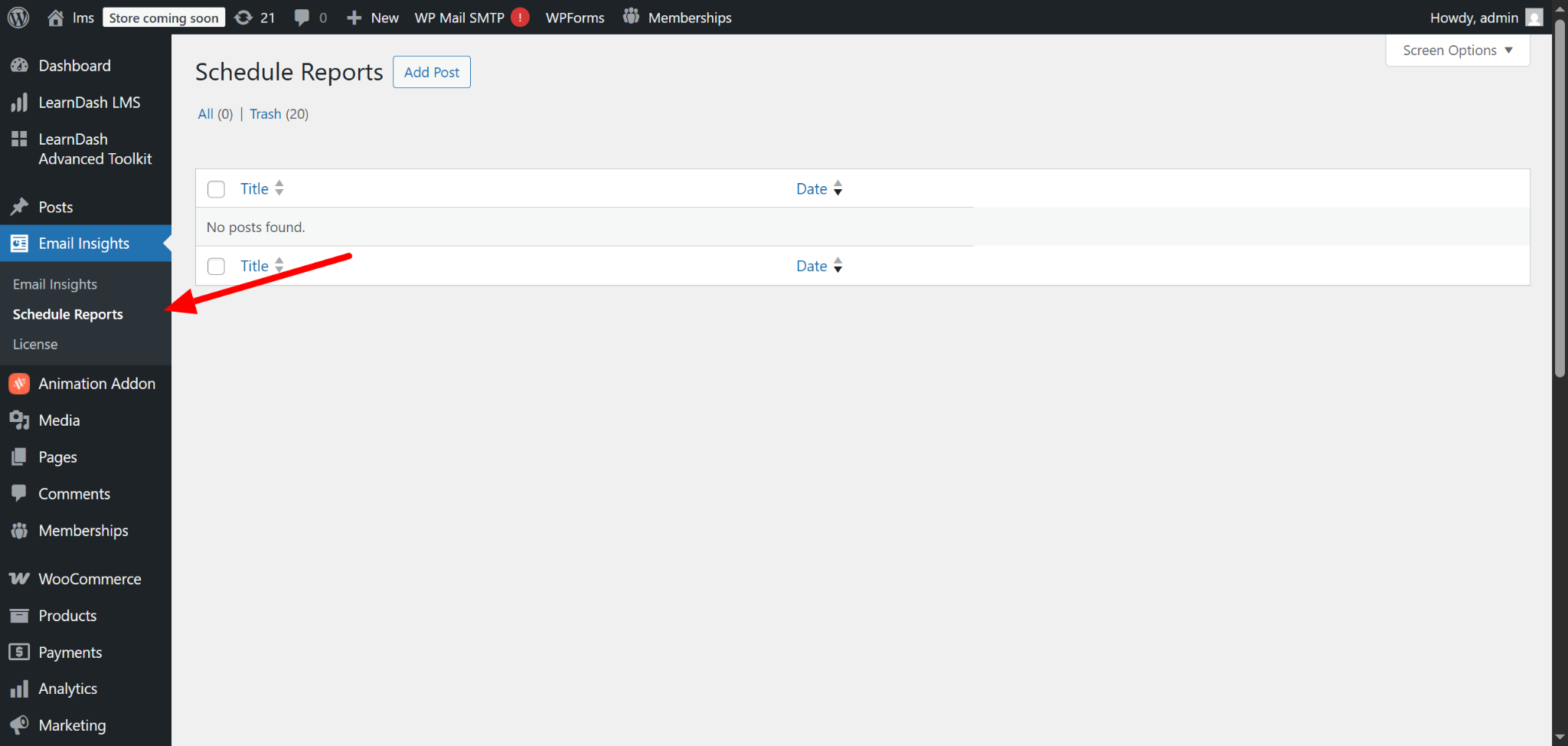
Start by adding a new scheduled report. Enable it so it can run based on your settings.
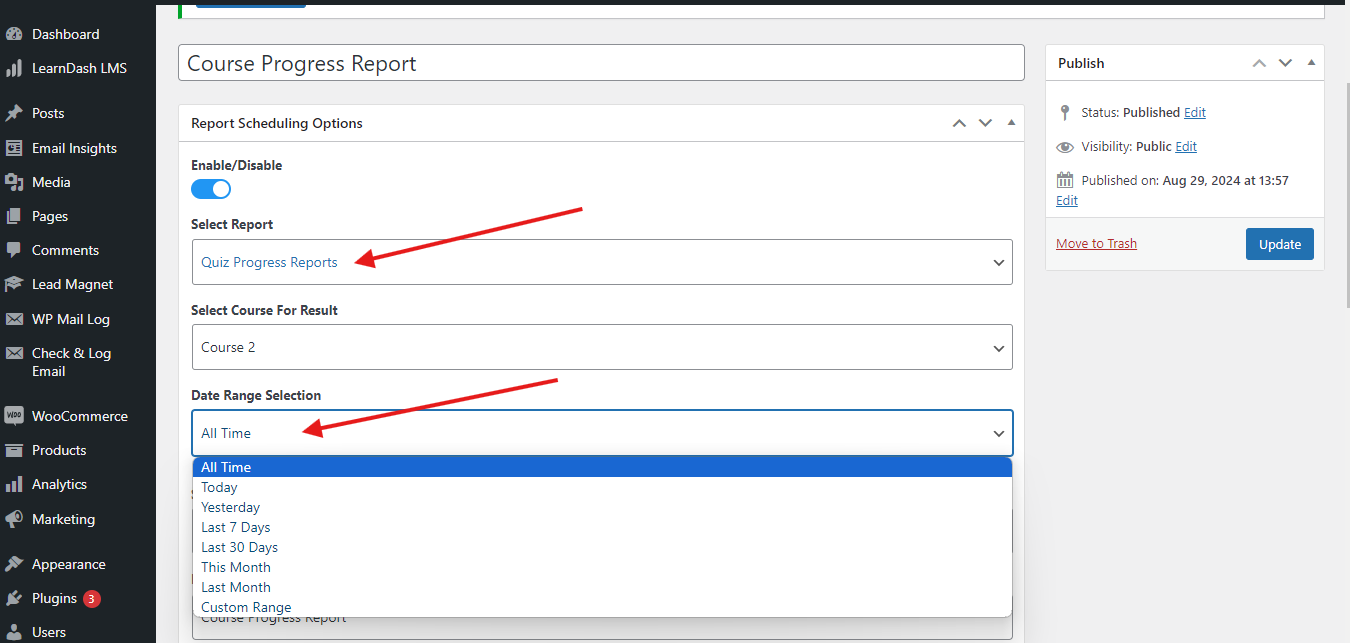
Step 2: Select the Report Type
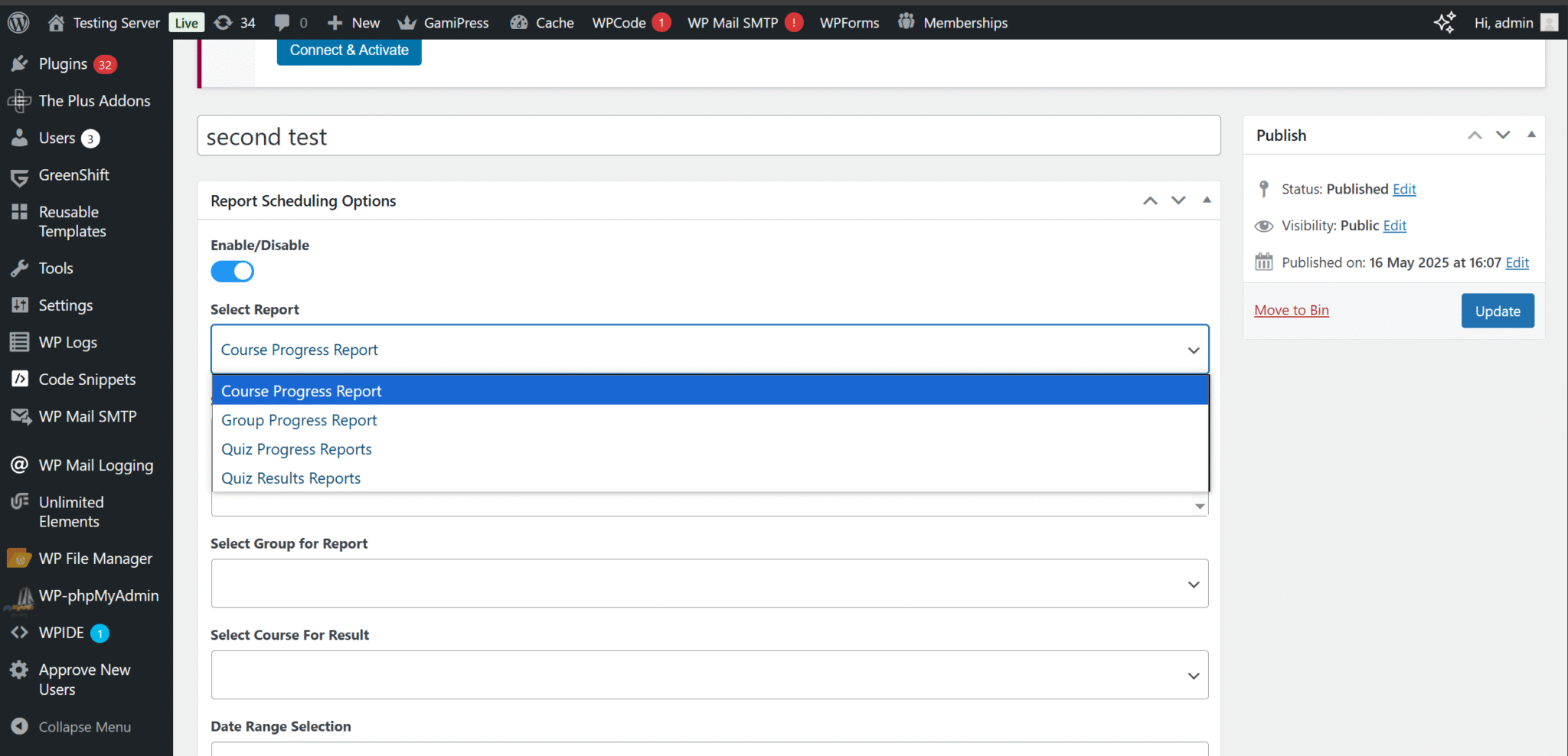
Choose the report you want to generate:
- Course progress
- Group progress
- Quiz progress
- Quiz results
Each option helps you track a different part of your training program.
Step 3: Configure the Data
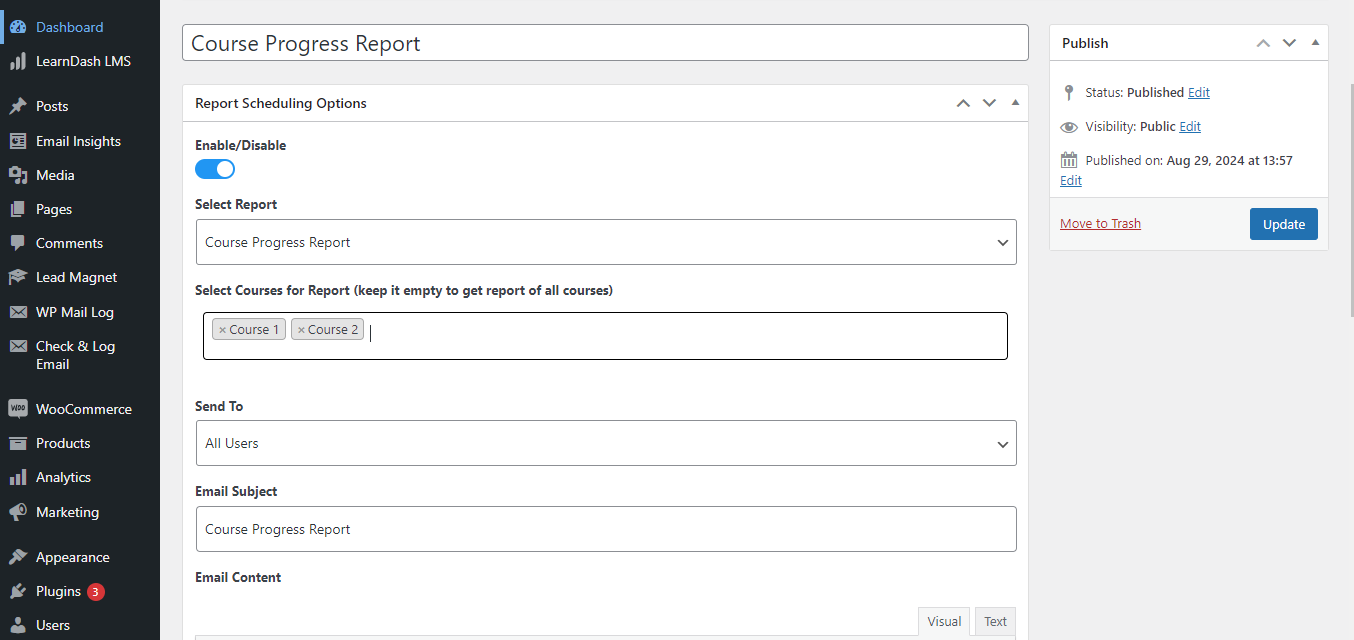
Now decide what data you want in your report. You can:
- Select specific courses
- Choose a group to track performance
- Set a date range for quiz reports
This helps you focus only on relevant data.
Step 4: Choose Recipients
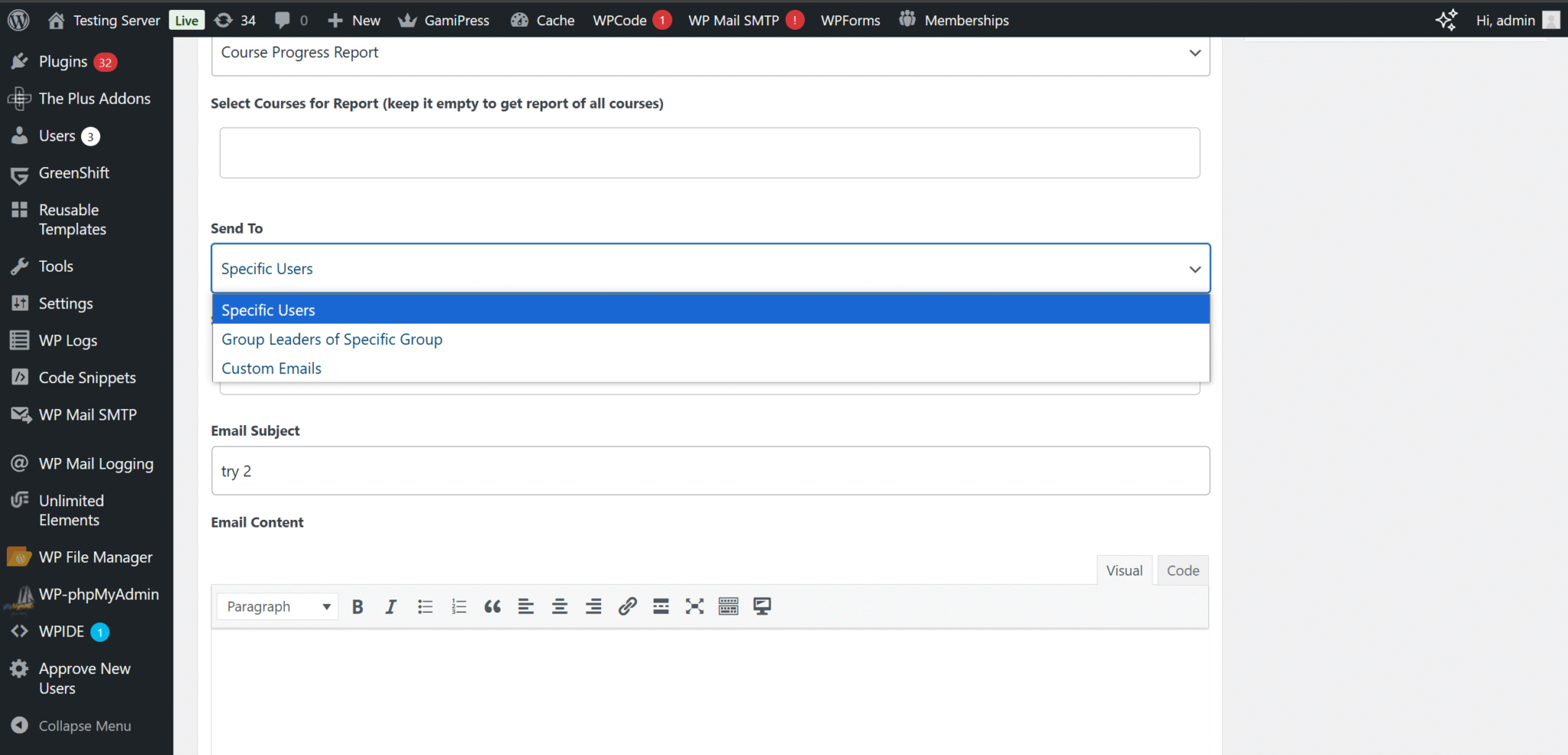
Select who should receive the report:
- Specific users
- Group leaders
- Entire groups
- Custom email lists
It sends the right information to the right people without extra effort.
Step 5: Set Timing and Frequency
Choose a start date and start time. Select the frequency of report generation. You may opt for generating a report every other day or on a weekly basis.
Step 6: Add Email Details
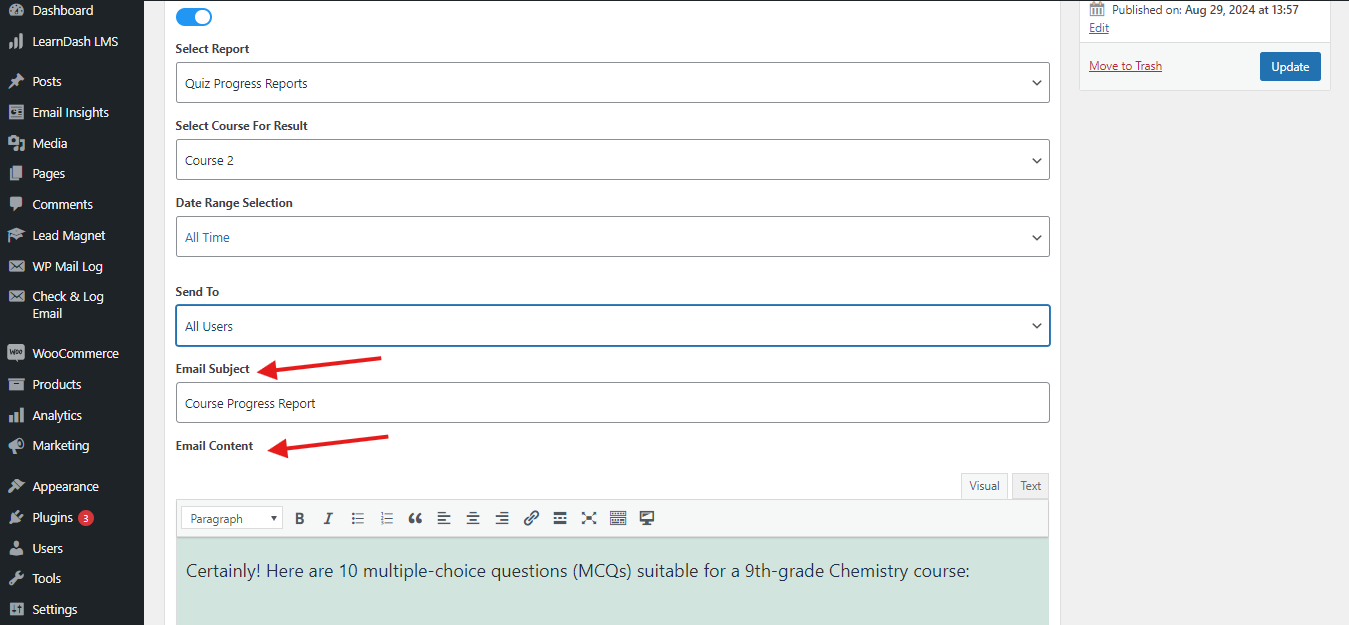
Type a title for the report and then a message. It will provide some background information about the report.
Save and Automate
Once everything is set, save your report. Now, Email Insights will automatically generate and send reports like this.
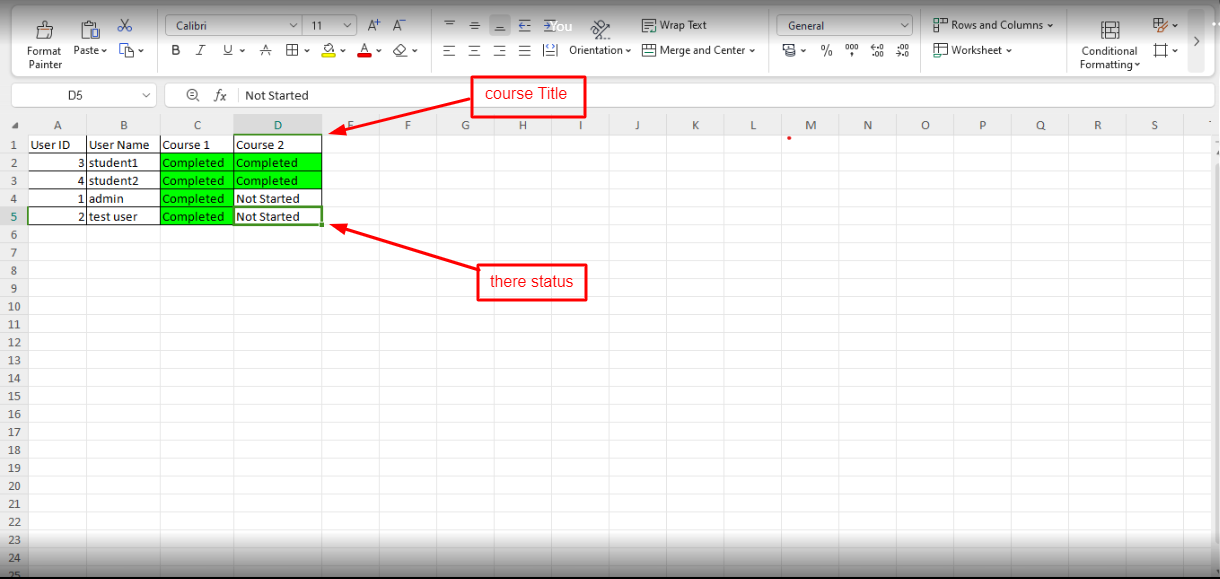
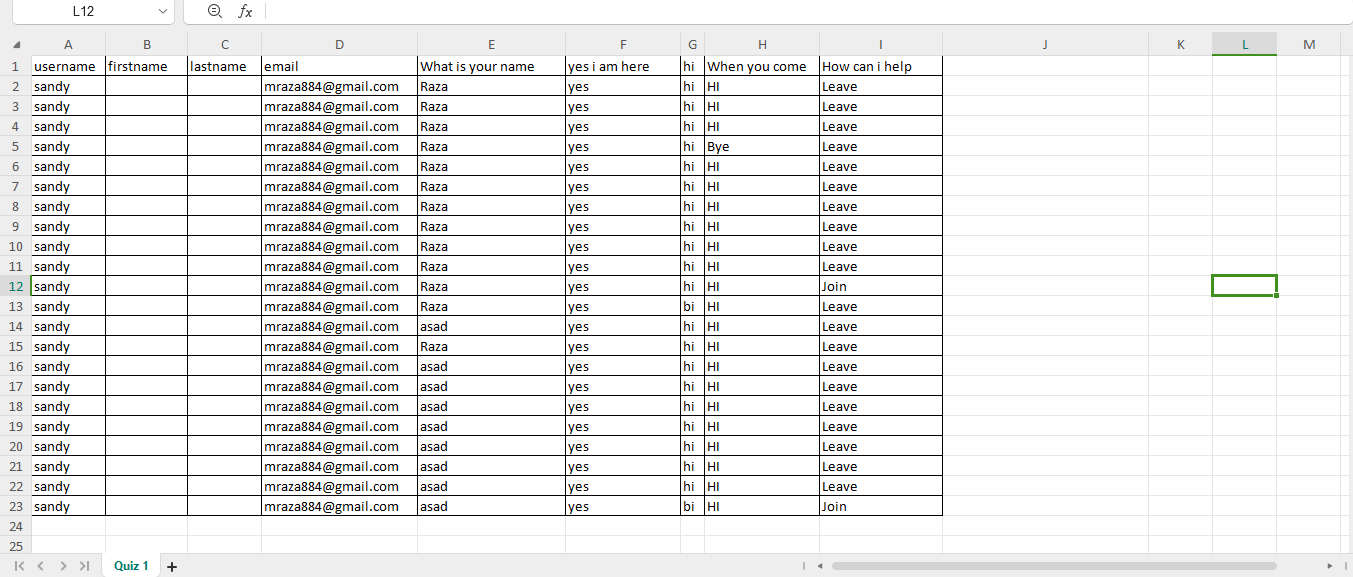
This is how the quiz progress report will appear
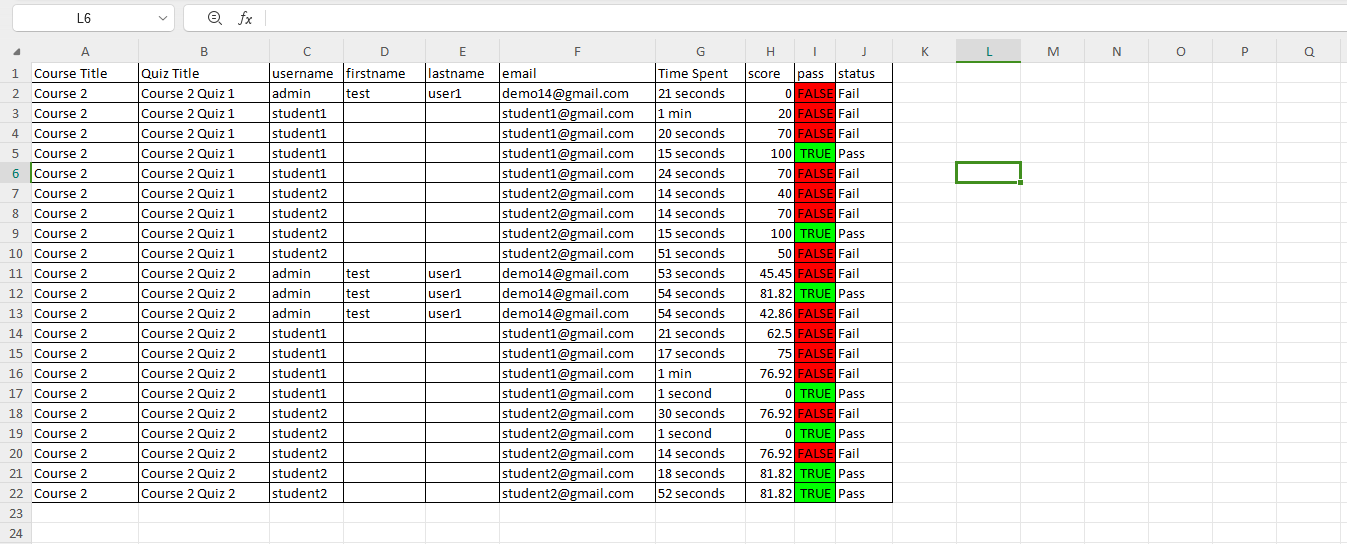
This is how the quiz result report will appear
Testing Your Reports
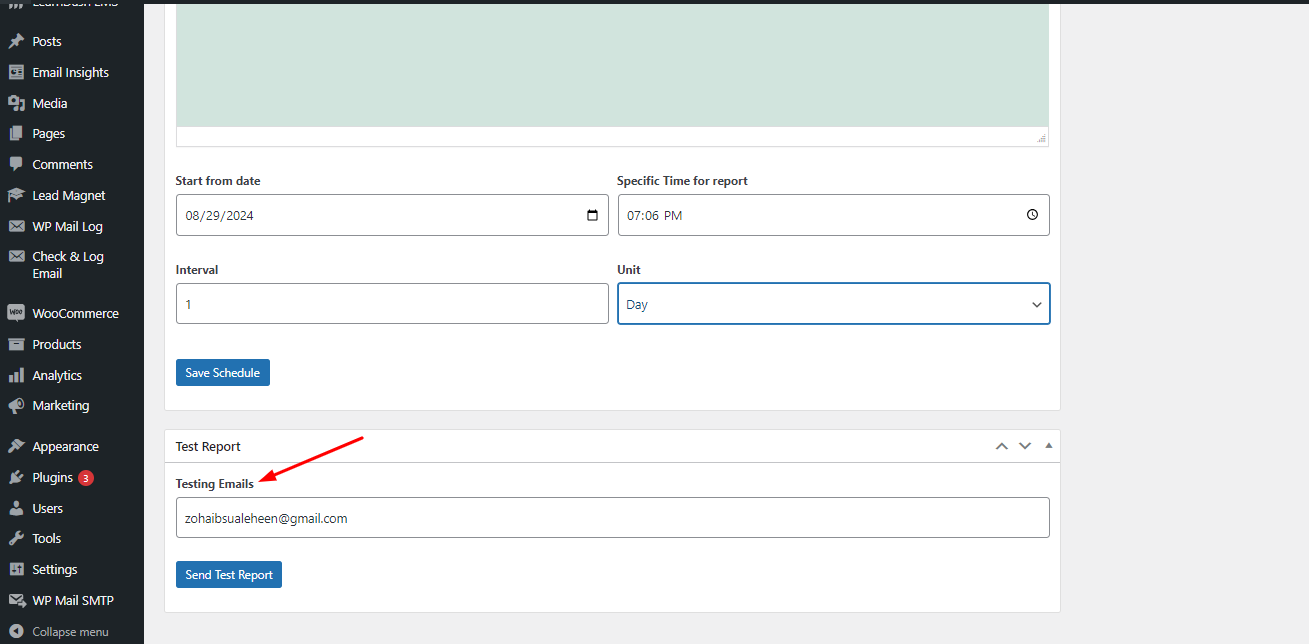
Before relying on automation, it’s always a good idea to test your report.
Send a test email to yourself and check:
- The format of the report
- The accuracy of data
- The email content
If anything needs adjustment, you can update your settings before scheduling it fully.
Who Should Use Email Insights and When Do You Need It?
TeknoFlair’s Email Insights is useful for anyone managing training through LearnDash, especially when reporting and communication start becoming difficult to handle manually.
Email Insights is useful when:
- You manage multiple learners or groups
- You send reports regularly
- You want to reduce manual admin work
- You need consistent communication
For CPD training providers, this becomes even more valuable. You can keep your reporting structured and your communication clear.
It is especially useful for:
- CPD and compliance training providers who need consistent reporting
- LMS administrators managing large groups of learners
- Course creators who want structured and reliable communication
- Organisations that rely on regular progress and performance updates
If you are sending reports regularly, Email Insights gives you a more efficient and controlled way to handle everything.
Benefits at a Glance
- Consistent reporting
Reports are sent in a clear and structured format every time. - Better team accountability
Everyone stays updated, making it easier to track progress and responsibilities. - No more manual follow-ups
Reports are sent automatically, so you don’t need to resend or remind. - Improved decision-making
Regular reports help you spot gaps and improve your training. - Clear communication
Trainers, managers, and admins stay aligned with timely updates. - Flexible reporting
You can create reports based on your specific needs.
Conclusion
Managing emails and reports inside an LMS should not feel uncertain. You should know what is sent, who receives it, and when it happens.
TeknoFlair’s LearnDash Email Insights gives you that control. It turns manual reporting into an automated process and keeps your communication consistent.
This is a practical solution if you want a smoother workflow that fits easily into LearnDash.
